What's in the Release Notes?
The Omnissa Connect, the Cloud Admin Hub and Cloud Services Release Notes describe the new features and enhancements in each release. This page contains a summary of the new capabilities, issues that have been resolved, and known issues that have been reported.
Cloud Admin Hub and Cloud Services 24.12.16
New Features
- Health & Environments is generally available (GA) in Omnissa Cloud Services.
- Omnissa Cloud Services has a Health & Environments tile upon login for both on-premises and SaaS deployments. Health & Environments provides the following capabilities:
- Scheduling of upgrades to install patch and version upgrades on your Workspace ONE UEM commercial SaaS environments.
- Certificate signing, which is required for Workspace ONE UEM on-premises installation.
- Renewal of SSL certificates for Workspace ONE UEM-managed, hosting SaaS environments.
- See Omnissa service/product status information.
- If you are using the legacy MyWorkspaceONE for the scheduling of upgrades or for certificate signing, the system redirects you to the Omnissa Cloud Services.
- Access the Health & Environments tile in Cloud Services on the Services page, in the Resources area.
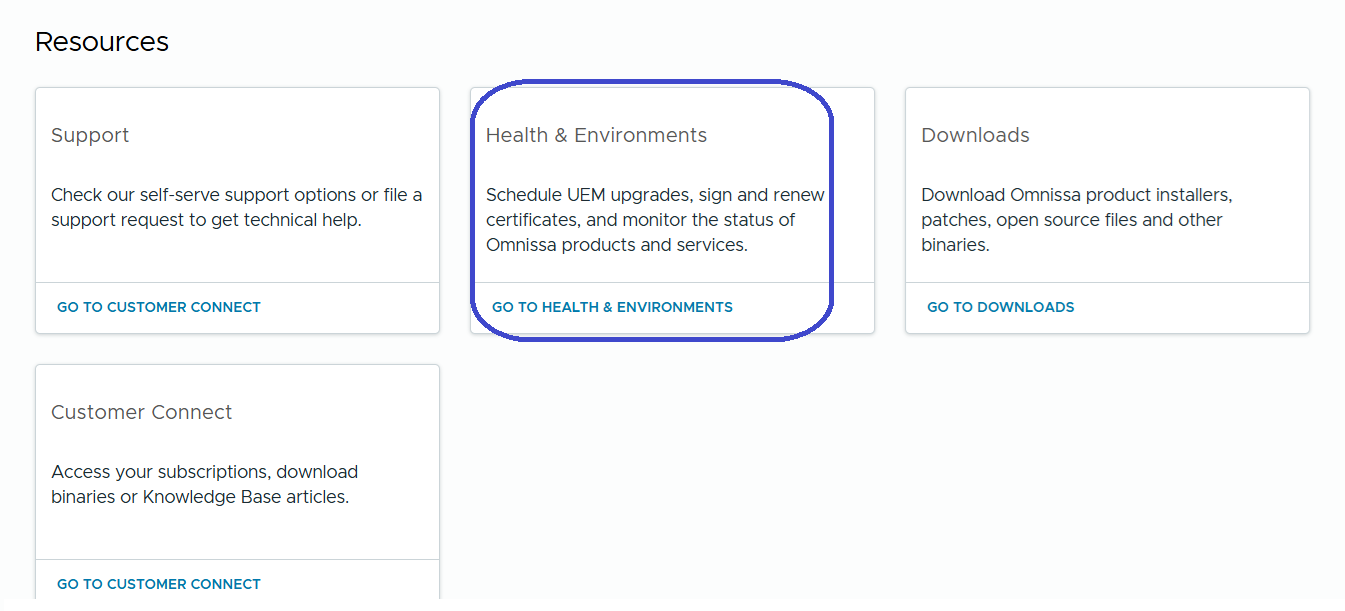
- Omnissa Cloud Services has a Health & Environments tile upon login for both on-premises and SaaS deployments. Health & Environments provides the following capabilities:
- We've updated references in Cloud Services to the Omnissa brand.
Resolved Issues
We are always working to improve Cloud Admin Hub and Cloud Services with every release. There are no major bug fixes to report.
Known Issues
We haven't identified any notable known issues in this release. If you have any problems, reach out to our support team.
Cloud Admin Hub 24.09.05
New Features
The Role Based Access Control feature is generally available (GA).
- As an Organization Owner, you can add and manage your administrator’s Omnissa Intelligence and Omnissa Workspace ONE UEM role assignments in Cloud Admin Hub, provisioning a way for you to provide granular service access.
- Seamlessly manage both federated and external administrators, and manage admin group role assignments.
- You can find the new page in Cloud Admin Hub at Accounts > Administrators.
- Find documentation at Roles Based Access Control.
Resolved Issues
We are always working to improve Cloud Admin Hub with every release. There are no major bug fixes to report.
Known Issues
We haven't identified any notable known issues in this release. If you have any problems, reach out to our support team.
Cloud Admin Hub 24.07.15
New Features
We've rebranded Cloud Admin Hub to reflect the Omnissa brand.
Currently, we've made changes in links, logos, notifications, and in the documentation, and we'll continue to update product branding moving forward.
Visit the Omnissa site for more information about us, our products, and our solutions.
Resolved Issues
We are always working to improve Cloud Admin Hub with every release. There are no major bug fixes to report.
Known Issues
We haven't identified any notable known issues in this release. If you have any problems, reach out to our support team.
Cloud Admin Hub 24.02.05
New Features
We updated the name of the DEEM (Digital Employee Experience Management) tile in My Workspace to Experience Management.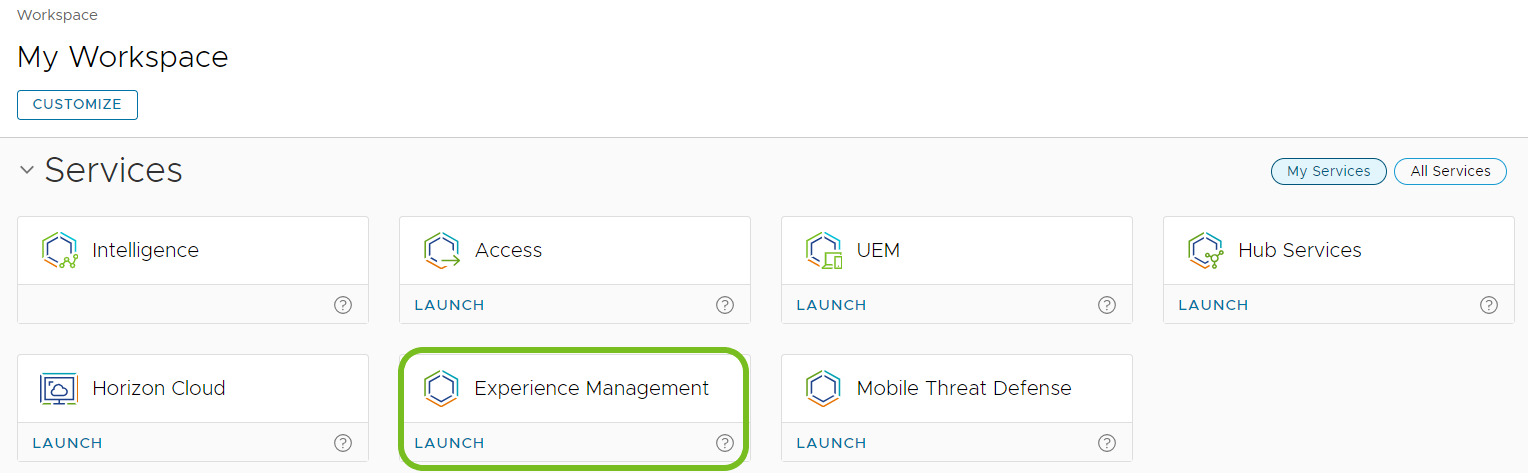
Resolved Issues
We are always working to improve Cloud Admin Hub with every release. There are no major bug fixes to report.
Known Issues
We haven't identified any notable known issues in this release. If you have any problems, reach out to our support team.
Cloud Admin Hub 23.12.05
New Features
We are happy to announce the release of Identity Services public APIs for Workspace ONE to help you bring more power to your Workspace ONE integration with cloud Identity Providers using SCIM 2.0.
For details about this release, see the Identity Services Release Notes.
Resolved Issues
We are always working to improve Cloud Admin Hub with every release. There are no major bug fixes to report.
Known Issues
We haven't identified any notable known issues in this release. If you have any problems, reach out to our support team.
Cloud Admin Hub 23.10.16
New Features
We've added Omnissa Freestyle Orchestrator templates to the Marketplace.
- Use Freestyle to automate device management tasks like managing macOS major updates and managing application updates to enrolled devices. You can preview the workflow steps, download the template from the Marketplace, and import the template into Freestyle.
- For more details about the Marketplace, see the content for Marketplace Templates. For details about Freestyle Orchestrator for Workspace ONE UEM, see What is Freestyle Orchestrator?.
Resolved Issues
We are always working to improve Cloud Admin Hub with every release. There are no major bug fixes to report.
Known Issues
We haven't identified any notable known issues in this release. If you have any problems, reach out to our support team.
Cloud Admin Hub 23.08.28
New Features
Use the new Learning Center that provides on-demand access to guides, announcements, feedback, and integrated modules.
- For details about the Learning Center, access the article Introducing the Workspace ONE Learning Center: Your Gateway to Seamless Learning.
- Access it any time using the hexagon icon in the bottom right of the screen.
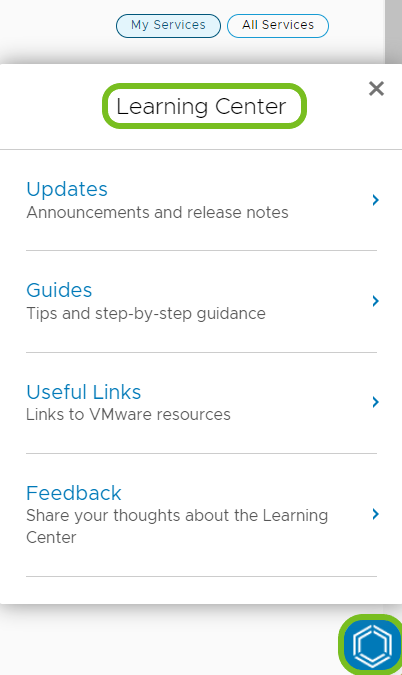
- Access it any time using the hexagon icon in the bottom right of the screen.
- In Updates , see what's new and get release announcements.
- Updates provide an easy way to inform you on significant updates, release-over-release, inside of the product.
- The system can direct you to product documentation and release notes when the content requires a deeper understanding.
- Use Guides for user journeys.
- The guides appear in the context of where you are in a process.
- You can dismiss a guide, interact with it, or have the system remind you about it later.
- Guides serve as a catalog to help you achieve outcomes.
- Access Useful Links.
- Useful Links bring Workspace ONE resources together into a single place for access.
- Use this section to easily and quickly find what you're looking for.
- Give us Feedback.
- Rate and provide feedback on the Learning Center.
Resolved Issues
We are always working to improve Cloud Admin Hub with every release. There are no major bug fixes to report.
Known Issues
We haven't identified any notable known issues in this release. If you have any problems, reach out to our support team.
Cloud Admin Hub 23.08.14
New Features
We’ve updated the Marketplace.
- Available Services has become Services in My Workspace. Use this menu option to learn about all the services in our portfolio.
- We’ve added new tiles to My Workspace for Experience Management and Mobile Threat Detection. Depending on your entitlements, use the tiles to learn about or manage the service.
Resolved Issues
We are always working to improve Cloud Admin Hub with every release. There are no major bug fixes to report.
Known Issues
We haven't identified any notable known issues in this release. If you have any problems, reach out to our support team.
Cloud Admin Hub 23.07.31
New Features
Sensors and Scripts is now in General Availability!
- Use powerful sensors and scripts to fine-tune system-level controls and to send remediation codes to your desktop deployments.
- Discover sensors and scripts templates in the Marketplace designed for Workspace ONE UEM desktop management and Experience Management (DEX) use cases.
Resolved Issues
We are always working to improve Cloud Admin Hub with every release. There are no major bug fixes to report.
Known Issues
We haven't identified any notable known issues in this release. If you have any problems, reach out to our support team.
Cloud Admin Hub 23.06.20
New Features
We've released Sensors and Scripts with Limited Availability.
- Powerful sensors and scripts provide fine-tuned, system-level controls and remediation codes for your desktop deployments.
- Discover sensors and scripts templates in the Marketplace designed for Workspace ONE UEM desktop management use cases.
Resolved Issues
We are always working to improve Cloud Admin Hub with every release. There are no major bug fixes to report.
Known Issues
We haven't identified any notable known issues in this release. If you have any problems, reach out to our support team.
Cloud Admin Hub 23.06.12
New Features
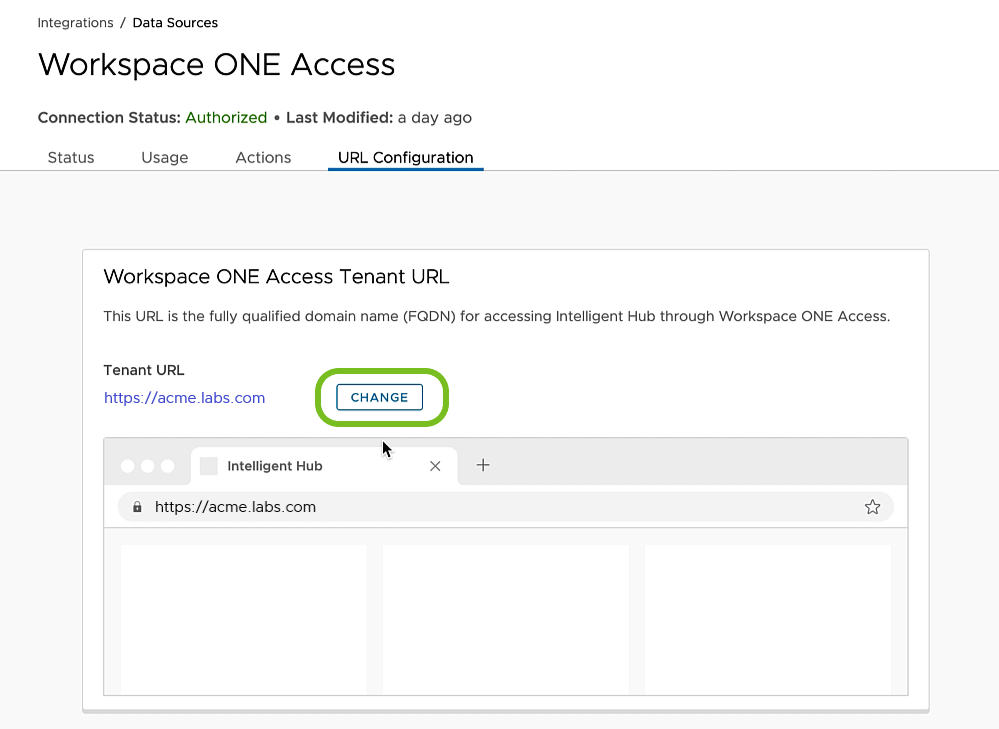
We've updated how you can change your Access tenant URL after onboarding.
- In the Hub, go to Integrations > Data Sources > Access.
- If your Access tenant has active users, the system deactivates the URL change mechanism.
- Delete the active users and then you can change your tenant.

- After you delete users, refresh the screen and the system activates the change mechanism.
Resolved Issues
We are always working to improve Cloud Admin Hub with every release. There are no major bug fixes to report.
Known Issues
We haven't identified any notable known issues in this release. If you have any problems, reach out to our support team.
Workspace ONE Status
You can subscribe to Workspace ONE Status for real-time operational statuses of Workspace ONE environments. Check this page for scheduled maintenance and past incidences.
Documentation
Find content on the Omnissa Product Documentation site.
Support Information
- Access the Customer Connect site for help with your product.
- For details on filing support requests, access How to file a Support Request in Customer Connect and via Cloud Services Portal.
Localized Content for Omnissa Docs
For details on Omnissa's localization strategy, see the article Announcing Omnissa Localization Support.
Was this page helpful?