Omnissa Workspace ONE Tunnel is used to securely provide either Per-App or Full Device VPN capabilities across all your employees' devices and delivered with a modern Zero Trust architecture. It is a part of the AnyWhere Workspace solution set for enabling remote work and enforcing endpoint compliance. The Workspace ONE Tunnel solution provides a secure access to your work apps and corporate resources.
Users will have a simple on-demand experience that will not require any interact with Workspace ONE Tunnel. Your organization will be able to provide easy on-boarding with no downtime knowing that only defined apps and domains will be able to gain access to their network. It allows IT professionals and Workspace ONE UEM administrators to easily define granular traffic policies specific to each application. For optimum security, Tunnel is built on TLS 1.2 with certificate pinning and authentication.
The Workspace ONE Tunnel Solution has three main components.
-
The Workspace ONE UEM Console- facilitates administrators to configure the Tunnel server, the Tunnel profiles, and the Device and Server Traffic Rules. It also provides device lifecycle and Tunnel certificate management for Standalone Tunnel enrollment.
-
The Tunnel Server Component (Gateway) - runs as an edge service on the Unified Access Gateway (UAG). The Tunnel server provides client authentication with remote and secure access to company resources.
-
The Tunnel Clients- deployed on end-user devices and configured via Workspace ONE UEM Tunnel profiles to facilitate secure connection to the Tunnel server(s).
The Workspace ONE Tunnel client provides per-app management, with explicit trust of individual applications you want to manage. Domain-based filtering is used for easy definition of access control and split-tunneling policies. It is built on native frameworks and is provided across all major platforms. When an application is either launched, or creates a network request, that request is forwarded to the Tunnel client for routing. In this way, local filtering is provided to determine what traffic must be tunneled into your network, sent to the Internet or another proxy, or blocked from leaving the device. Data that is passed to the Tunnel gateway leverages TLS and DTLS algorithms to perform the following checks as part of authentication:
-
SSL pinning to ensure that the server identity is correct.
-
TLS mutual authentication with a client certificate that uniquely identifies the device.
-
Client certificate validation of trusted certificates within the Workspace ONE UEM console and device compliance check to ensure user device integrity.
Note:
For internal routing of traffic, it is required that the Workspace ONE Tunnel gateway has properly configured DNS (domain name system), as routing policies for Tunnel are defined on hostnames and not IP address. If internal DNS is not exposed in the DMZ (demilitarized zone), then it is recommended to deploy Tunnel in a cascade mode to make use of the internal DNS controllers.
Workspace ONE Tunnel requires the authentication of each client after a connection is established. Once connected, a session is created for the client and stored in memory. The same session is then used for each piece of client data so the data can be encrypted and decrypted using the same key.
Tunnel offers single-tier and multi-tier deployment models that are configured to support load-balancing for faster availability. Most deployments can use least-connection load balancing with no persistence profile, for both front-end and back-end Tunnel servers.
If you are making use of DTLS for high-performance, UDP-heavy applications, only then does persistence matter on the front-end. In this scenario, IP-based persistence is recommended such that a Tunnel client will have both the TLS and DTLS channel assigned to the same front-end server. The back-end server may still function without any persistence. Workspace ONE Tunnel requires a TCP/UDP pass-through configuration on the load balancer for the VPN capabilities.
Supported Platforms
The Workspace ONE Workspace ONE Tunnel app is available for managed and unmanaged devices providing Per-App and Full Device Tunnel across multiple platforms. Only TCP and UDP traffic will be routed to the Tunnel App; ICMP-based traffic used by ping utilities is not supported. Tunnel Mode (Per-App and Full Device) is available based on the device platform and how it is managed as described in the following table.
Feature Availability Based on Management Mode and Device Platform
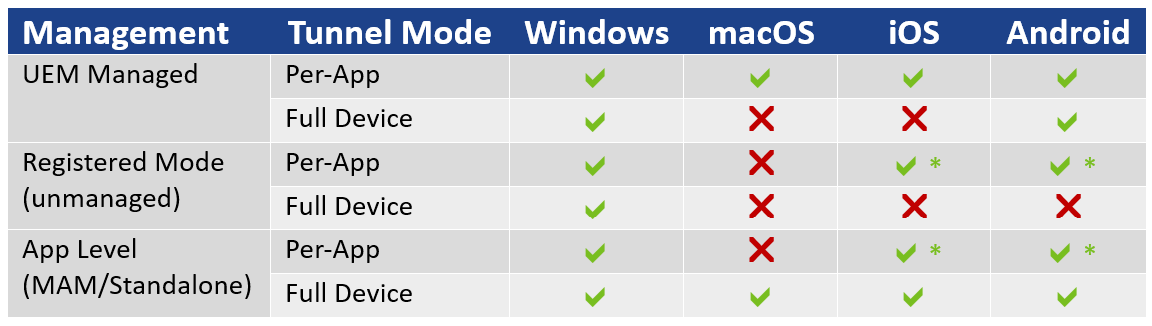
*Requires use of the Tunnel module available on Workspace ONE SDK.
Was this page helpful?