在 Workspace ONE Hub Services 中建立並發佈橫幅之前,您必須先在全域設定中啟用橫幅功能。這是一次性的組態步驟,可在您的 Workspace ONE Intelligent Hub 環境中啟用橫幅功能。
先決條件
- 具備 Hub Services 主控台的管理員存取權限
程序
-
登入 Hub Services 主控台。
-
從左側窗格開始,導覽至通知和橫幅 > 全域設定。
-
開啟啟用橫幅。
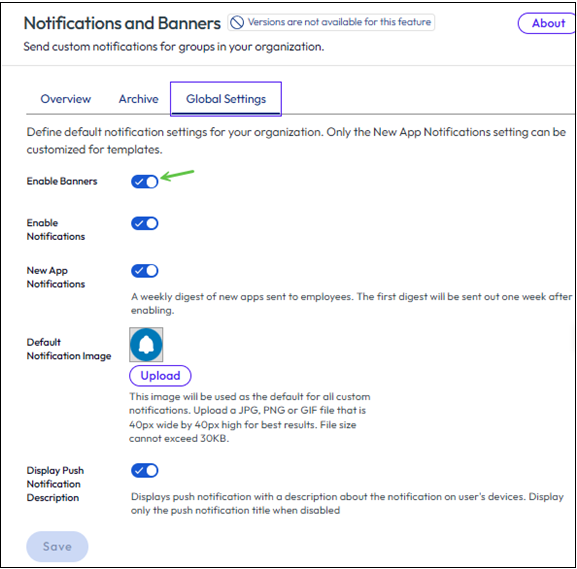
-
按一下儲存以套用變更。
結果
橫幅功能現已啟用。
後續步驟
在全域設定中啟用橫幅後:
- 依照在 Workspace ONE Hub Services 中建立橫幅的步驟建立您的第一個橫幅。
- 發佈橫幅,讓使用者看到該橫幅。
相關主題
Was this page helpful?