You can customize your Omnissa RemoteHelp Plus console with your own favicon, logo, and console color scheme. Contact support to supply your customizations.
Console Branding
As a Omnissa RemoteHelp Plus customer, you can customize the Favicon, the Logo, and the colors of four Console Elements. Do this by contacting Omnissa Support to supply your customizations.
-
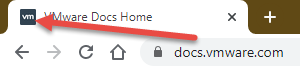
A Favicon is the icon that appears to the left of the title of browser tabs. The only restrictions on the favicon is that is must be in ICO format and it cannot exceed 15KB in size.
-
The Logo must be in PNG or SVG format and it also cannot exceed 15KB.
-
The Console Elements of which you can choose colors are the following.
- Primary Fill Color
- Primary Font Color
- Secondary Fill Color
- Secondary Font Color
Was this page helpful?