This wizard is used to automatically deploy a pod-manager-based pod into your Microsoft Azure subscription. When using this wizard to deploy your very first pod, you start the pod deployment wizard using the Manage > Add Pod feature in the Microsoft Azure row of the Horizon Universal Console's Getting Started page.
Important: Use this page solely when you have access to a first-gen tenant environment in the first-gen control plane. As described in KB-92424, the first-gen control plane has reached end of availability (EOA). See that article for details.
Note: Login authentication into the cloud-based console relies on authenticating account credentials with Cloud Services. If that service is unable to complete the necessary authentication requests, then you will not be able to log in to the console during that time period. If you encounter issues logging in to the console's first login screen, check the Horizon Cloud System Status page at https://status.workspaceone.com to see the latest system status. On that page, you can also subscribe to receive updates.
Important: This wizard does not support deploying a Horizon pod into AVS. In the current release, there is no wizard that automates deployment of a pod into AVS. For that type of pod, you must first manually stand up the Horizon pod in AVS and then use the Horizon Cloud Connector to connect it to Horizon Cloud. For information about standing up a Horizon pod in AVS, see Tech Zone's 'Horizon 8 on AVS' article at techzone.omnissa.com.
Prerequisites
Verify that you have met the prerequisites described in First-Gen Tenants - Prerequisites for Running the First-Gen Pod Deployment Wizard.
Procedure
-
Log in to the first-gen administrative console using one of the following methods:
- Unless otherwise directed by your organization, you can go to the first-gen Horizon Cloud address at https://cloud.horizon.omnissa.com. The system then automatically redirects to the standard Cloud Services login screen. Sign in using your Customer Connect account's credentials. The account credentials are the primary email address, such as
user@example.com, and the password that are set in the account's profile. - If your organization has asked you to access their first-gen Horizon Cloud tenant using Cloud Services, first log in at https://connect.omnissa.com. When logged in, then click the Horizon Cloud card that appears under the My Services section.
If you have not previously accepted the Horizon Cloud terms of service using those credentials, a terms of service notification box appears after you click the Login button. Accept the terms of service to continue.
When your login is successfully authenticated, the console displays in your browser. When you have no existing pods, the Getting Started wizard is displayed by default with the Capacity section expanded and the Add Cloud Capacity row.

Note: As described in First-Gen Tenants - Horizon Cloud Deployments and Onboarding Pods, depending on the configuration of the Horizon Cloud tenant record, you might see a blue banner about onboarding to Cloud Services. That step is not required for pod deployment and can be performed later. For information about that feature, see Onboard Your Horizon Cloud Tenant to Cloud Services.
- Unless otherwise directed by your organization, you can go to the first-gen Horizon Cloud address at https://cloud.horizon.omnissa.com. The system then automatically redirects to the standard Cloud Services login screen. Sign in using your Customer Connect account's credentials. The account credentials are the primary email address, such as
-
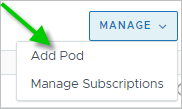
In the Add Cloud Capacity row, click Manage > Add Pod.
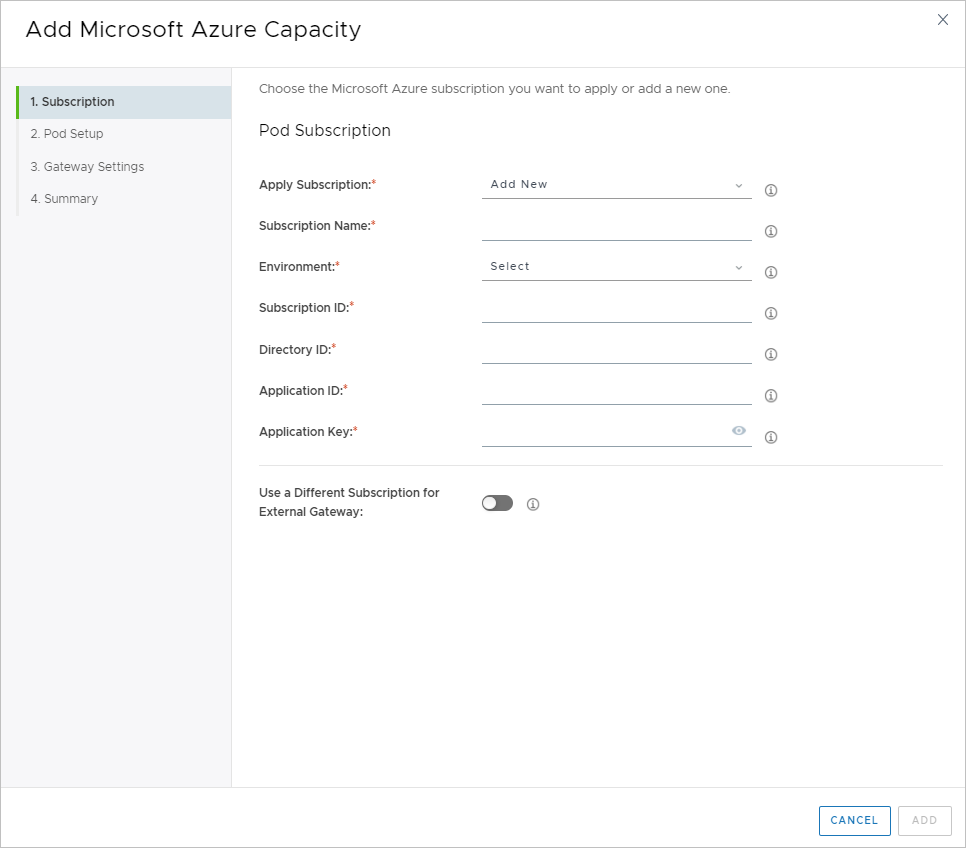
The Add Cloud Capacity wizard opens to its first step.
-
Specify the subscription to use for this pod by following the steps in First-Gen Tenants - Specify the Microsoft Azure Subscription Information for the New Horizon Cloud Pod.
Previous topic:First-Gen Tenants - Prerequisites for Running the First-Gen Pod Deployment Wizard
Was this page helpful?