For OAuth 2.0 clients in Omnissa Access that use the grant type Password Grant, you can set password validation to a third-party OpenID Connect identity provider. Users coming from those clients will then be authenticated against the third-party identity provider, regardless of their directory type.
This setting overrides the default auto-discovery mechanism that determines the identity source with which to validate a user's password.
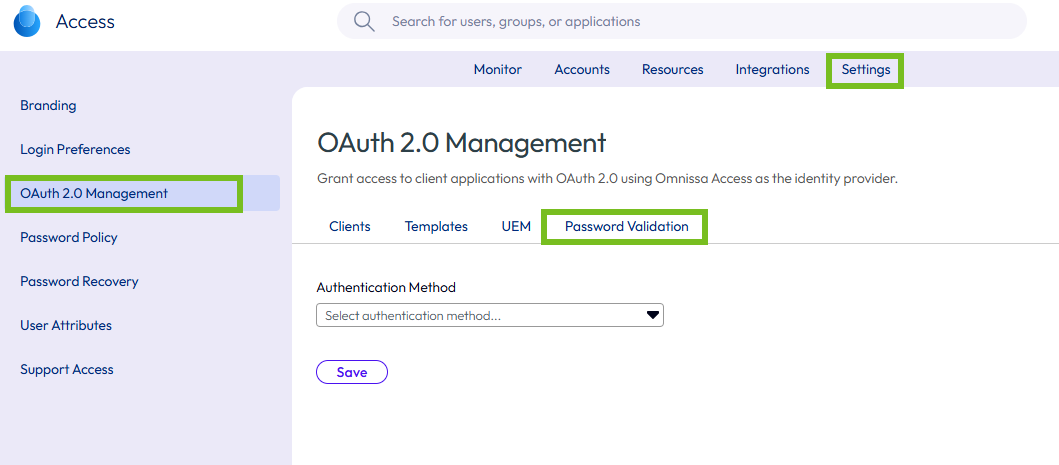
You configure password validation in the OAuth 2.0 Management > Password Validation tab by selecting the authentication method associated with the OpenID Connect identity provider. If no authentication method is selected in that tab, password validation defaults to the directory type associated with the user.
Important: Password Validation is a global setting that applies to all OAuth 2.0 clients that have Grant Type set to Password Grant.
Procedure
-
In the Omnissa Access console, navigate to Settings > OAuth 2.0 Management.
-
Select the Password Validation tab.
-
From the Authentication Method list, select the authentication method associated with the OpenID Connect IDP you created for the third-party identity provider integration.
Only OpenID Connect IDPs appear in the list.
-
Click Save.
Note: If no authentication method is selected in the OAuth 2.0 Management > Password Validation tab, password validation defaults to the directory type associated with the user.
Was this page helpful?