在配置 Omnissa Access 后,您可以转到设备配置设置页面以更新当前配置并监控虚拟设备的系统信息。
过程
-
登录 Omnissa Access 控制台。
-
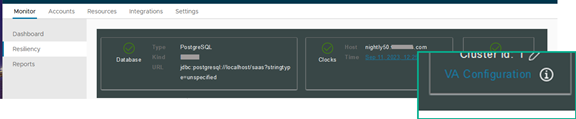
选择监控 > 弹性。
-
单击要配置的服务节点的 VA 配置,然后使用管理员用户密码登录。
-
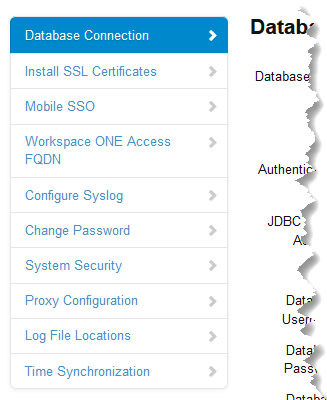
在左窗格中,选择要查看或编辑的页面。
后续步骤
验证您所做的设置或更新是否生效。
Was this page helpful?
2026 年 7 月 16 日
在配置 Omnissa Access 后,您可以转到设备配置设置页面以更新当前配置并监控虚拟设备的系统信息。
登录 Omnissa Access 控制台。
选择监控 > 弹性。
单击要配置的服务节点的 VA 配置,然后使用管理员用户密码登录。
在左窗格中,选择要查看或编辑的页面。
验证您所做的设置或更新是否生效。
Was this page helpful?