Administrators can use App Volumes to gather feedback from users regarding application usage, for example, during User Acceptance Testing. This App Volumes functionality provides the following: activate a feedback prompt for every package in the admin UI, enable users to provide feedback in the agent computer, and display the collected feedback in the admin UI.
How feedback can be configured in App Volumes Manager
Administrators can activate the Prompt for Feedback toggle in the App Volumes Manager admin UI when creating, editing, and updating the package. When the toggle is turned on, feedback is prompted either at the time of exiting an application or at a configured time interval after application launch. The event that occurs first takes precedence.
After providing feedback for a package, the user is never shown the feedback dialog box again for the same package. However, this feedback data can be reset and the user can once again be prompted for feedback for the same package. To re-prompt feedback for the package, administrators can use the RE-PROMPT button, which is present in the package details page of every package. When the RE-PROMPT button is used, the user is prompted for feedback only a single time. Previously received feedback for the package remains unaffected.
To enhance the user experience, administrators can customize the dialog text boxes presented to the user. This customization option is available in the CONFIGURATION > Settings page.
Considerations when using the Prompt for Feedback functionality
-
End users can provide only English comments with punctuation in the feedback text box. The text box does not support certain non-English or special characters.
-
Retaining meaningful and useful feedback helps avoid unnecessary consumption of database storage. Some best practices can be followed to manage feedback effectively:
-
If feedback received is for issues unrelated to a package, for example, server configuration, then existing feedback can be deleted and the RE-PROMPT functionality can be used for the package after the issue is resolved.
-
If the feedback is no longer relevant, for example, package issues are resolved and the package is delivered to multiple users, then the existing feedback can be deleted.
-
How feedback can be viewed and exported in App Volumes Manager
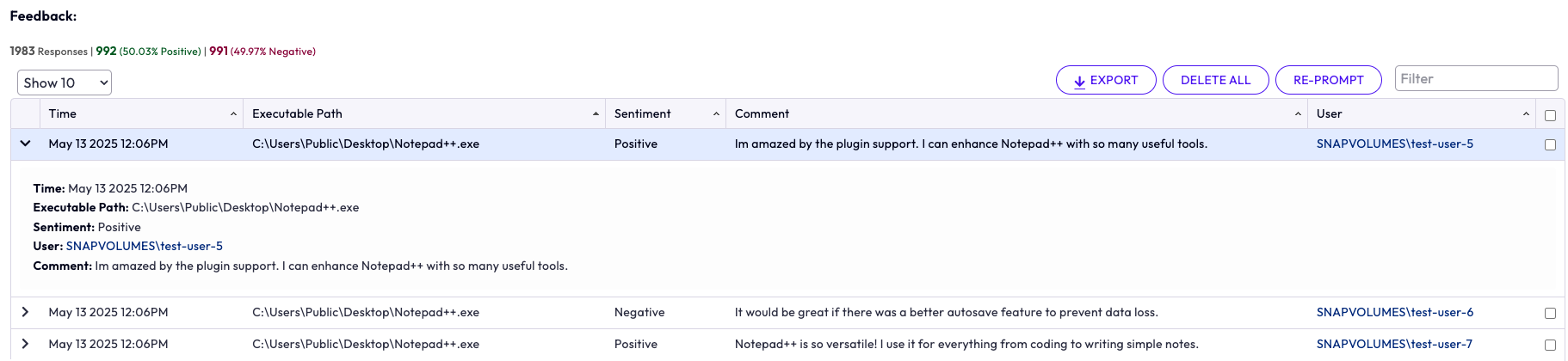
On every package detail page, a Feedback table is displayed. This table lists the total number of responses received for the package, user sentiment (Positive and Negative), time stamp of the received feedback, path of the executable file with which the application is launched, comments provided by the end user, and end user details. The EXPORT functionality can be used to download all feedback and save the data for later use.
Using the DELETE functionality, administrators can either delete selected feedback or all feedback. If the package is deleted, then the feedback also gets deleted.
The following screenshot shows the Feedback table, which is present in the details page of every package. In the screenshot, the table contains two positive responses and one negative response for Notepad++. The Comment column displays the comments provided by the users.
What is the end-user experience
The following are a few end-user scenarios:
-
If the user dismisses a feedback dialog box when prompted for a package, then a subsequent feedback dialog box is prompted only after the following events have occurred: a minimum of 5 minutes has elapsed since the previous dialog was dismissed, a new instance of the application is launched, and either the new instance of the application is closed or the configured timer has elapsed since launching the new instance of the application.
-
If the user provides feedback for a package, then the feedback dialog box is never prompted again for that package in that session or subsequent sessions, either at application exit or at the configured time.
-
User is re-prompted for the same package in the following scenarios:
-
If the initial feedback fails to reach App Volumes Manager and the user launches the application again during the same session or a subsequent session.
-
If the administrator decides to reset the completed feedback and selects RE-PROMPT for that package in App Volumes Manager.
Note: A re-prompt does not affect already-provided feedback.
-
-
If the feedback fails to reach App Volumes Manager, the user is asked to contact the administrator. The feedback text previously submitted by the user is displayed with a copy-paste functionality. This ensures that the user has not lost the feedback information and can share this with their administrator through other methods.
Feedback that does not reach App Volumes Manager is not retained or attempted to be sent later.
What to do next
The Prompt for Feedback toggle can be activated for a package in the following scenarios: Create a Package for an App Volumes Application, Edit an App Volumes Package, and Update an App Volumes Package.
For customizing the feedback dialog text boxes displayed to the end user, see App Volumes Manager Configuration Settings Page.
Was this page helpful?