Workspace ONE Mobile Threat Defense provides endpoint security and protection for iOS, Android, and Chrome OS, securing devices against app, device, OS, and network-based threats. Integrating Mobile Threat Defense with Workspace ONE UEM empowers your organization to adopt secure mobility without compromising productivity. It allows the integration of mobile security threat and device events into your security incident and event workflows. Additionally, Mobile Threat Defense allows you to streamline the management of devices and drive enforcement when threats are detected.
Requirements
- Workspace ONE Mobile Threat Defense.
- A currently supported version (non EOL) of Workspace ONE UEM, shared SaaS, Managed Hosting, or on-premises.
- Administrator access to the Workspace ONE UEM console.
- Omnissa Workspace ONE Intelligent Hub 23.05 or later installed on devices intended for protection.
- Workspace ONE Tunnel 23.01.1 or later (for Phishing and Content Protection)
The Omnissa Workspace ONE Intelligent Hub mobile application is the device-side agent, detecting threats on mobile devices and reporting the information to the end user and also to the console. Workspace ONE Intelligent Hub is available for iOS from the App Store and for Android from the Google Play Store. Enter getwsone.com into the browser window of any device and you can download the correct Workspace ONE Intelligent Hub installer for that device.
Supported Platforms
- Android 11.0+
- Apple iOS 15.0+
- Apple iPadOS 15.0+
- Chrome OS
Network Requirements
Devices protected with Workspace ONE Mobile Threat Defense must be able to communicate with Lookout Services. Add the following IP addresses to your firewall when devices are running on a closed or restricted network.
Device
- Secure DNS (https 443)
dns.prod.lookout.com - MiTM Reference Endpoint (https 443)
*.protect.prod.lkt.is
WS1 UEM Console Integration with Lookout (MDM connector in MTD console)
- IP Addresses for Lookout Services
- 52.11.153.147
- 52.11.153.253
- 54.153.102.83
- 54.153.102.84
MTD Console (443)
https://omnissa.lookout.com
Mobile Threat Defense Capabilities by Management Mode
Depending upon which mode of management you select for your environment, you can expect different capabilities and behaviors from Mobile Threat Defense.
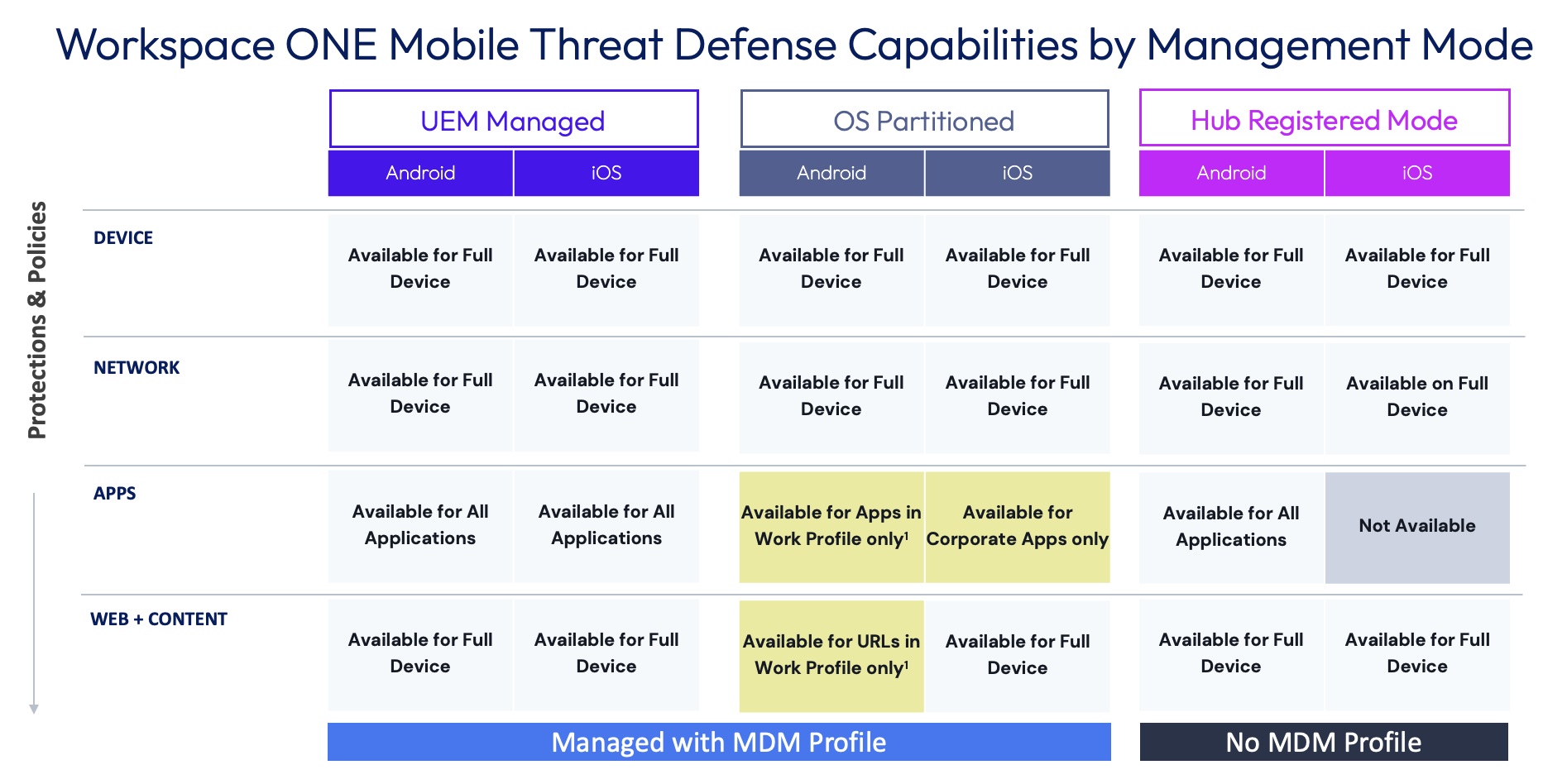
1 Apps and web content for Android devices with dual profiles (OS Partitioned) are supported with Workspace ONE Mobile Threat Defense Dual Enrollment.
Privacy
For more information about how Omnissa handles information collected through our products, see the Omnissa Privacy Policy at https://www.omnissa.com/trust-center/#privacy-policy.
For more information about what data is collected from your end users’ devices, visit the Omnissa Workspace ONE Privacy Disclosure page: https://static.omnissa.com/uploads/workspace-one-privacy-datasheet.pdf.
For more information about how our Mobile Threat Defense service provider, Lookout, uses data from end user devices for its security research and to improve its ability to detect new threats, visit https://legaldocs.lookout.com/en/enterprise-privacy-policy.pdf.
Was this page helpful?