The Dynamic Environment Manager Self-Support Tool allows end users to restore application settings from a backup or reset them to defaults.
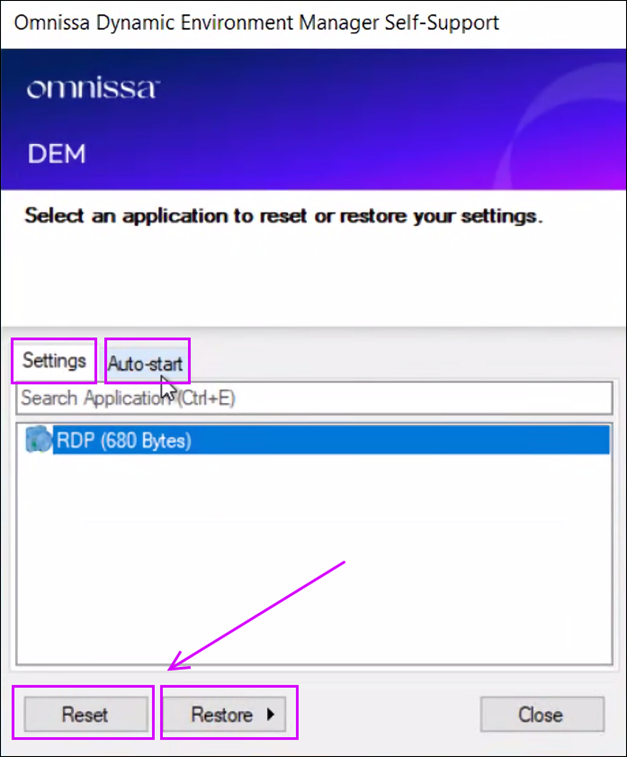
When you start Dynamic Environment Manager Self-Support, it displays a list of applications managed by Dynamic Environment Manager whose settings can be reset or restored.
-
Click Reset to remove a profile archive for a particular application or Windows setting. See Reset Applications to Default Settings.
-
Click Restore to display a list of backups if one or more profile archive backups exist for a particular application. When you select a backup, the settings captured in that particular backup are restored. See Restore Application Settings From Backup.
-
If the Allow managing auto-start shortcuts agent configuration setting is enabled, the application list will appear on the Settings tab and the new Auto-start tab lists the shortcuts that have User-managed auto-start setting enabled, each with a check box that allows the end user to indicate whether that shortcut should be auto-started at logon. By default, this tab is hidden. To configure this setting, see Configure DEM Self-Support to Allow Managing Auto-Start Shortcuts.
Was this page helpful?