As Omnissa embraces the transformative capabilities of AI, it is our duty to maintain a responsible approach to its use. The Omnissa approach is centered on earning and maintaining the trust of our customers and partners; and founded on governance, transparency, and data privacy and security. This document provides an overview of our customer-facing machine-learning and GenAI enabled features and where we have integrated AI functionality within our cloud services and on-premise software/product offerings.
Overview of the Omnissa AI program
Use and governance of Artificial Intelligence (AI), including GenAI systems, is a rapidly growing area, and, like many new innovations, we understand that they carry serious risks if not used responsibly.
Omnissa has adopted its own set of internal Ethical Principles for Omnissa AI that govern the development, deployment and use of AI systems. These core principles of trustworthy AI include:
- Fairness
- Explainability and transparency
- Reliability and safety
- Privacy and security
- Accountability
Most importantly, an internal Omnissa AI policy requires that every AI-based feature embedded within our products and cloud services has a way for the customers to opt-out of using the feature, either through the service user interface (UI) or by submitting a support request.
AI governance at Omnissa
Omnissa has established a cross-functional Omnissa AI Governance team that facilitates our use and development of AI systems in line with Omnissa principles, policies, and our company values. The key element of our AI governance structure includes operationalizing our ethical principles and applicable legal requirements through risk-based, verifiable, and enforceable controls with the necessary degree of transparency to our customers that are monitored and verified.
Innovating with a responsible and ethical approach is a core component of Omnissa culture and essential for earning and maintaining the trust of our customers. Dedicated teams are working to help mature our existing AI governance framework and help ensure that AI systems are developed, integrated, and deployed in line with emerging AI laws and policies and in a way we and our customers can trust.
To help manage the risks associated with using AI in our products, Omnissa has designed our AI policies based on the NIST AI Risk Management Framework (AI RMF). This framework was designed to improve the ability to incorporate trustworthiness considerations into the design, development, use, and evaluation of AI products, services, and systems.
Omnissa approach to AI model training
Omnissa leverages both proprietary and third-party models to enable its AI capabilities. At present, we utilize only pre-trained foundational large language models (LLMs) provided by third-party vendors. In accordance with our contractual agreements, these vendors are prohibited from using Customer Content (that is, content uploaded by a customer or any user into an Omnissa Cloud Service) to train or improve their models. For the Omni AI Platform, Omnissa uses Azure OpenAI LLM in secure enterprise configurations which are designed for data privacy and strict regulatory compliance. Some of our other offerings, such as Omnissa MCP Server and Horizon Delegate, allow you to connect our services to your own LLM. Customers are responsible for selecting, configuring, and managing their own LLM and should review their own privacy policy and applicable data handling requirements to ensure the selected LLM's data processing, retention, configurations and use practices align with their organization's requirements.
To improve the accuracy and relevance of its AI-powered recommendations, Omnissa may collect and analyze interaction and resolution data generated through customer use of Omnissa AI Features ("Usage Data"), including Omni and Omnissa AI agents. This includes data on how customers are using our products such as steps taken, playbooks executed or created, and the effectiveness of executed actions (for example, whether the issue was resolved or persisted) when resolving issues through our AI-assisted workflows. The Usage Data referenced here is distinct from Customer Content in that it reflects how problems were approached and resolved by the AI workflows rather than the underlying data collected by customer environments. Omnissa leverages this Usage Data to develop and refine a pattern library in our AI tools, helping provide more accurate and effective guidance for similar issues in the future and other purposes listed in the Omnissa Products & Services Privacy Notice. All data used for this purpose is de-identified and aggregated, where appropriate, in a manner designed to protect the privacy and confidentiality of individual customers.
Many of our AI features include a way to provide user feedback. For example, using the feedback panel included in Omni, you can give the experience a thumbs up or down and provide additional feedback using the free text field. Omnissa will then use the feedback, and associated activity, to improve the our AI services.
For further information on our AI feature terms (including intellectual property ownership and other legal terms), see the Omnissa Cloud Services Guide.
Omnissa AI features, AI gateways and agentic AI
Omnissa incorporates AI capabilities across several products and services, ranging from embedded intelligence and generative AI experiences to AI integration gateways and autonomous agents:
AI embedded features (AI features):
- Workspace ONE UEM Scripts and Sensor Generation Service
- Omnissa Intelligence Experience Management
- Insights
- Guided Root Cause Analysis (gRCA)
- Omni AI Platform
- Data Analysis
- Knowledge Search
AI gateway:
- Omnissa MCP Server
Agentic AI:
- Horizon Delegate
Additional details regarding each component are provided in the sections below.
Workspace ONE UEM Scripts and Sensor Generation Service
Workspace ONE UEM Scripts and Sensor Service includes the ability to generate sensors automatically based on a prompt provided by the admin. These sensors collect data about the device, such as the hardware configuration, the operating system, and the installed applications.
This feature currently supports scripting languages such as PowerShell and Bash, providing users with flexibility and convenience when switching between different languages within Workspace ONE for both Windows and macOS platforms. Sensor generation is currently limited to 50 requests per day per Workspace ONE UEM tenant. Note: Support for generating scripts is coming in a future release.
Where your data is processed and stored
The Workspace ONE UEM Scripts and Sensors Service, hosted within Omni AI cloud service, functions as the entry point for user queries submitted through the Workspace ONE UEM user interface (UI) using the Omni AI chatbot interface. It interacts with the third-party LLM (that is, Azure OpenAI service) which processes the query and receives the generated response from the LLM to return the message back to the user.
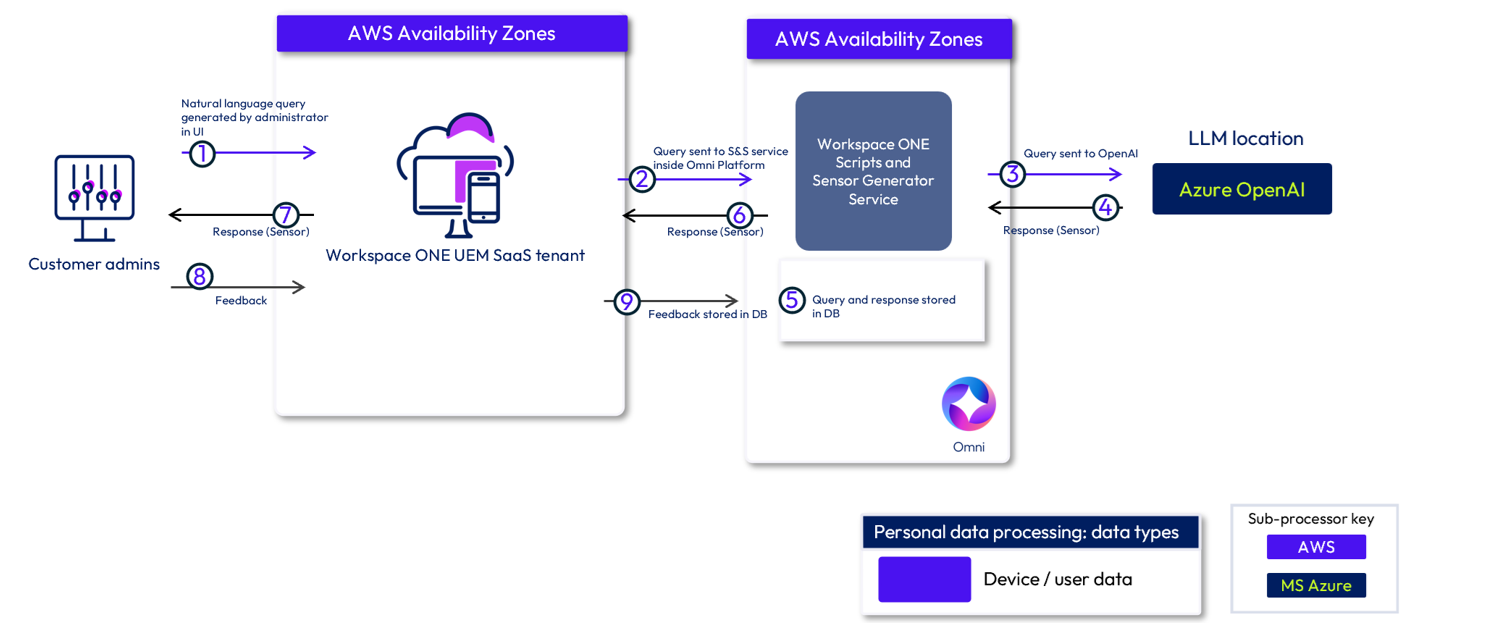
Workspace ONE UEM Sensor Generation Service also has role-based access controls in place. For example, to use this service, a Workspace ONE UEM administrator needs to have permissions to create sensors. Furthermore, since this service uses the Omni AI chatbot interface, an Omni role must be enabled using Omnissa Connect as described in our AI tool controls section below.
Processing and storage of data in Workspace ONE UEM Scripts and Sensor Generation Service
| Scripts and Sensors Generation Service | |
|---|---|
| Data processed or stored | The Scripts and Sensor Generation Service component stores relevant information in the database, such as queries, responses and user provided feedback. This data is stored encrypted at rest in the Scripts and Sensor Generator Service located in the Omni AI Platform. |
| Data processing location | Data is processed in your Workspace ONE UEM instance, Omni AI and in Azure OpenAI. Omni AI: Omni cloud service (hosted in AWS) is available in 9 regions worldwide. The location used to store your data is determined by your assigned customer location. Azure OpenAI: Whenever possible, Omnissa processes and stores data within your region; however, data may be processed outside of your region based on your assigned customer location. See the list of Azure OpenAI data zones below: - US customers: US Data Zone - EU customers: EU Data Zone - Other: Global |
| Data storage location | Data is stored in a database within the Omni AI cloud service. The location used to store your data is determined by your assigned customer location. |
| Data retention period | 90 days |
Workspace ONE® Experience Management
Workspace ONE Experience Management, also called Digital Employee Experience (DEX), helps organizations gain insights into the employee experiences with their digital workspace. Experience Management provides insights into apps, operating system stability, and performance. It also displays analytics for key performance indicators that impact employee experiences such as start time, shutdown time, logon, and logout events.
Insights
Insights detect anomalies in your Experience Management environment. They are a machine-learning based feature that alerts you to interesting or potentially problematic data point changes without you having to constantly monitor your dashboards. For more information on Insights, see Omnissa Docs.
Guided RCA
Investigations let you track, collaborate, and perform guided root cause analysis within your Experience Management solution. gRCA in Omnissa Intelligence assists you with debugging various widespread issues such as application crashes, OS crash issues, and slow boot events. For more information on how to use this feature, see Omnissa Docs.
Where your data is processed and stored
For the machine-learning enabled features within Workspace ONE Experience Management -- Insights and gRCA -- data is processed and stored in the same region as your Omnissa Intelligence instance.
Processing and storage of AI features in Experience Management
| Experience Management: Insights and gRCA | |
|---|---|
| Data processed or stored | Uses the same data collected by Omnissa Intelligence -- these features just analyze the data already available within Omnissa Intelligence. See Omnissa Workspace ONE Disclosure for details on what data is collected by Omnissa Intelligence. |
| Data processing location | Experience management is built into Omnissa Intelligence; data is processed in your instance of Omnissa Intelligence. |
| Data storage location | Data is stored in your Omnissa Intelligence instance. Storage and processing locations for Omnissa Intelligence are detailed in the Platform Services Sub-Processor List available in the Omnissa Legal Center. |
| Data retention period | Same as Omnissa Intelligence |
Omni chat assistant
Omni is an AI chat assistant available within all Omnissa consoles. This assistant provides natural language support for our AI features, including data analysis, workflow creation, and in-product help across Omnissa platform and product consoles.
Data Analysis
Our Data Analysis tool helps you analyze the vast range of metrics available in Omnissa Intelligence using natural language queries instead of building or finding a widget one at a time. While Omni provides you with answers within your conversation, using either the Omni chat assistant or the data explorer in Omnissa Intelligence, you can refine your queries for a more targeted analysis.
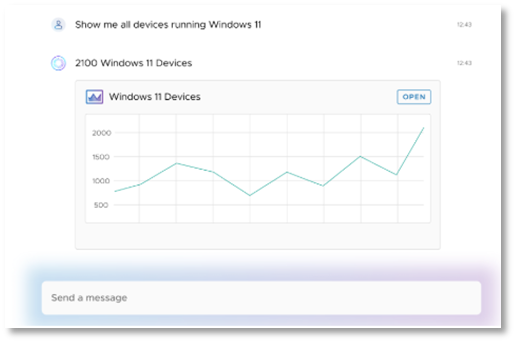
Data Analytics leverages a large language model (LLM) to interpret the user's natural language input and generate a corresponding query. This query is then executed by Omnissa Intelligence, leveraging the existing Role Based Access Control (RBAC) and security capabilities of Omnissa Intelligence. Custom roles enable the creation of roles that can access Omni functionality (or a subset of Omni functionality) without access to other features of Omnissa products, so that broader stakeholders (for example, Management, Security, Finance, Procurement, and Legal) can answer queries on the deployment, and potentially view dashboards, without the risk and distraction of broader capabilities.
Knowledge Search
Because Omni can access Omnissa documentation, you can use its knowledge search capabilities to get help and tips directly in the Omnissa consoles.
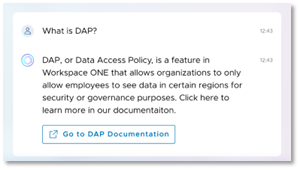
Using the Knowledge Search tool, which is present across the UEM, Horizon, Intelligence, and Omnissa Connect consoles, you can ask any question related to the documentation and search any Omnissa product documentation, knowledgebase articles, Tech Zone, and other technical resources directly in the interface. The response provides a summary and the option to take you straight to the documentation -- no more wasting time searching for answers.
Where your data is processed and stored
Omni AI assistant functionality is supported by the Omni AI Platform, a cloud service hosted in AWS and either the Data Analysis cloud service (hosted in AWS) or Knowledge Search cloud service (hosted in Azure).
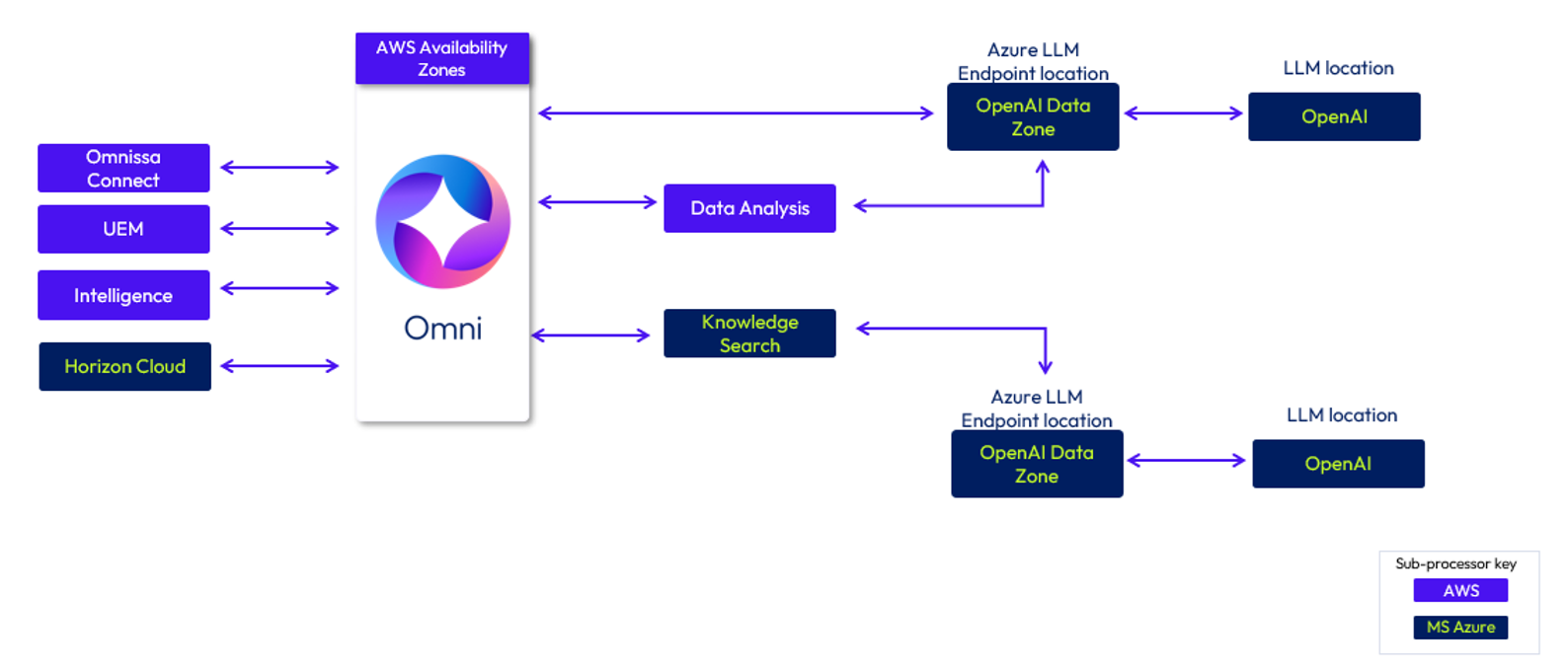
When using the features built on the Omni AI Platform, Omni cloud service collects and stores user prompts, LLM responses, and customer feedback. Omni also stores audit logs detailing what prompts each user submits; these logs may include user ID which may be considered personally identifiable information (PII). When Omnissa uses these logs or other stored customer feedback to improve our services, any customer-uploaded PII is aggregated and de-identified in region.
Processing and storage of data within Omni assistant
| Omni AI Platform | |
|---|---|
| Data processed or stored | Prompt, LLM response, and feedback data are stored (encrypted at rest) in Omni AI Platform. Note that Omnissa uses feedback data to improve the Omni services. Audit logs are generated for each prompt submitted. |
| Data processing location | Whenever possible, Omnissa processes and stores data within your region. The data flow may be different depending on your assigned customer location, what console you are using to access Omni and the type of query you are making (Data Analysis vs. Knowledge Search). Also see the sub-processor listing available in the Omnissa Legal Center for details. |
| Data storage location | Omni cloud service (hosted in AWS) is available in 9 regions worldwide. The location used to store your data is determined by your assigned customer location. Also see the sub-processor listing available in the Omnissa Legal Center and our data flow diagrams for details. |
| Data retention period | 90 days |
Data Analysis
The Data Analysis tool simply converts your natural language prompt into a SQL data query that the Omnissa Intelligence service can read to generate an output in an easy-to-understand format. Your natural language prompt and response is what is processed by the Azure OpenAI service which is secured with enterprise configuration and configured not to train on customer data. Note that the Data Analysis cloud service is hosted separately from the Omni AI Platform in AWS as described above.
Processing and storage of data for Data Analysis AI tool
| Data Analysis (available to customers with an Omnissa Intelligence subscription) | |
|---|---|
| Data processed or stored | Customer prompt, LLM response, and customer feedback data for Data Analysis queries are stored in the Omni AI Platform (encrypted at rest using AES-256). Note that Omnissa uses feedback data to improve Omni services. Logs (stored in the Omni cloud service) |
| Data processing location | Whenever possible, Omnissa processes and stores data within your region. The Data Analysis cloud service is hosted separately from the Omni AI Platform in AWS and is available in 9 regions worldwide. The location used to store your data is determined by your assigned customer location in the Omni AI Platform. OpenAI processing locations Due to the nature of available locations, data may be processed outside of your home region based on your assigned customer location. See the list of Azure OpenAI data zones below. - US customers: US Data Zone - EU customers: EU Data Zone - Other: Global Also see the sub-processor listing available in the Omnissa Legal Center and our data flow diagrams for details. All traffic is encrypted in transit over the public internet using strong encryption. |
| Data storage location | Stored in Omni. See Processing and storage of data within Omni assistant. |
| Data retention period | Stored in Omni. See Processing and storage of data within Omni assistant. |
Knowledge Search
The Knowledge Search tool is available from Omnissa consoles, including Omnissa Connect, Workspace ONE UEM, Omnissa Intelligence and Horizon Cloud.
Processing and storage of data for Knowledge Search AI tool
| Knowledge Search (available to all Omnissa customers) | |
|---|---|
| Data processed or stored | Customer prompt, LLM responses, and customer feedback data are collected and processed by the Knowledge Search service; however, they are not stored by the Knowledge Search service. This data is stored in the Omni AI platform database. Note that Omnissa uses feedback data to improve Omni services. All data is stored encrypted at rest (AES-256). |
| Data processing location | Whenever possible, Omnissa processes and stores data within your region; however, data may be processed outside of your region based on your assigned customer location as hosting regions for Knowledge Search are limited. See the list of Knowledge Search hosting locations below: Knowledge Search is hosted in 3 service locations worldwide (hosted in Microsoft Azure): - US: for customers located in US and Canada - Ireland: for customers located in EU and UK - Japan: for customers located in Australia, Japan, India, Singapore OpenAI processing locations Due to the nature of available locations, data may be processed outside of your home region based on your assigned customer location. See the list of Azure OpenAI data zones below. Azure OpenAI data zones: - US: US Data Zone - EU: EU Data Zone - Other: Global Also see the sub-processor listing available in the Omnissa Legal Center and our data flow diagrams for details. All traffic is encrypted in transit over the public internet using strong encryption. |
| Data storage location | Stored in Omni. See Processing and storage of data within Omni assistant. |
| Data retention period | Stored in Omni. See Processing and storage of data within Omni assistant. |
AI gateway: Omnissa MCP Server
Omnissa MCP Server is a managed AI integration capability that enables enterprise AI assistants and agents to securely interact with Omnissa services through a single, standardized interface. It simplifies AI adoption by eliminating the need for separate product integrations while maintaining existing security, permission, auditing, and access controls.
Omnissa MCP Server provides a centralized integration layer that allows compatible AI assistants and large language models (LLMs), such as Claude Desktop, Cursor, Claude Code, and custom agents, to discover available capabilities and securely access Omnissa product functions. By abstracting underlying product-specific APIs and routing requests to the appropriate Omnissa service, the MCP Server delivers a consistent and streamlined integration experience across supported Omnissa solutions.
The Omnissa MCP Server currently supports any MCP-compatible AI client and can be used with the following Omnissa cloud services and associated use cases:
- Workspace ONE UEM
- Executing a limited set of device commands, such as device query, sync, clear passcode, sensor sync, and user logout
- Investigating a device's applications, profiles, compliance, security posture, and event history
- Looking up deployment status across a device fleet
- Finding and inspecting applications, scripts, sensors, baselines, provisioning, and workflows
- Looking up tenant- or organization-group-level system settings
- Omnissa Access (Read only)
- Searching users, groups, and applications
- Retrieving a user, group, or application record by ID
- Checking whether a user can access an application
- Querying audit and login events
- Retrieving selected tenant configuration sections
- Omnissa Intelligence: Natural-language reporting (Omnis Data Analysis is required)
- Natural-language data queries through Omni Data Analysis, resource search, and lifecycle operations for reports, dashboards, widgets, investigations, schedules, and workflows.
- Workspace ONE Hub Services: Notifications and workflows
- Horizon Cloud Service
To connect to your AI agent, an MCP token is issued from Omnissa Connect against an administrator. The organization administrator enables MCP and chooses the maximum scope:
- Read-only: View data and resources
- Full scope: Read, modify, and execute, where supported by the product
MCP permissions cannot exceed the administrator's existing product roles. For example, a Workspace ONE UEM-only administrator with full MCP scope still receives only UEM tools and cannot access Omnissa Intelligence or Omnissa Access tools without the corresponding product roles. Omnissa Intelligence tools also require the appropriate data analysis permissions as described above.
Where your data is processed and stored
MCP Server is comprised of two main components: the MCP Server Proxy which acts as an API gateway and is hosted in AWS across 9 regions, and embedded MCP servers hosted in boundary in each Omnissa cloud service. MCP Server uses Omnissa Connect for centralized identity authentication and authorization with role-based access controls.
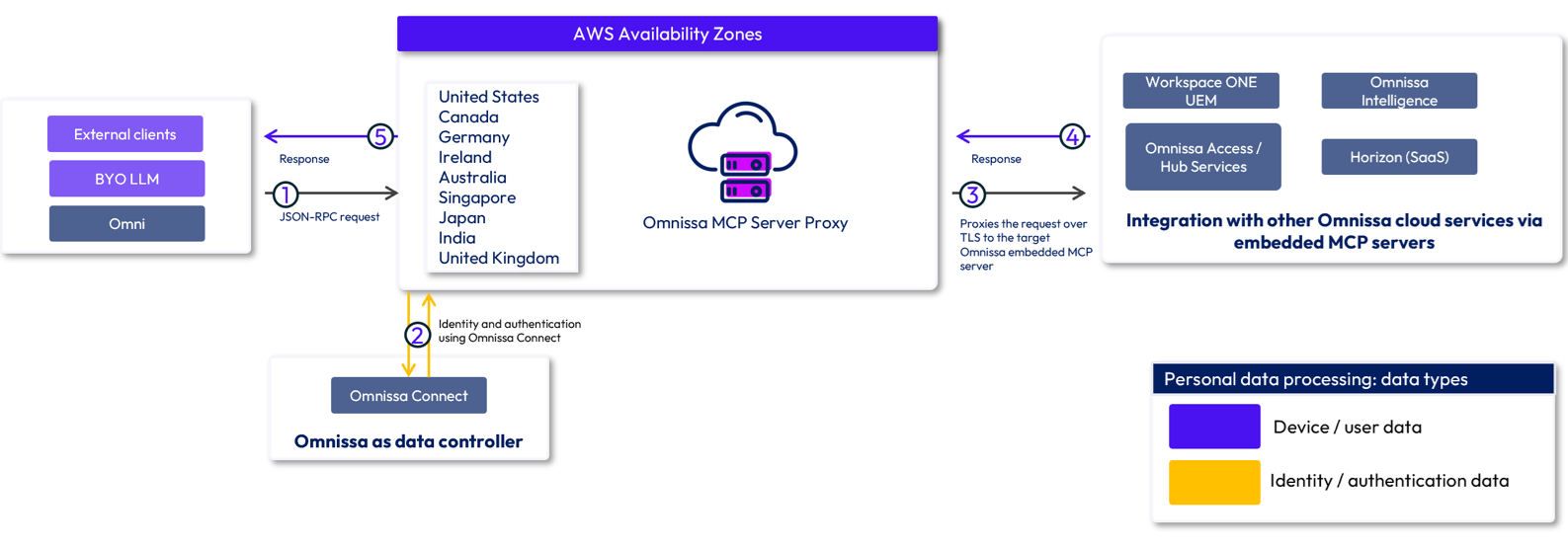
The global location of the MCP Server Proxy is determined by your assigned customer region when you generate your MCP token within your organization's account settings in Omnissa Connect. Note that the MCP Server Proxy and embedded MCP servers do not persist Customer Content. These components process requests and responses only transiently for the duration of request execution and do not retain Customer Content after processing is complete.
The MCP Server Proxy receives structured JSON-RPC requests containing authentication tokens and tool input parameters. It processes the associated data transiently in memory to validate, manage, and route requests to the appropriate backend service. No persistent storage is required for these processing activities.
The embedded MCP servers (within Workspace ONE UEM, Omnissa Access, Omnissa Intelligence, Workspace ONE Hub Services and Horizon Cloud Service) process authorized requests, apply relevant business rules, interact with required backend systems, and generate the corresponding response which is routed back through the MCP Server Proxy to the originating agent or LLM.
Processing and storage of data by Omnissa MCP Server
| Omnissa MCP Server | |
|---|---|
| Data processed or stored | The MCP Server Proxy is a stateless routing and aggregation layer. It does not process or generate natural language prompts or execute LLM models (prompt execution and LLM inference take place on the calling AI client / LLM host, such as Omni AI or customer BYO-LLM clients). The MCP Server Proxy may process Customer Content and Operations Data, including personal data, to the extent necessary to authenticate requests, validate request schemas, route requests to the appropriate customer tenant endpoint, enforce security controls, and transmit requests and responses between the client and the target embedded MCP Server. Such processing is performed solely to provide the service and is transient in nature. |
| Data processing location | MCP Server Proxy is hosted in AWS in 9 regions worldwide. The processing location used by MCP Server Proxy is determined by your assigned customer location. The embedded MCP servers are hosted in boundary with your existing Omnissa cloud services. |
| Data storage location | N/A: Neither the MCP Server Proxy nor the MCP layer persists customer payload content, prompts, or tool execution response data to any database or persistent storage. Data lives only in-memory for the duration of the request/response lifecycle before being returned to the calling client. |
| Data retention period | N/A: Neither the MCP Server Proxy nor the MCP layer persists customer payload content, prompts, or tool execution response data to any database or persistent storage. Data lives only in-memory for the duration of the request/response lifecycle before being returned to the calling client. |
Omnissa AI agents
Horizon Delegate
Horizon Delegate is a native AI-powered conversational interface integrated into Horizon HTML Access Client (Browser) that enables enterprise users to delegate complex desktop tasks, including legacy application workflows, to customer's own BYO-LLMs/AI agents (such as GitHub CoPilot) within their secure Horizon virtual desktop infrastructure (VDI) session.
Users engage with the Horizon Delegate through natural language from any Horizon endpoint device. While AI reasoning occurs at customer's own BYO-LLM/AI agent layer, all actions are executed locally within the secure Horizon VDI environment, ensuring adherence to existing Workspace ONE® UEM™, Omnissa® Dynamic Environment Manager™ (DEM), and Unified Access Gateway (UAG) security, management, and access policies. This means that the agent executes as the user, inside the Horizon session, using the user's entitlements and credentials (note that the user can determine either synchronous or asynchronous agent actions). Long-running tasks, multi-step workflows, and background AI processes continue to execute uninterrupted within the virtual machine (VM), independent of the state or availability of the user's physical device. Users can seamlessly resume their work from any endpoint, at any time, exactly where they left off.
Horizon Delegate also includes an AI governance layer that governs what is allowed to be sent to the LLM, who is entitled to use it, along with tracking and monitoring the execution of the AI agent. The UAG enforces an admin-defined allowlist of AI provider Fully Qualified Domain Names (FQDNs). No AI traffic can bypass the gateway.
In our initial offering, Horizon Delegate supports GitHub CoPilot via a bundled Horizon software development kit (SDK). It also connects to your BYO-LLM via the Horizon Blast protocol, rather than open internet connections, for added security.
Where your data is processed and stored
During the agent reasoning cycle, the Horizon Agent SDK supplies the LLM with the user's natural language request along with observed desktop context necessary for task execution. Depending on the workflow, this context can include screenshots, document contents, application state, and other desktop telemetry, allowing the agent to make informed decisions and perform actions within the desktop session. The Horizon software does not persist this data; it is transmitted transiently as part of the agent loop.
The tenant VM is network-isolated: the external egress is the user-authenticated call to the LLM. The Horizon endpoint never talks to the LLM directly, and the LLM never reaches internal enterprise systems.
AI tool controls: disabling AI features and AI agents
Experience Management: Insights and gRCA
These features are required by Workspace ONE Experience Management. Customers can request that these features be disabled by submitting a support request.
Omni AI Platform
You can activate Omnissa MCP Service and Workspace ONE Sensor Generation Service for users in Omnissa Connect using roles. For details on how to add or edit an admin in Omnissa Connect, access the topic Administrators. When you add or edit the admin, select one or both Organization Roles in Omnissa Connect located in the Set Omnissa AI Preferences area.
Horizon Delegate
Horizon Delegate is not enabled or installed by default. For the functionality to work, both conditions must be met: the feature must be installed as part of the Horizon Agent and explicitly enabled for the applicable machine pool by the administrator through the admin console.
Where we embed AI in our products and solutions: third-party AI integrations
The following Omnissa offerings incorporate third-party AI integrations: Workspace ONE Boxer for Android with Gemini Nano, Workspace ONE Boxer, Workspace ONE Content, and Workspace ONE Web for iOS with Apple Intelligence, and Omnissa Mobile Threat Defense with Lookout SAIL assistant. The applicable third‑party terms will govern the use of any integrated AI tool or service.
Workspace ONE Boxer for Android with Gemini Nano integration
Workspace ONE Boxer for Android with Gemini Nano integration enables end-users to leverage AI for email summarization, providing accurate, real-time summaries of both individual emails and complex threads.
The Workspace ONE Boxer AI summary feature is built using the Google Machine Learning (ML) Kit APIs. Processing the input data (for example, email) takes place on the device, and ML Kit does not send that data or the resultant outputs to Google or Omnissa servers. The ML Kit APIs may contact Google servers occasionally to receive bug fixes, updated models and hardware accelerator compatibility information. Google receives data regarding the utilization and performance of the ML Kit APIs integrated into the Workspace ONE Boxer application. Google uses these metrics to measure performance, debug, maintain and improve the APIs, and detect misuse or abuse, as further described in their Privacy Policy.
Where your data is processed and stored
Processing of the input data (for example, email) takes place completely on the device, and ML Kit does not send that data or the resultant outputs to Google or Omnissa servers. For further information, see the Google Privacy Policy.
The activation of this integration will require enablement by your organization's IT administrator. Availability and functionality may vary based on device management policies.
See the Omnissa Product Guide for usage and age restrictions and other disclaimers.
Workspace ONE Boxer for iOS with Apple Intelligence integration
Workspace ONE Boxer's integration for iOS with Apple Intelligence brings powerful on-device AI for email summarization.
Apple Intelligence identifies only the essential data needed to complete the request and sends it to the generative model without granting access or storing any information. It prioritizes on-device processing to keep data local and secure whenever possible. For tasks requiring greater computational power, Apple Intelligence leverages Private Cloud Compute, transmitting only the relevant data to Apple servers for processing. This data is used solely to fulfill the request and is never stored or accessed by Apple. Once the task is complete, results are securely returned to the device. To maintain privacy, Apple only gathers minimal request data, such as file sizes, features utilized, and completion duration. The data Apple sends to its cloud is anonymized and processed on secure servers. Learn more about Apple Private Cloud Compute here.
The activation of this integration will require enablement by your organization's IT administrator. Availability and functionality may vary based on device management policies. See the Omnissa Product Guide for usage and age restrictions and other disclaimers.
Where your data is processed and stored
As described above, Apple Intelligence prioritizes on-device processing to keep data local and secure whenever possible. For tasks requiring greater computational power, Apple Intelligence leverages Private Cloud Compute, transmitting only the relevant data to Apple servers for processing. This data is used solely to fulfill the request and is never stored or accessed by Apple. Once the task is complete, results are securely returned to the device. No data is sent to Omnissa servers.
Workspace ONE Content for Android with Gemini Nano integration
Workspace ONE Content for Android with Gemini Nano integration enables end-users to leverage AI for document page summarization, providing accurate, real-time summaries of single document page.
The Workspace ONE Content AI summary feature is built using the Google Machine Learning (ML) Kit APIs. Processing the input data (for example, document page) takes place on the device, and ML Kit does not send that data or the resultant outputs to Google or Omnissa servers. The ML Kit APIs may contact Google servers occasionally to receive bug fixes, updated models and hardware accelerator compatibility information. Google receives data regarding the utilization and performance of the ML Kit APIs integrated into the Workspace ONE Content application. Google uses these metrics to measure performance, debug, maintain and improve the APIs, and detect misuse or abuse, as further described in their Privacy Policy.
Where your data is processed and stored
Processing of the input data (for example, document) takes place completely on the device, and ML Kit does not send that data or the resultant outputs to Google or Omnissa servers. For further information, see the Google Privacy Policy.
The activation of this integration will require enablement by your organization's IT administrator. Availability and functionality may vary based on device management policies.
See the Omnissa Product Guide for usage and age restrictions and other disclaimers.
Workspace ONE Content with iOS Apple Intelligence integration
Workspace ONE Content's integration for iOS with Apple Intelligence enables end-users to leverage AI for document summarization, providing accurate, real-time summary of document contents.
Apple Intelligence identifies only the essential data needed to complete the request and sends it to the generative model without granting access or storing any information. It prioritizes on-device processing to keep data local and secure whenever possible. For tasks requiring greater computational power, Apple Intelligence leverages Private Cloud Compute, transmitting only the relevant data to Apple servers for processing. This data is used solely to fulfill the request and is never stored or accessed by Apple. Once the task is complete, results are securely returned to the device. To maintain privacy, Apple only gathers minimal request data, such as file sizes, features utilized, and completion duration.
The activation of this integration will require enablement by your organization's IT administrator. Availability and functionality may vary based on device management policies. See the Omnissa Product Guide for usage and age restrictions and other disclaimers.
Where your data is processed and stored
Apple Intelligence prioritizes on-device processing to keep data local and secure whenever possible. For tasks requiring greater computational power, Apple Intelligence leverages Private Cloud Compute, transmitting only the relevant data to Apple servers for processing. This data is used solely to fulfill the request and is never stored or accessed by Apple. Once the task is complete, results are securely returned to the device. No data is sent to Omnissa servers.
Workspace ONE Web for Android with Gemini Nano integration
Workspace ONE Web for Android with Gemini Nano integration enables end-users to leverage AI for Web page summarization, providing accurate, real-time summaries of single web page.
The Workspace ONE Web AI summary feature is built using the Google Machine Learning (ML) Kit APIs. Processing the input data (for example, Web page) takes place on the device, and ML Kit does not send that data or the resultant outputs to Google or Omnissa servers. The ML Kit APIs may contact Google servers occasionally to receive bug fixes, updated models and hardware accelerator compatibility information. Google receives data regarding the utilization and performance of the ML Kit APIs integrated into the Workspace ONE Web application. Google uses these metrics to measure performance, debug, maintain and improve the APIs, and detect misuse or abuse, as further described in their Privacy Policy.
Where your data is processed and stored
Processing of the input data (for example, web page) takes place completely on the device, and ML Kit does not send that data or the resultant outputs to Google or Omnissa servers. For further information, see the Google Privacy Policy.
The activation of this integration will require enablement by your organization's IT administrator. Availability and functionality may vary based on device management policies.
See the Omnissa Product Guide for usage and age restrictions and other disclaimers.
Workspace ONE Web for iOS with Apple Intelligence integration
Workspace ONE Web's integration for iOS with Apple Intelligence enables end-users to leverage AI for page summarization, providing accurate, real-time summary of the web page content.
Apple Intelligence identifies only the essential data needed to complete the request and sends it to the generative model without granting access or storing any information. It prioritizes on-device processing to keep data local and secure whenever possible. For tasks requiring greater computational power, Apple Intelligence leverages Private Cloud Compute, transmitting only the relevant data to Apple servers for processing. This data is used solely to fulfill the request and is never stored or accessed by Apple. Once the task is complete, results are securely returned to the device. To maintain privacy, Apple only gathers minimal request data, such as file sizes, features utilized, and completion duration.
The activation of this integration will require enablement by your organization's IT administrator. Availability and functionality may vary based on device management policies. See the Omnissa Product Guide for usage and age restrictions and other disclaimers.
Where your data is processed and stored
Apple Intelligence prioritizes on-device processing to keep data local and secure whenever possible. For tasks requiring greater computational power, Apple Intelligence leverages Private Cloud Compute, transmitting only the relevant data to Apple servers for processing. This data is used solely to fulfill the request and is never stored or accessed by Apple. Once the task is complete, results are securely returned to the device. No data is sent to Omnissa servers.
Omnissa Mobile Threat Defense -- Lookout SAIL AI Assistant
For customers using Omnissa Mobile Threat Defense with Lookout, there is a gen AI-enabled feature within the Lookout platform -- Lookout SAIL AI Assistant. The Lookout SAIL AI Assistant is developed and managed by Lookout. For more information on how Lookout manages your data, see their privacy disclosure.
Lookout SAIL uses gen AI to enable you to interact with the Lookout platform instead of having to learn from a user manual or guide. It does not process Customer Content. Fully integrated within Lookout's user experience, Lookout SAIL enhances workflows and helps you interact with systems quickly -- taking you directly to the relevant part of the Lookout console.
For more information on the Lookout SAIL AI Assistant, see this blog on Lookout's website.
How we use AI: nutrition labels
To help with understanding how we use your data, Omnissa has developed a series of AI nutrition labels outlining the most important information for each AI feature we develop or make available.
These labels can be found on Omnissa Docs:
- Insights
- Guided Root Cause Analysis
- Omni AI Platform
- Gemini Nano integration with Workspace ONE Boxer for Android
- Apple Intelligence integration with Workspace ONE Boxer for iOS
Change log
The following updates were made to this guide:
| Date | Description of Changes |
|---|---|
| September 28, 2026 | Added content for new/upcoming AI features, AI gateway and services: - Workspace ONE UEM Scripts and Sensors Generation Service - Omnissa MCP Server - Horizon Delegate |
| June 30, 2026 | Updated AI governance team Updated how we train on customer data Added nutrition facts labels for Boxer integrations Added content for Gemini Nano integration for Workspace ONE Content for Android and Workspace ONE Web for Android |
| February 25, 2026 | Added content for Workspace ONE Content for iOS with Apple Intelligence integration Added content for Workspace ONE Web for iOS with Apple Intelligence integration Removed customer support chatbot |
| January 8, 2026 | Added content for Workspace ONE Boxer for Android with Gemini Nano integration Added content for Workspace ONE Boxer for iOS with Apple Intelligence integration Added content for customer support chatbot using Yellow.ai |
| September 10, 2025 | New AI feature content added for Omni (Data Analysis and Knowledge Search) Omnissa approach to AI model training Added instructions on how to subscribe to Docs |
| August 18, 2025 | Content published on Omnissa Docs |
Was this page helpful?