Control data collection in supported productivity apps that use the Omnissa Workspace ONE SDK framework by entering key-value pairs in the Settings and Policies area of Omnissa Workspace ONE UEM. Display your organization's privacy policy in the app and let users decide whether to share their productivity app data.
Configurable privacy policies
Privacy configurations consist of key-value pairs entered in the Workspace ONE UEM console. The default SDK settings power these configurations, and they provide the listed controls.
- Display your company's privacy policy within the productivity application so that users can review it and know the company's exact policy.
- To allow users to decide if they want to share their feature usage analytics, display a Data Sharing page in the productivity application. Sharing feature usage analytics helps improve existing features and develop new ones.
- If you use Omnissa Intelligence, you can share the diagnostic data for productivity applications that is collected from these systems.
- Sharing diagnostic data helps to analyze and troubleshoot problems with applications and your enterprise mobility management environment.
- For details on configuring privacy settings for the Intelligent Hub and the Intelligence SDK, see Prerequisite - configure Intelligent Hub privacy settings
Redirect links for Android
Links that redirect users to a privacy policy work for iOS but they do not work on Android devices. If you deploy to Android devices, use direct links to your company's privacy policy.
Supported productivity applications
The privacy policies impact the listed productivity applications.
- Omnissa Workspace ONE Web
- Omnissa Workspace ONE Content
- Omnissa Workspace ONE Boxer
Access to privacy policy information
Users can access the privacy information in productivity applications and they can change their selections at any time. Users also see the privacy dialog box when they first access the application and when they upgrade the application.
Configure privacy settings to control data collection
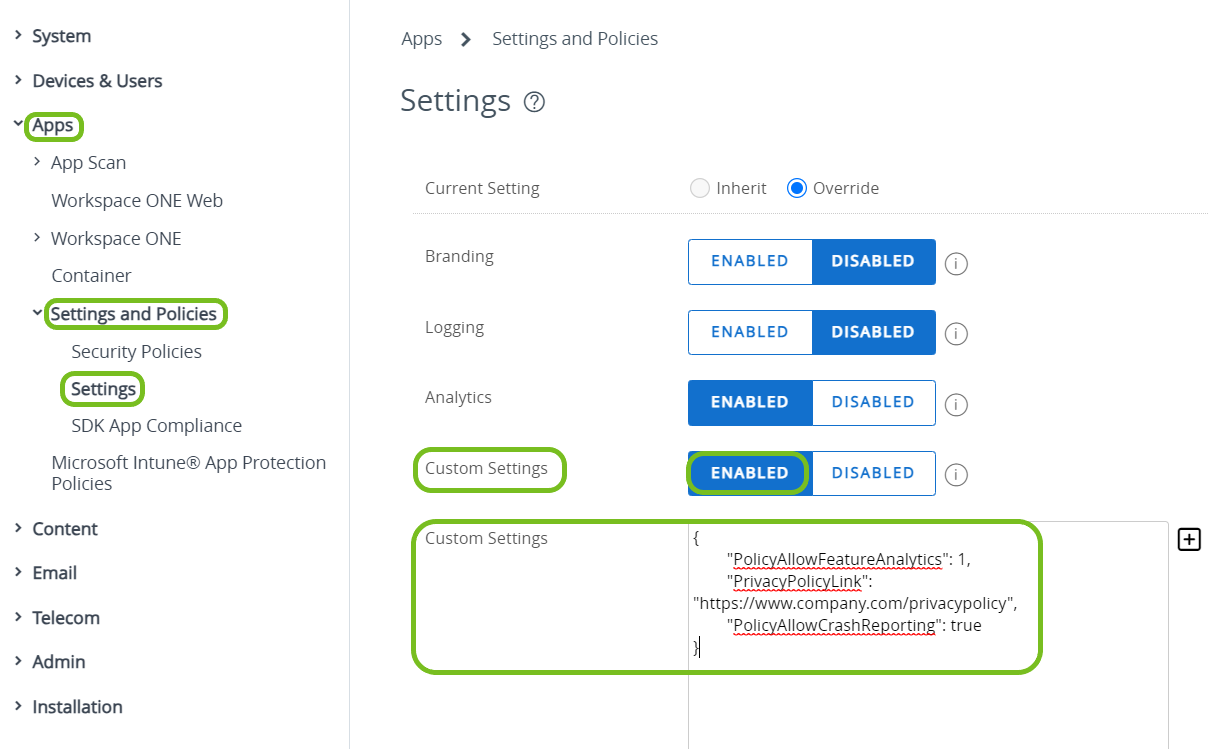
Control the collection of data in productivity applications with the default SDK profile in the Workspace ONE UEM console. Enter code in the custom settings text box to display and apply the privacy settings.
Links that redirect users to a privacy policy work for iOS but they do not work on Android devices. If you deploy to Android devices, use direct links to your company's privacy policy.
- Navigate to Groups & Settings > All Settings > Apps > Settings and Policies > Settings > Custom Settings.
- Select Enabled.
- Enter the key-value pairs in the Customer Settings text box and save your settings.
Available KVPs
| Name | Key | Value | Description |
|---|---|---|---|
| Company Privacy Policy URL | "PrivacyPolicyLink" | "https://www.company.com/privacypolicy" | The value for this key is the company's specific privacy policy URL. Navigate users to a specific privacy disclosure site from the productivity application. Users can review the policy so that they know the company's stance on privacy. |
| Feature Usage Analytics | "PolicyAllowFeatureAnalytics" | 0 - Deactivated - Prevents data sharing for all users of productivity applications. - This value prevents the display of the Data Sharing page in the productivity application. 1 - Activated - Users can decide if they want to share their usage data for productivity applications. - This value does display the Data Sharing page in the productivity application. | This key controls the display of the Data Sharing page within the productivity application. Users can opt in or out of sharing their feature usage analytics. Feature usage analytics collection helps us improve existing products and to develop new ones. |
| Diagnostics Data Through Omnissa Intelligence and Omnissa Intelligence SDK | "PolicyAllowCrashReporting" For this key to work, you must use Omnissa Intelligence SDK or Omnissa Intelligence. | false - Deactivated - Prevents the reporting of diagnostic data for productivity applications as reported by Omnissa Intelligence SDK and Omnissa Intelligence. -When deactivated, your ability to investigate and resolve problems is reduced because your system receives no diagnostic data for productivity applications from Omnissa Intelligence SDK or Omnissa Intelligence. true - Activated - Sends diagnostic data for productivity applications as reported by Omnissa Intelligence SDK and Omnissa Intelligence. - When set to true, your system receives diagnostic data for productivity applications from Omnissa Intelligence SDK and Omnissa Intelligence to help with investigating and resolving problems. | This key controls reporting diagnostic data from Omnissa Intelligence SDK and Omnissa Intelligence. Omnissa Intelligence SDK and Omnissa Intelligence are tools that help analyze, troubleshoot, and maintain applications and enterprise mobility management deployments. |
Example
```
{
    "PolicyAllowFeatureAnalytics": 1,
    "PrivacyPolicyLink": "https://www.company.com/privacypolicy",
    "PolicyAllowCrashReporting": true
}
```
The example entry configures the listed actions.
- Displays the Data Sharing page within the productivity applications so that users can decide to share or not share their feature usage analytics.
- Navigates users to a URL within the productivity application so that users can review the company's privacy policy.
- Shares diagnostic data for productivity applications from Omnissa Intelligence SDK and Omnissa Intelligence.
Was this page helpful?