This section describes how Omnissa Horizon is supported using Unified Access Gateway 3.9 and later in environments that have a single or double Demilitarized Zone (DMZ).
Unified Access Gateway is a virtual appliance used in support of secure remote access for several Omnissa End-User Computing enterprise products. One example is to use Unified Access Gateway to support remote access to Horizon for accessing virtual desktops and Remote Desktop hosted applications.
Single DMZ deployment
For on-premises deployment of Horizon within a data center of an organization, it is common to install Unified Access Gateway appliances in a single DMZ which provides a network isolation layer between the internet and the customer data center.
Unified Access Gateway has built-in security mechanisms for all the Horizon protocols to ensure that the only network traffic entering the data center is traffic on behalf of an authenticated user. Any unauthenticated traffic is discarded in the DMZ.
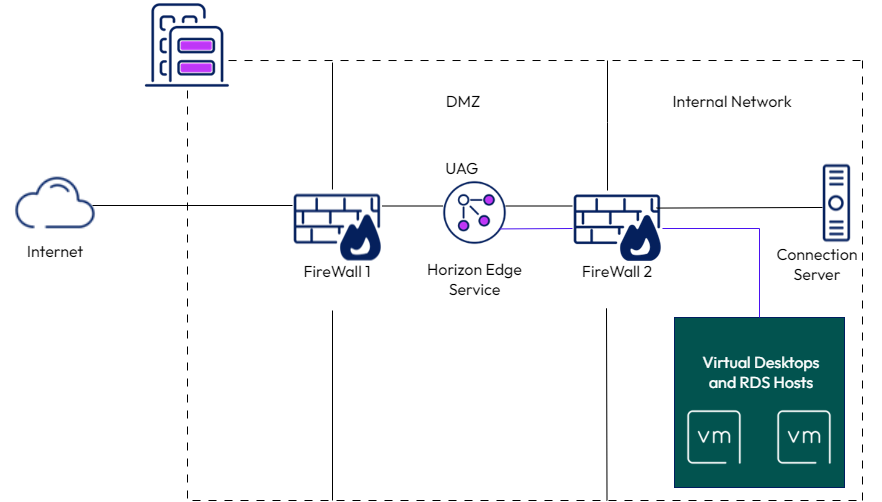
This is shown in Figure 2-1. For a simple setup, it shows just a single Unified Access Gateway appliance in a DMZ although in a production environment supporting high availability and large scale it is common to deploy multiple Unified Access Gateway appliances fronted by a load balancer. Details of configuring a Unified Access Gateway appliance for use in a single DMZ are covered in the standard document Deploying and Configuring Unified Access Gateway.
Double DMZ deployment
Some organizations have two DMZ. It is often called as a double DMZ or a double-hop DMZ and is sometimes used to provide an extra layer of security protection between the Internet and the internal network.
In a double DMZ, traffic has to be passed through a specific reverse proxy in each DMZ layer. Traffic cannot simply bypass a DMZ layer.
Note: In a Horizon deployment, a double DMZ is not required, but for environments where a double DMZ is mandated, an extra Unified Access Gateway appliance acting as a Web Reverse Proxy can be deployed in the outer DMZ.
This section describes the configuration of Unified Access Gateway appliances for double-DMZ deployment.
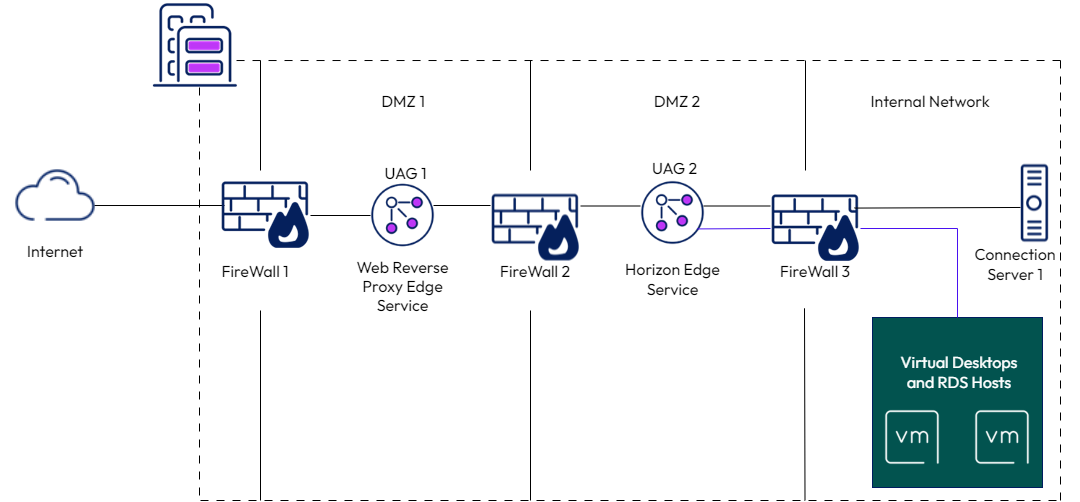
The Figure 3-1 above shows a network with a double DMZ. In this deployment, UAG 2 in DMZ 2 is configured for Horizon edge service in exactly the same way as for a single DMZ described in the previous section. The configuration of the Internet facing FireWall 1 is the same as for a single DMZ. The required TCP and UDP ports should be allowed and routed FireWall 1 only to Unified Access Gateway appliances in DMZ 1. In terms of TCP and UDP ports for FireWall 2, these are the same as for FireWall 1 except that the rules should only allow source IP addresses of Unified Access Gateway appliances in DMZ 1 and should only forward this traffic to Unified Access Gateway appliances in DMZ 2. This ensures that the only network traffic entering DMZ 2 is traffic that has been filtered by a DMZ 1 Unified Access Gateway appliance.
UAG 1 in DMZ 1 is configured as a Web Reverse Proxy for Horizon protocols. It terminates the TLS connection from the client and provides specific Horizon URL validation on that traffic prior to forwarding it to UAG 2 on a new TLS connection between UAG 1 and UAG 2. Any network traffic from the Internet to UAG 1 that falls outside of the Horizon protocol specification configured on UAG 1 in terms of port numbers, TLS version, ciphers, and HTTPS URL patterns for Horizon is discarded in DMZ 1. Valid Horizon network traffic is forwarded to UAG 2 in DMZ 2 for the next layer of security.
In this double DMZ configuration, UAG 2 is configured as a standard Horizon Edge Server appliance. The Horizon external URLs (tunnelExternalUrl,blastExternalUrl and the optional pcoip ExternalUrl) are used by the clients to connect these protocols to the Unified Access Gateway environment. They must be set to values that route these connections to UAG 1.
Note: This document does not describe any further configuration needed for UAG 2 as this is standard Unified Access Gateway Horizon configuration, which is covered in Deployment with Horizon 8.
Was this page helpful?