Omnissa Workspace ONE UEM Email Notification Service (ENS2) provides new email notifications for Workspace ONE Boxer on both iOS and Android. The service works by monitoring the Exchange or Office365 back end for email events and sending updates to the end user devices through Apple or Google’s push notification services. This documentation provides the information required to install and configure the ENS2 as a cloud-hosted or on-premises service.
The Workspace ONE Boxer provides notifications about your emails by running in the background. Due to platform limitations, Boxer can only run in the background for a limited time. Email Notification Service (ENS2) provides a solution to deliver notifications to the user's device when Boxer is not running.
ENS2 supports notifications that include the email subject and a badge icon (iOS only) to notify the number of unread emails in the Inbox on the server. However, for Android, ENS2 does not support notifying the number of unread emails in the Inbox on the server.
You can configure ENS2 with the Secure Email Gateway (SEG) V2 to secure your organization's email infrastructure. For more information about SEG, see the Secure Email Gateway Guide (SEG) V2 guide.
Mailbox Subscription Methods
ENS2 uses different methods to subscribe to mailboxes and receive change notifications, depending on the mailbox type:
- Office 365 mailboxes: ENS2 uses the Microsoft Graph APIs.
- On-premises Exchange mailboxes: ENS2 continues to use Exchange Web Services (EWS).
Note:
- EWS: EWS for Exchange Online is deprecated and scheduled for retirement on October 1, 2026. ENS2 uses Microsoft Graph for Office 365 mailboxes.
- Authentication: Microsoft Graph does not support basic authentication. Office 365 mailboxes must use modern authentication (OAuth) with ENS2.
You can continue using EWS through April 1, 2027 by enabling the EWSEnabled configuration. For more details on how to enable EWS, see KB 6001558.
Enabling the Microsoft Graph Subscription for Office 365 Mailboxes
The Microsoft Graph subscription is not enabled by default. To use the Microsoft Graph APIs with Office 365 mailboxes, perform the following steps in the following order:
-
An Exchange Online administrator must grant the required Microsoft Graph API permissions to the ENS application in Microsoft Azure. For the steps, see Grant the Microsoft Graph API permissions to the ENS application.
-
Set the IsGraphEnabledForENS application configuration key to true for Omnissa Workspace ONE Boxer. For more information, see the ENS2 Application Configuration Keys for the Microsoft Graph and the Notification Encryption Features section.
No changes are required for on-premises Exchange mailboxes.
Notification Encryption
ENS2 encrypts the email details that are included in a notification. When Omnissa Workspace ONE Boxer provides an encryption key during device registration, ENS2 encrypts the notification content before the notification is sent. The content is decrypted only on the registered device.
To use this feature, set the EnableEnsNotificationEncryption application configuration key to true for Omnissa Workspace ONE Boxer. By default, the value of this key is false.
ENS2 Architecture
This section provides information about the architecture design and functionality of ENS2.
ENS2 Architectural Flow
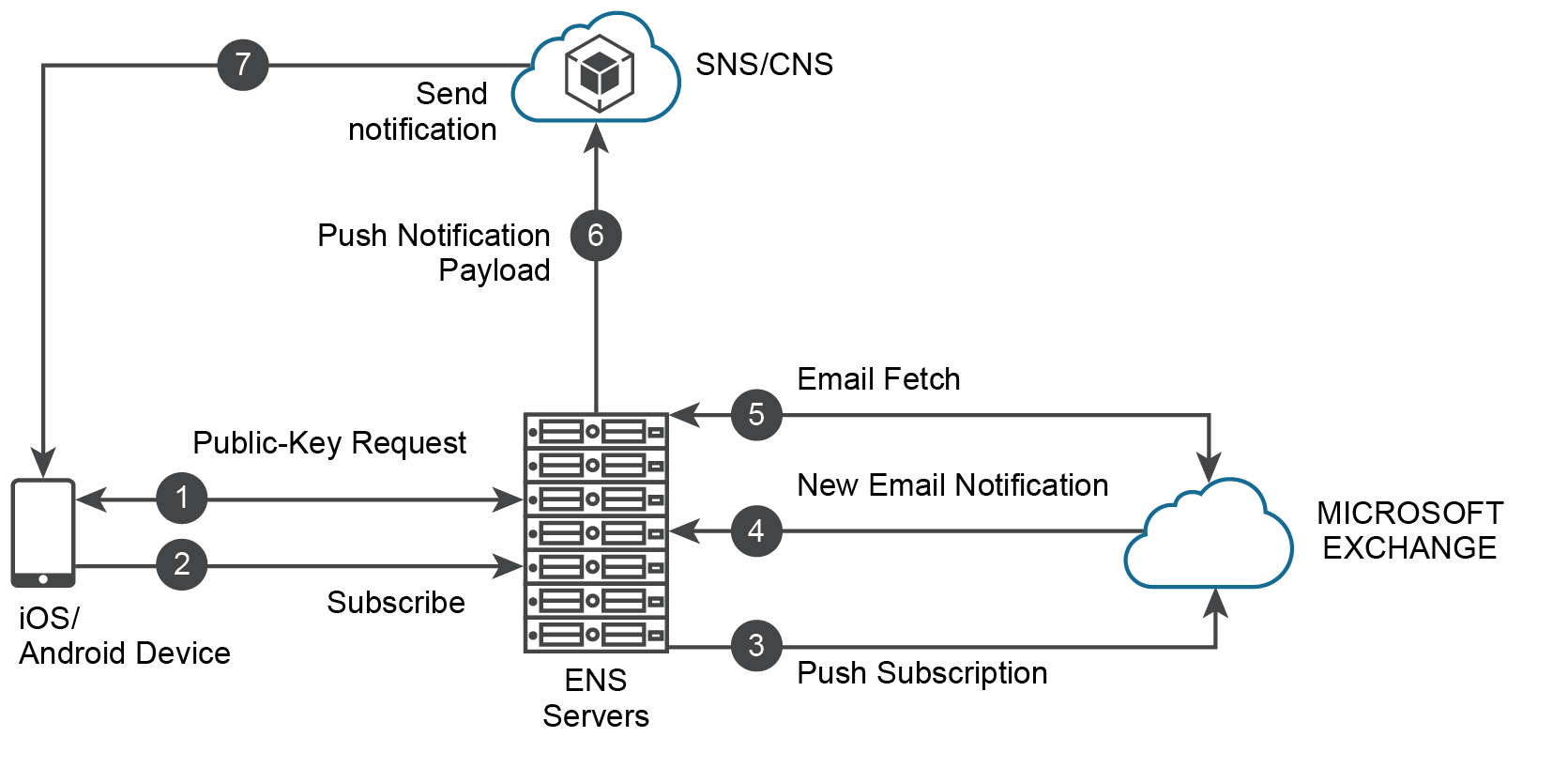
ENS2 architectural flow description:
- Public-Key Request - The device requests a public key to encrypt the account credentials.
- Subscribe - The device sends an encrypted payload with credentials and all the necessary information to subscribe and get email notifications.
- Push Subscription - ENS authenticates with EWS and subscribes for push notifications using a webhook URL. The webhook URL contains the encrypted credentials. The credentials are now kept encrypted on the Exchange server.
- New Email Notification -
- Exchange sends notification about the mailbox changes to the provided webhook URL.
- ENS extracts and decrypts the credentials and prepares a call to fetch emails.
- Email Fetch - ENS performs a fetch for the email details (subject and sender) required for providing a notification.
- Push Notification Payload - ENS delivers email details to all of a user's devices through CNS. When Workspace ONE Boxer provides an encryption key during device registration, the email details in the notification payload are encrypted.
- CNS sends notifications to iOS or Android devices. For iOS devices, CNS uses Apple Push Notification Service (APNS), and for Android devices, CNS uses Firebase Cloud Messaging (FCM).
Note:
- Office 365 mailboxes: ENS2 uses Microsoft Graph subscriptions instead of EWS subscriptions. Microsoft Graph sends mailbox change notifications to ENS2, and the remaining steps in the flow are the same.
- Subscription renewal: Microsoft Graph subscriptions have a fixed expiration and must be renewed before they expire. ENS2 automatically renews subscriptions for registered users. On an on-premises deployment, a background service performs the renewal, so the service must be running for Office 365 mailbox notifications to continue.
- Device re-registration: After Microsoft Graph subscriptions are enabled, users who were previously subscribed through EWS must re-register their devices with ENS2 before notifications are delivered through Microsoft Graph. For the re-registration procedure, see Workspace ONE Boxer documentation.
Was this page helpful?