This article gives a brief overview of some basic concepts involved in using the first-gen Horizon Control Plane and first-gen Horizon Cloud service. The overall tenant environment consists of the cloud-based service, the control plane, and your pods deployed into their on-premises, software-defined data centers (SDDCs), or public cloud environments and connected to the control plane. From the single cloud-based Horizon Universal Console, you can efficiently deploy, manage, and monitor virtual desktops and apps across your pod fleet, regardless of where the pods are physically located.
Attention: Use this page solely when you have access to a first-gen tenant environment in the first-gen control plane. As described in KB-92424, the first-gen control plane has reached end of availability (EOA). See that article for details.
As of August 2022, Horizon Cloud is generally available and has its own Using Horizon Cloud documentation set available here.
An indication of which environment you have, Horizon Cloud or first-gen, is the pattern that appears in the browser's URL field after you log in to your environment and see the Horizon Universal Console label. For a Horizon Cloud environment, the console's URL address contains a portion like /hcsadmin/. The first-gen console's URL has a different section (/horizonadmin/).
Horizon Control Plane

The control plane is hosted in the cloud. Each control plane service works to simplify management of your Horizon environments and your virtual desktops and apps. When you sign up for a Horizon subscription license, your tenant environment is created in this control plane and configured according to the terms in that license.
The Horizon Cloud team is responsible for hosting the service and providing feature updates and enhancements for a software-as-a-service experience. Horizon Cloud is a multi-tenant environment, and has several regional control plane instances. Each regional control plane instance corresponds to its hosting geographic data center, as described in the service documents available in the Omnissa Legal Center - Contract Center Resources. Your tenant account is associated with a specific regional instance at the time the account is created.
For an in-depth look at the control plane, see the Tech Zone's First-Gen Horizon Control Plane Architecture.
Horizon Universal Console
The control plane also hosts the common cloud- and web-based management user interface called the Horizon Universal Console, or console for short. This console runs in industry-standard browsers. It provides IT administrators with a single location for management and administrative tasks involving user assignments and the virtual desktops, remote desktop sessions, and applications. This console dynamically reflects your tenant's current state and is accessible from anywhere at any time, providing maximum flexibility.
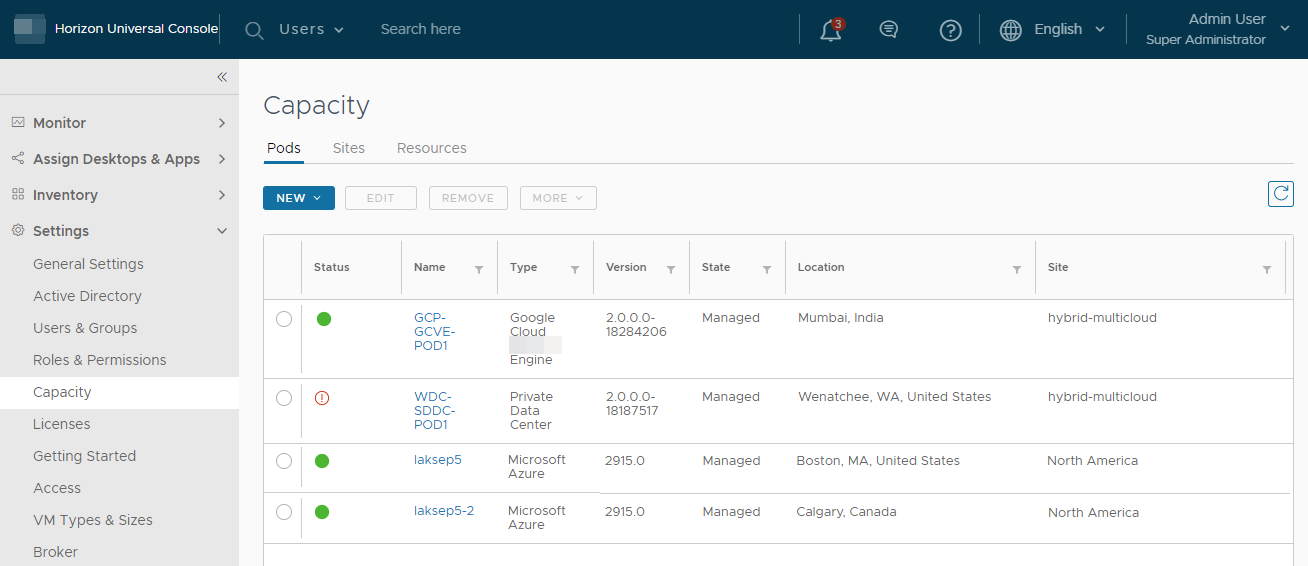
The following screenshot is an illustration of the console's Capacity page's Pods tab for a tenant with four pods in its pod fleet.
Cloud-Connected Pods
In Horizon deployments, a pod is primarily a conceptual entity. A pod is based on various software components deployed into a supported environment, such as a public cloud, a supported SDDC, or an on-premises data center. The pod's inter-related components provide for the provisioning of virtual desktops and apps and for facilitating the routing of an end-user client's request to a virtual desktop or app entitled for their use.
The specific collection of software components that make up a cloud-connected pod will depend on the type of deployment used to construct the pod. The current service release supports use of the following pod constructions with your tenant.
-
Horizon pod
Built on the Horizon Connection Server software and related software components. The components are deployed according to an architecture that are supported for use with such pods, such as on-premises, all-in-SDDC architecture, or federated architecture. These deployments involve a software-defined data center (SDDC) in some way or form. This pod construction is named a Horizon pod because its underlying software is the Horizon Connection Server. For a brief overview, see First-Gen Tenants - Horizon Pod Deployment Architectures with First-Gen Horizon Cloud.
-
Horizon Cloud pod
Built on the Horizon Cloud pod-manager technology for use with Microsoft Azure cloud and Microsoft Azure Virtual Desktop. The pod components are deployed by running the Horizon Cloud on Microsoft Azure deployment wizard. The wizard automates the pod deployment into your Microsoft Azure subscription. For an overview, see First-Gen Horizon Cloud on Microsoft Azure Deployments.
An Initial Tenant Environment
A tenant environment starts fresh, a clean-slate, without any cloud-connected pods. The first required step is to onboard a pod into that clean-slate environment. That pod will become the tenant's very first cloud-connected pod.
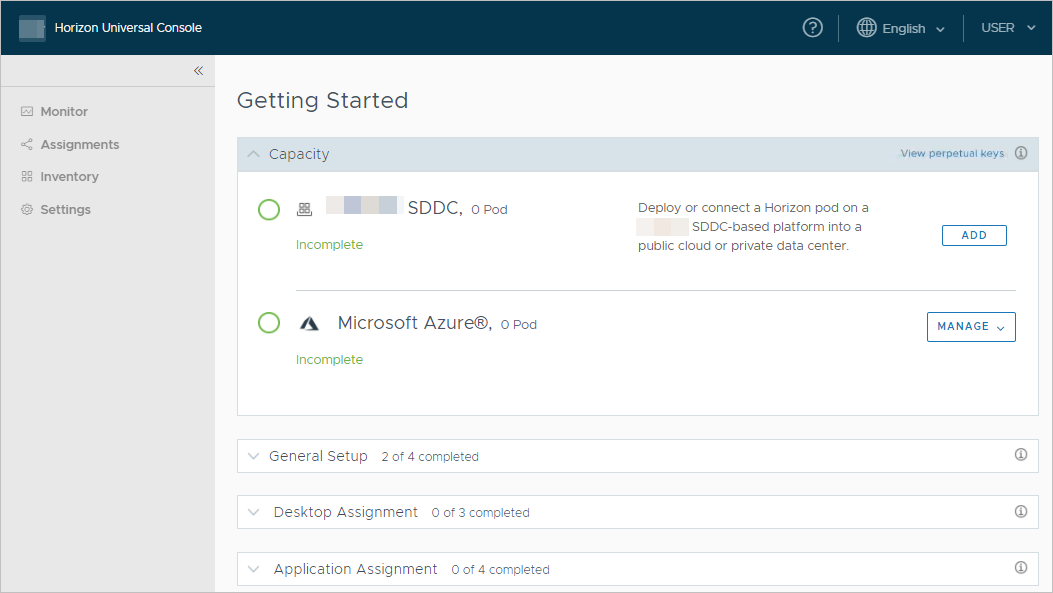
The screenshot that follows is an illustration of what a brand new fresh Horizon Cloud environment looks like when an administrator logs in for the first time. This clean-slate screen is oriented around the pod types that can onboard to the service: Horizon pods and Horizon Cloud pods in Microsoft Azure. Until you have one pod onboarded and the Active Directory domain registration completed, all of the other UI pages located in the left-hand navigation are inaccessible.
To learn about the items needed to add the first pod to your pod fleet, see the Requirements Checklist that corresponds to the pod's type - Horizon pod or Horizon Cloud pod.
Was this page helpful?