|
Omnissa Access | SEP 2026 Omnissa Access Connector 26.05 | 02 JUN 2026 | Build Access-Connector-Installer-376-26.05.exe Check for additions and updates to these release notes. |
Notice of DNS Record Deletion of Legacy Omnissa Access Domains
As announced previously in KB 6001323, legacy Omnissa Access tenant URLs have been disabled. As the final step in the URL migration process, DNS records for the legacy domains are now being deleted. This change affects the following products: Omnissa Access, Omnissa Workspace ONE Hub Services, and Omnissa Identity Service.
After the DNS records are deleted, attempts to access legacy URLs will result in a DNS resolution error. This behavior is expected.
The following table lists the impacted legacy domains along with their corresponding new URLs by region.
| Region | Legacy Domain (DNS Record Deleted) | New URL |
|---|---|---|
| Japan (Asia) | *.vmwareidentity.asia | *.jp.wss.workspaceone.com |
| Australia | *.vmwareidentity.com.au | *.au.wss.workspaceone.com |
| Ireland (Europe) | *.vmwareidentity.eu | *.ie.wss.workspaceone.com |
| Germany | *.vmwareidentity.de | *.de.wss.workspaceone.com |
| United Kingdom | *.vmwareidentity.co.uk | *.uk.wss.workspaceone.com |
| Canada | *.vmwareidentity.ca | *.ca.wss.workspaceone.com |
| US1 | *.vmwareidentity.com | *.us1.wss.workspaceone.com |
For more information, see KB 6001304.
What's Coming in October 2026
The following feature is now in preview.
Support for Device Bound Session Credentials (DBSC)
Omnissa Access now supports Device Bound Session Credentials (DBSC), an open browser protocol that prevents stolen session cookies from being replayed elsewhere.
Attackers increasingly bypass strong authentication by stealing a valid session cookie directly from a compromised browser or device — a technique known as session hijacking. Once stolen, that cookie can typically be replayed from any machine to impersonate the user, without additional authentication.
DBSC closes this gap by cryptographically binding a session to the specific device where it was created. When DBSC is active, the browser generates a private key that is stored in device hardware (e.g., TPM on Windows) and never leaves it. Omnissa Access requires proof of possession of that key each time the session is refreshed, so a copied cookie value alone is no longer enough to keep a stolen session alive. Without the device-held key, the session cannot be renewed and expires quickly on the attacker's machine.
Administrators can enable DBSC on the Settings > Login Preferences page in the Omnissa Access console, choosing Monitoring mode to log potential cookie theft without impacting access, or Strict mode to actively block sessions that fail device-bound verification. This release supports Chrome on Windows; other browsers continue to be protected by existing session-hijack safeguards.
What's New in September 2026
Configurable Fallback from Push Timeout to TOTP in Omnissa Pass
Omnissa Pass now lets administrators enable a fallback to TOTP entry when a push notification request times out. Previously, a push timeout ended the login attempt with an Access Denied response, forcing the user to restart the authentication process. With this release, administrators can configure Pass so a timed-out push no longer ends the session. The user is offered a TOTP option instead and can complete the same authentication attempt without re-entering credentials.
This addresses a common real-world gap: users who don't have their phone on hand, experience a delayed push, or notice the notification too late to respond within the timeout window.
Key capabilities in this release:
- New configuration option in the Pass authentication method settings for administrators to optionally enable Allow Passcode fallback after push timeout (off by default).
- When enabled, a push timeout no longer terminates the login. The user is prompted to enter a TOTP code instead which continues the same authentication transaction. No re-entry of credentials is required.
For information about configuring Omnissa Pass, see Configure Pass App Authentication in Omnissa Access.
Choice of Authentication extended to first-factor (primary authentication)
Omnissa Access now supports OR logic at the first-factor (primary authentication) step in access policy rules, extending the existing Choice of Authentication capability that was previously available only for second-factor (step-up) authentication.
With this enhancement, administrators can configure access policies where users are presented with a selection of first-factor authentication methods rather than being forced through a sequential fallback chain. This enables scenarios such as:
- (Authenticator App OR Omnissa Pass) — first-factor choice to support phased user migration between authentication methods
- (Password OR Kerberos) AND (RADIUS OR RSA) — mixed first-factor choice combined with second-factor step-up choice
For information about configuring this feature, see Set Up Choice of Authentication Access Policy Rules.
August 2026
Security Events Service: Support for receiving external security events
Omnissa Security Events Service can now be configured as a receiver of security events from external identity providers, in addition to its existing role as a publisher of outgoing events. This allows Security Events Service to subscribe to real-time security signals from a third-party identity provider — for example, when a credential or session state changes upstream.
With this release, administrators can add an external source and:
- Establish a subscription (event stream) with the external transmitter using the Shared Signals Framework (SSF) CAEP standard
- Receive signed security event tokens such as session revoked or credential change from that source
This release supports Okta as a security events provider. The following events are supported for Okta:
- session-revoked
- credential-change
Licensing requirements: Configuring incoming event subscriptions requires the Risk Analytics add-on license. Outgoing security events remain available to all customers at no additional cost. Tenants without the Risk Analytics license will be unable to configure or update an external source or receive incoming events.
To learn more, see Configuring Omnissa Security Events Service.
July 2026
Platform SSO Registration during macOS Setup Assistant (ADE)
Omnissa Access now supports Apple macOS Platform Single Sign-On (Platform SSO) as part of the macOS Automated Device Enrollment (ADE) flow. With this release, end users are prompted to authenticate with their Omnissa Access credentials directly within the macOS Setup Assistant — eliminating post-enrollment registration steps and delivering a seamless, zero-touch onboarding experience from the very first login. Platform SSO with a Secure Enclave-backed key enables hardware-bound, phishing-resistant authentication, eliminating the need for passwords for Identity Provider authentication.
This capability leverages the Platform SSO extension framework introduced in macOS Ventura (13.0) and significantly reduces the friction associated with traditional Mac provisioning workflows. Omnissa Access acts as the native Identity Provider (IdP) to complete Platform SSO registration.
Workspace ONE UEM now includes a dedicated Platform SSO configuration option within the ADE profile. When enabled, the macOS Setup Assistant automatically installs the required SSO Extension profile and IdP application, then prompts the user to register with Omnissa Access before device onboarding completes.
Key capabilities in this release:
- Platform SSO is configured and registered before the macOS Setup Assistant exits, ensuring users begin work with identity already established.
- Omnissa Access acts as the identity provider for Platform SSO registration.
- Supports federated identity provider backends: Omnissa Access can bridge to any federated directory that doesn't natively implement Platform SSO.
- macOS local account creation is aligned with the user's corporate identity provider credentials.
- Passwordless login with support for Secure Enclave-backed keys for authentication
- Single Sign-On to Omnissa Access-enabled web applications. SSO is also supported for native apps that use Secure Enclave-backed keys.
For more information, see Configuring Apple macOS Platform Single Sign-On with Omnissa Access.
Session Revoked and Credential Change security events available for all subscribers
The Session Revoked and Credential Change events generated by Omnissa Access can now be configured for all types of subscribers in the Security Events service. Previously, these events were only available for Apple. Subscribers can take the appropriate security actions based on the events.
See Configuring Omnissa Security Events Service for more information.
June 2026
New Connector Version Available
A new version of the connector, Omnissa Access Connector 26.05, is now available. See the Omnissa Access Connector Release Notes for details.
May 2026
Support for Multiple Omnissa Pass Device Registrations per User Account
Omnissa Access now supports the registration of multiple Omnissa Pass devices per user account in a single tenant. Users can register up to three independent devices through the standard QR-based registration flow. Each device is uniquely registered in Omnissa Access and associated with the same user identity, allowing any registered device to generate valid TOTP codes and receive sign-in push notification requests.
This feature requires the Omnissa Pass Advanced license and must be enabled by the administrator through the Pass adapter configuration in the Omnissa Access console.
For information about configuring this feature, see Configure Pass App Authentication in Omnissa Access (Cloud Only).
April 2026
PKCE Support for OpenID Connect Applications
Omnissa Access now supports Proof Key for Code Exchange (PKCE) for OpenID Connect (OIDC) applications, improving the security of the OAuth 2.0 authorization code flow, especially for mobile and browser-based applications.
Administrators can now choose a client type when creating an OIDC application.
- For Public clients with no client secret, PKCE is always enforced.
- For Confidential clients that require a client secret, PKCE is optional.
The OIDC application details page indicates whether the associated OAuth 2.0 client is Public or Confidential.
Note that:
- If you enable PKCE on an existing Confidential client, all tokens for that OAuth 2.0 client are deleted to ensure a secure transition.
- PKCE is not supported for OIDC apps with SSF Integration enabled. These apps always use a Confidential client with a client secret.
- Omnissa Access supports only the S256 code challenge method for PKCE.
For more information, see Adding OpenID Connect Applications to Omnissa Access.
CORS Support for OAuth 2.0 and OIDC Endpoints
Omnissa Access now supports Cross Origin Resource Sharing (CORS) for OAuth 2.0 and OpenID Connect (OIDC) endpoints. This support enables browser-based applications such as single-page applications (SPAs), hosted on approved domains, to securely call Omnissa Access for tokens and user information directly from the browser.
Administrators can configure the allowed cross-origin domains in the Omnissa Access admin console.
The following Omnissa Access endpoints now support CORS when called from approved cross-origin domains:
| Endpoint | Methods |
|---|---|
/acs/authorize | GET, OPTIONS |
/acs/token | POST, OPTIONS |
/acs/userinfo | GET, POST, OPTIONS |
/acs/openid/logout | GET, POST, OPTIONS |
/acs/revoke | POST, OPTIONS |
/acs/.well-known/openid-configuration | GET, OPTIONS |
/acs/jwks | GET, OPTIONS |
For more information, see Configuring Cross-Origin Resource Sharing in Omnissa Access.
Friendly Account Name for Authenticator and Omnissa Pass
Administrators can now specify a Friendly Account Name in the Authenticator and Omnissa Pass adapter settings. This becomes the name shown to end users within the Omnissa Pass application or their TOTP authenticator during and after registration. Friendly Account Name is an optional value in Omnissa Access and the internal Tenant Name is shown when it is not configured. This Tenant Name could often be long or contain technical identifiers not easily recognized by users. The new, optional parameter allows for a more recognizable and professional branding experience.
Note that the Friendly Account Name will only apply to authenticators registered after a value is configured. Existing registrations will continue to show the account name at the time they were registered.
For more information, see:
- Configure an Authenticator App for Two-Factor Authentication with Omnissa Access
- Configure Pass App Authentication in Omnissa Access (Cloud Only)
March 2026
Pass Device Status Report
For Omnissa Pass Advanced customers, Omnissa Access now includes a new Pass Device Status report that provides admins visibility into the overall posture of Omnissa Pass authenticator devices. The report contains information such as the OS version, installed Omnissa Pass app version, and key security indicators like screen lock and jailbreak or root status. This helps administrators assess the security posture of authenticator devices, and support investigations, incident response, and compliance requirements.
As part of this enhancement, the existing MFA Registration report that is available to all Omnissa Access customers has been renamed to Pass Registration, with no changes to its underlying data. The Pass Registration report continues to show which users are enrolled with Omnissa Pass and whether the device is enabled for Push notification approvals.
Prerequisites:
- Available only to Omnissa Pass Advanced tenants
- Requires Omnissa Pass version 26.03 (or later) for iOS and Android installed on user devices for data to appear in the Pass Device Status report
For more information, see Configure Pass App Authentication in Omnissa Access.
Security Events Source Health Status
The Security Events Service Sources tab now displays the health status of supported sources, providing visibility into whether the environment is properly configured for the Security Events Service to receive events from the source. For Workspace ONE UEM, you can check if the status is Healthy, Unhealthy, Unknown, or Not Configured, and you can reset the configuration to troubleshoot issues.
For more information, see Managing the Security Events Service.
February 2026
Updated Omnissa Pass Flow for Unregistered Users
Previously, when Omnissa Pass was configured as the second factor authenticator and the Enable Registration During Login option was set to No, users who had not yet registered Pass were still prompted for a TOTP code.
This flow has been updated. Now, the Pass App authentication method will immediately fail for unregistered users, and they will either be directed to the fallback authentication method or the authentication will be denied (based on how your access policies are configured).
December 2025
Support for Workspace ONE UEM Device compliance signals with Security Events Service
Security Events Service now supports sharing continuous, real-time Workspace ONE UEM device compliance state change events as CAEP signals. Integrated partners can now take actions such as authentication, session management, application access, or access certificate decisions based on these compliance state changes.
Omnissa Security Events Service is a platform feature for sharing real-time security alerts such as user credential changes or device compliance status between the Omnissa platform and third-party security systems such as Okta, Google, or SailPoint using the Continuous Access Evaluation Protocol (CAEP). This integration enables the creation of a unified and robust security system by leveraging security insights between partners in a standard and scalable fashion.
See Configuring Omnissa Security Events Service for more information.
November 2025
Omnissa Pass
We are excited to announce the public availability of Omnissa Pass, our native multi-factor authentication (MFA) solution that enables secure logins to corporate accounts and applications. The solution offers a scalable, user-friendly authentication experience for users accessing resources delivered through Omnissa Access. This general availability release includes key features that are available for all Omnissa Access customers such as sign-in approvals via time-based one-time passcodes (TOTP) or push notifications, device security policy enforcements, and attestation checks. Additional features for phishing protection for push notification approvals and other MFA-related threats are available as an add-on to existing Omnissa licenses.
See the Omnissa Pass Release Notes for more information:
Support for App Volumes
Omnissa Access now supports App Volumes as a resource type in Access. Omnissa App Volumes is an application packaging solution that provides real-time application delivery and life-cycle management for digital workspaces. App Volumes provides faster application delivery, and simplified and unified management of apps and users.
With this update, administrators can manage App Volumes similarly to other web and virtual apps resources and enforce authentication and access control on these apps. Further, users can launch their App Volumes apps from the Intelligent Hub web portal. App Volumes from Horizon, Citrix, and RDSH environments are supported with this update.
For more information, see:
- Providing Access to App Volumes Packaged Applications
- Integrate App Volumes Manager and Workspace ONE Intelligent Hub with Omnissa Access.
Support for Single Sign-On for Office 365 clients on Microsoft Entra Hybrid domain-joined Horizon desktops
Omnissa Access now supports authentication and single sign-on (SSO) of Microsoft Office 365 applications on Microsoft Entra Hybrid domain-joined Horizon desktops. This support adds new WS-Trust endpoints in Omnissa Access, enabling Office 365 clients on Horizon desktops to authenticate and SSO against Omnissa Access. SSO for Office 365 published apps from Microsoft Entra Hybrid domain-joined desktops are also supported with this update.
For more information, see Configuring Single Sign-on to Microsoft Office 365 applications (Horizon published apps and desktops).
TLS 1.3 Support for Access Certificate Authentication Service (CAS)
The Omnissa Access Certificate Authentication Service (CAS) now supports Transport Layer Security (TLS) 1.3. This update improves security and performance of CAS by removing session renegotiation and optimizing certificate-based authentication flows. CAS will continue to support TLS 1.2 by default. Administrators will now have the option to enable TLS 1.3 from the Omnissa Access console.
Note: If you select Use TLS 1.3 for SSL connections for either the Certificate (cloud deployment) or Mobile SSO (for Apple) authentication method, customers might need to update their proxy and firewall configurations and device profiles to support the new CAS hostnames. See KB article 6000726 for details.
October 2025
Security Events Service
We are excited to announce the public availability of Omnissa Security Events Service.
Security Events Service is an Omnissa platform service that enables integration with identity and security vendors for the exchange of security and threat data using standard protocols.
Security Events Service adopts Shared Signals Framework (SSF), an OpenID standard, designed to enable scalable and secure exchange of security and threat data between registered participants. SSF establishes standard protocols such as Continuous Access Evaluation Protocol (CAEP) for sharing security events and risk intelligence between trusted parties. The framework allows organizations to leverage security insights from various sources, fostering a more comprehensive and unified security posture.
In this general availability release, Security Events Service supports sharing continuous, real-time Identity state change information with Apple Business Manager and Apple School Manager, as well as third-party consumers. Through Omnissa Access connectors, Security Events Service can identify user password changes or user account state changes and can share the information through real-time CAEP events. This integration, for example, allows Apple Business Manager, upon detecting a user disabled event, to enforce access restrictions for a user to the iCloud environment.
The release also extends the Beta of the Security Events Service sharing continuous, real-time Omnissa Workspace ONE UEM device compliance state change events as CAEP signals. Integrated partners can take further actions such as authentication, session management, application access, or access certificate decisions based on these compliance state changes.
For information about configuring the service, see Configuring the Omnissa Security Events Service.
macOS Platform Single Sign-On
IMPORTANT: Platform SSO with Omnissa Access requires Intelligent Hub version 25.11 or a later version.
We are excited to announce the general availability of Platform Single Sign-On for macOS devices using Omnissa Access as the Identity Provider (IdP).
Platform SSO enables users to sign in to their Macs using their corporate IdP credentials and seamlessly authenticate to a wide array of applications, virtual desktops, and services that are federated with the same IdP, significantly reducing the need for multiple logins. Administrators can enforce password policies and manage their macOS users in Omnissa Access or in a third-party Identity Provider federated with Access.
Platform SSO extends the single sign-on directly to the macOS login, meaning the user's IdP password can become their Mac password, keeping them synchronized. Users can log into the macOS devices using their IdP password or Touch ID or Apple Watch proximity.
Platform SSO is delivered through Apple SSO Extension. The Omnissa Intelligent Hub application bundles the SSO extension that enables identity integration into macOS devices. During user authentication, the SSO extension redirects authentication to Omnissa Access and allows users to log into their Mac using their Omnissa Access credentials. Omnissa Access can also redirect user logins to Active Directory or a federated third-party Identity Provider, extending corporate options to include third-party Identity Providers, such as Active Directory Federation Service (ADFS), PingFederate, or OneLogin, that do not natively support macOS Platform SSO.
For information about configuring the integration, see Configuring Apple macOS Platform Single Sign-On with Omnissa Access.
Identity Integration with Apple Business Manager
Omnissa Access now supports provisioning and single sign-on of Omnissa Access users as Managed Apple Accounts in Apple Business Manager and Apple School Manager. This integration allows Omnissa Access users to sign into their managed Apple devices using their Omnissa Access identity and gives organizations a single point of control to manage the services that a Managed Apple Account can access. Further, in Workspace ONE UEM, you can use Managed Apple IDs for account-driven User Enrollment on an enrolled iOS device, allowing for a dedicated, managed volume of data separate from personal data. Account-driven User Enrollment significantly improves privacy of BYO devices. See Managed Apple ID.
As part of the integration, Omnissa Access now supports SCIM-based user provisioning to Apple Business Manager and Apple School Manager. Omnissa Access also supports OIDC for federated single sign-on to Apple Business Manager and Apple School Manager. Further, a change in a user's security status, such as password changes and disable status, are shared with Apple Business Manager and Apple School Manager through the Security Events Service, enabling a real-time synchronization of security state between the systems.
This integration allows using conditional access policies, Mobile SSO, and MFA to enforce secure and seamless authentication to Managed Apple Accounts.
For information about configuring the integration, see Configuring Omnissa Access as an Identity Provider for Apple Business Manager or Apple School Manager.
September 2025
Certificate and URL Migration: Category 1 migration is now available
As part of the ongoing changes related to the establishment of Omnissa as a new company, certificates and URLs are being updated in Omnissa Access. These changes require you to update your integrations with both Omnissa and third-party products and services. A Migration Dashboard is available in the admin console to guide you through the migration process.
See KB article 6001062 for detailed information about migration.
Migration is being rolled out in two phases. Your migration timeline depends on the category you belong to, as defined in the KB article. We strongly encourage you to start migration as soon as it is available for your category.
Migration for "Category 1 - Certificate Branding only (No URL Change)" is now available.
Action Required:
- Check KB article 6001062 to determine your migration category.
- If you belong to Category 1, proceed with migration.
- In the Omnissa Access console, select Settings > Migration Support to access the Migration dashboard.
- Follow the instructions in the dashboard to complete the migration. See the KB article for additional information.
- If you belong to Category 2, do not make any changes yet. Category 2 migration will be available at a later date. Watch for notifications in the admin console and updates to KB article 6001062. In the meantime, you can review the KB article to get familiar with the types of updates that will be required at the time.
IMPORTANT: Do not update any URLs yet.
Omnissa Access Connector 24.12.1.0 available
Omnissa Access connector version 24.12.1.0 is now available. You can perform a fresh installation of version 24.12.1.0, or upgrade from versions 23.09, 24.07, and 24.12.0.0. Version 24.12.1.0 is compatible with Omnissa Access Cloud and Omnissa Access FedRAMP.
This version of the connector includes the following resolved issues.
Directory Sync service:
- HW-230769: Prevent directory sync failure when a deleted user continues to have group membership
- HW-215396: Allow manual override of domain controller auto-discovery in krb5.conf file
- HW-216294: During Active Directory password reset from Intelligent Hub, limit domain controller discovery retries
- HW-201638: Add safeguards check to photo sync
- HW-223982: Limit the number of directory sync alerts to 1,000
Virtual App service:
- HW-222985/HW-225845: Support the new Omnissa-based application partition names in Active Directory Lightweight Directory Services (LDS) introduced with Horizon 2503 (see KB article 6000797).
July 2025
Support for SIEM Integration in Omnissa Access Cloud
Omnissa Access Cloud now offers the ability to forward Access audit information to third-party Security Information and Event Management (SIEM) systems as Syslog events. Access Cloud can forward audit events to SIEM and Syslog servers in the cloud or in customer data centers. This release includes native adapters for a Syslog server, Splunk, and CrowdStrike Next-Gen SIEM, with support for more SIEMs coming in a future release. The integration requires mutual TLS (mTLS) authentication between Access and the external system.
See Integrating Omnissa Access with External SIEM Systems.
June 2025
Device Trust Connector for Microsoft Edge for Business
We're excited to announce Omnissa Access Device Trust Connector for Microsoft Edge for Business. Device Trust Connector for Edge for Business signals make it possible to verify the posture of an unmanaged device (BYOD) or a third-party managed device prior to allowing access to company resources.
Microsoft Edge management service is a capability in the Microsoft 365 admin center that enables admins to easily configure Microsoft Edge browser settings for their organization. A managed Edge web browser can collect information about the security posture of a device and Omnissa Access can now use this information for a posture-informed access decision made in real time.
Edge for Business Device Signals authentication is available for users running the Edge browser with a managed profile on Windows devices.
For more information, see Configuring Microsoft Edge for Business Device Signals in Omnissa Access.
April 2025
Patch for Omnissa Access Connector 24.12
A patch is available for Omnissa Access Connector 24.12 to support the new application partition names in Active Directory Lightweight Directory Services (LDS) introduced with Horizon version 2503. See KB article 6000797 for more information.
The patch applies to Omnissa Access Connector 24.12, regardless of whether the connector is used with the on-premises Omnissa Access 24.12 virtual appliance or with Omnissa Access Cloud. You can download the patch from the Omnissa Access 24.12 page in Customer Connect.
Horizon app launch URL change
As part of the transition to the new company, Omnissa, and related branding changes, the launch URL for launching Horizon apps from the Intelligent Hub portal or app has changed. To support this change, we have introduced a new option in the Omnissa Access console, Enable Horizon Client with Omnissa URL, which determines whether app launch supports the new URL only or supports both old and new URLs.
- If the Enable Horizon Client with Omnissa URL option is enabled, Horizon app launch uses only the new launch URL. Only Horizon Client versions 24.12 and later support the new URL. App launch will fail with earlier Horizon Client versions.
- If the Enable Horizon Client with Omnissa URL option is deselected, Horizon app launch works with both the old and new launch URLs. You can continue to use older versions of the Horizon Client in addition to version 24.12.
By default, the option is deselected.
For more information, see KB article 6000707.
February 2025
New Audit Events for FIDO2 token registration
New audit events are introduced to provide additional debugging information for the FIDO2 token registration process. Audit events capturing successful and failed token registration details are available with this change.
Updated FIDO2 login prompts
With the updated FIDO2 authentication screens, users are prompted with a simpler and cleaner FIDO2 login screen. The login prompt to select FIDO2 authenticators can be removed from the login process through a new configuration option. Administrators can also optionally remove FIDO2 registration links from the login screens and have users register FIDO2 exclusively through the Intelligent Hub self-service portal.
December 2024
Omnissa Access Connector 24.12
Omnissa Access connector version 24.12 is now available. Upgrade to version 24.12 is supported from versions 24.07.0.0 and 23.09.0.0.
See the Omnissa Access On Premises 24.12 Release Notes and Upgrading Omnissa Access Connector for information.
November 2024
Conditional Access for Horizon Cloud Service Next-Gen apps and desktops
Omnissa Access conditional access is now available for Omnissa Horizon® Cloud Service Next-Gen apps and desktops. Conditional access allows organizations to use the context of a user or device such as the network range, group membership, or type of device to determine the user's authentication requirements and application access rights.
Omnissa Access customers can implement conditional access rules for SaaS apps such as Workday and Salesforce or for virtual apps such as Horizon desktops or published apps. With this release, conditional access is now extended to Horizon Cloud Service Next-Gen apps and desktops as well.
Administrators can now set conditional access policies within the Access console for their Horizon and Horizon Cloud Service Next-Gen desktops and apps. Horizon and Horizon Cloud Service Next-Gen will be able to enforce conditional policies when the user accesses entitlements through the Omnissa Workspace ONE® Intelligent Hub web client or through Horizon clients. See the documentation for more information.
October 2024
Google Chrome Enterprise Device Trust Signals Support
We are excited to introduce support for Google Chrome Enterprise Device Trust signals in Omnissa Access. This feature enables Omnissa to retrieve device security signals from Windows, MacOS and ChromeOS devices running the Google Chrome browser, providing enhanced security for unmanaged and third-party managed devices.
Key Features:
- Device Signal Verification: Verify the security posture of ChromeOS, Windows, and MacOS devices using Google’s Device Trust.
- Bring Your Own Device (BYOD) & Contractor Device Risk Management: Omnissa Access can now enforce conditional access rules based on device signals to manage risks posed by employee-owned or third-party devices, such as contractor use-cases.
Supported Signals:
- Disk Encryption: Ensures access is granted only to devices with encrypted drives
- Firewall Status: Only devices with active firewalls can access resources
- Screen Lock: Verifies devices have screen lock enabled before granting access
This integration simplifies security for BYOD and contractor devices through seamless posture verification without the requirement for these devices to be managed.
Omnissa Access Cloud and Hub Services available now in Singapore Region
Omnissa Access Cloud and Omnissa Workspace ONE® Hub Services are now available as a cloud service hosted in the Singapore region. Availability in the Singapore region improves performance and availability, and reduces latency for Access and Hub Services customers in the region. Expansion to the Singapore region is aimed at addressing the growing demand for Access and Hub Services in the region and regional customers can now meet the data residency and compliance requirements.
Entra ID MFA integration using RADIUS
Omnissa Access now supports integration with Microsoft Entra ID MFA as an additional authentication method using RADIUS integration. This option is available in addition to the federation-based Entra ID MFA integration and benefits customers who cannot use browser redirections during MFA. Users can log in to Omnissa Access using their existing authentication methods, and then can be authenticated with the Entra ID MFA without an additional Entra ID login prompt. This feature simplifies the user experience while adding the feature-rich Entra MFA capabilities to Omnissa Access authentication.
September 2024
Renewed App Policy Association Interface in Omnissa Access
App access policy assignment now has a new UI and improved workflow. The new policy assignment is now independent of the policy creation flow, allowing app assignment without editing a policy. The new UI lists apps with additional fields, supports multi-selection of apps for assignment, shows policy assignment conflicts, and offers better search and filtering.
New Settings to Grant Omnissa Technical Support Access to Omnissa Access
New settings are now available to securely grant the Omnissa technical support team access to the Omnissa Access admin console to resolve or debug technical issues. You can now control when to allow the Omnissa technical support team access to your Omnissa Access admin console and can determine the role and duration of the access. By default, Omnissa support team’s access to your console is turned off.
Enhanced Availability and Faster Launches for Horizon Apps
Horizon connection servers now use a single service provider metadata across all servers in a Horizon pod. This enhancement significantly reduces metadata refresh time, leading to faster app launches and improved overall availability.
This enhancement is available with Omnissa Access Cloud, Omnissa Access connector 24.07 and later versions, and Horizon 8.13 and later versions.
Omnissa Access Connector 24.07
Omnissa Access connector 24.07 is compatible with Omnissa Access Cloud, Omnissa Access On-premise 24.07, and Omnissa Access for FedRAMP.
Resolved Issues for Connector 24.07
This connector release includes the following resolved issues:
- HW-200932: Resolved an issue where Active Directory over IWA directory sync was failing with safeguard violations. A configurable option for comparing only attributes for updates during directory sync is now available.
- HW-200972: Prevent parallel sync if both People Search photo sync and directory sync are configured for the same time.
- HW-204691: Resolved an issue with directory sync exiting due to communication channel errors. A configurable parameter is available to set the number of hours after which scheduled sync starts automatically if the directory sync service exits due to unexpected communication channel errors.
May 2024
Support for Entra ID MFA as additional authentication method
Omnissa Access now enables integration with Microsoft Entra ID MFA as an additional authentication method. Users can log in to Omnissa Access using their existing authentication methods, and then are prompted for the Entra ID MFA without an additional Entra ID login prompt. This feature simplifies the user experience while adding the feature-rich Entra MFA capabilities to Omnissa Access authentication.
April 2024
NEW - End of Availability of Omnissa Access API login endpoint
The End of Availability for the Omnissa Access API login endpoint for all cloud deployments and on premises deployments was announced in April 2024.
Effective May 15, 2024, the /SAAS/API/1.0/REST/auth/system/login endpoint is disabled by default in all Omnissa Access Cloud tenants. This API is also disabled in Omnissa Access on premises version 23.09 and later.
Important: This End of Availability announcement is applicable to all Omnissa Access Cloud and on premises customers using login endpoint APIs for authentication. These APIs were typically used for custom monitoring purposes.
All customers using SAAS/API/1.0/REST/auth/system/login REST APIs must migrate to one of the following options:
-
Use OAuth2 clients with roles as a replacement for this API in all automated scripts. See Add an OAuth 2.0 User Access Token Client to Omnissa Access.
-
Use the /SAAS/auth/login endpoint that will perform a full authentication as configured in your authentication policy.
Support for Passkey Authentication
We are excited to announce the availability of passkeys for authentication in Omnissa Access Passkeys are discoverable FIDO credentials, built on the WebAuthn standard. Passkeys allow password-less authentication and provide users with faster, easier, and more secure login experiences across all their devices. Passkeys have garnered widespread industry support and offer a phishing-resistant, viable alternative to passwords.
Passkeys simplify FIDO2 authentication by synchronizing FIDO registration information across user’s devices. Passkey support is available across all devices including iOS, Mac, Windows, and Android and all major browsers. Administrators can continue to configure FIDO2 as the authentication method in Omnissa Access and can leverage the advantages of passkey.
Passkeys uses public key cryptography and has two parts: a public key on the server users are signing into and a corresponding private key on their devices. The public key is synced between devices that share a common login, such as Chrome browser profiles or Apple ID. When users sign in, the Omnissa Access service initiates a webauthn flow that triggers device biometric authentication or PIN to verify the identity of the user and checks to see if their public key matches up with their private key. The user experience is consistent with the typical device unlock that the user is familiar with. The user will be signed in to the account while the private key and their biometrics will stay safely on the device, and they will never be shared.
January 2024
Support for PKCE and OAuth 2.0 Public Clients
PKCE (Proof Key for Code Exchange) is an extension to OAuth 2.0 Authorization Code flow that helps in securing OAuth tokens from CSRF and code injection attacks. OAuth 2.0 public clients utilizing the Authorization Code Grant are susceptible to the authorization code interception attack. A communication path not protected by TLS is susceptible to this attack and an attacker can gain access to the authorization code and use it to obtain the access token.
PKCE extension utilizes a dynamically created cryptographically random key to ensure proof of possession by the client. Omnissa Access supports enabling PKCE for OAuth 2.0 public clients and clients participating in Authorization Code flow. Along with PKCE support, Omnissa Access now supports creation of OAuth 2.0 public clients. Public clients are useful for applications running in a browser or on a mobile device that cannot keep their registered client secret safe.
PKCE is enabled by default and is mandatory for all public clients created in Omnissa Access.
User Choice of Authentication
We are excited to announce the availability of User Choice of Authentication functionality with Omnissa Access. With this new feature, users have the flexibility to choose from a set of authentication options presented to them for their second factor authentication.
This feature is particularly valuable in scenarios where users might not have access to their second factor authentication option, such as a smartphone for receiving push notifications. In such cases, users can seamlessly opt for an alternative method from the presented choices to successfully complete the login sequence.
Administrators configure policies to control the availability of various authentication choices for specific authentication requirements. Further, conditional access parameters such as network range, device specifications, device management state or user groups can be configured to secure and customize authentication experience for end users.
This feature is available only in Omnissa Access SaaS.
December 2023
Support for Duo v4 SDK with Duo Universal Prompt
Omnissa Access now supports Duo v4 SDK. Duo v4 supports the new Duo Universal Prompt that provides a simplified and accessible Duo login experience for web-based applications, offering a redesigned visual interface with security and usability enhancements. Omnissa Access users are automatically migrated from traditional Duo prompt to Duo Universal Prompt after this support is rolled out. No admin action is required to enable this change.
Support for Horizon Client and App Launch from Shortcuts
Omnissa Access now provides an ability to relaunch Horizon published virtual desktops and apps from shortcuts using launch URLs. Prior to this release, when launching a shortcut pointing to the Horizon Client or app, users were directed to a blank screen that blocks the client or app launch. With this update, the app information and a launch option is provided to the user.
October 2023
Omnissa Access Connector 23.09 available
Omnissa Access connector 23.09 is compatible with Omnissa Access Cloud, Omnissa Access On-premise 23.09, and Omnissa Access for FedRAMP.
Resolved Issues for Connector 23.09
The following connector issues are resolved.
- HW-180874: The Default Launch Client setting for Horizon virtual apps collections is ignored
- HW-170798: Unable to sync Horizon Enterprise virtual apps collections when using a connection via a proxy
- HW-174051: Updating a virtual apps collection resets the network range
- HW-172671: Citrix App launch fails on Firefox browser
- HW-171435: Citrix App launch fails when the first connector in the virtual apps collection is down
- HW-170576: Unable to sync virtual apps collections when using a connection via a proxy
- HW-174269: Omnissa Access Connector 22.09.1 fails to install when the domain name has a '_' character
- HW-181989: Saving or syncing a Horizon virtual apps collection when a Horizon server is down removes existing metadata
- HW-170576: When a proxy is configured, the Virtual App service is unable to fetch metadata from a Horizon Cloud Service Single-Pod Broker setup
August 2023
Announcing General Availability of Mobile SSO for Apple Device Authentication
We are excited to announce the general availability of the Mobile SSO for Apple devices authentication - the next generation Mobile SSO feature in Omnissa Access.
As part of the iOS 13 SDK and MDM spec, Apple introduced a new cross-platform SSO extension that offered a native SSO approach using standard federation protocols. Mobile SSO for Apple devices in Omnissa Access leverages this native SSO Extension SDK in Apple.
In addition to providing seamless SSO across iOS and iPadOS devices, Mobile SSO for Apple in Omnissa Access offers configurable biometric authentication that allows using the platform's built-in biometric authenticators such as TouchID, FaceID or Passcode for additional authentications before accessing applications.
The Mobile SSO for Apple authentication method features the ability to limit Single Sign-On to selected apps. The solution uses certificate based authentication to Omnissa Access and supports Workspace ONE Shared iOS devices Check-In Check-Out use cases.
NOTE: Workspace ONE Intelligent Hub must be installed in the devices participating in SSO.
Mobile SSO for Apple is a replacement for Mobile SSO for iOS that's available with Omnissa Access today. Both solutions can however co-exist as part of migration configuration. A gradual migration from Mobile SSO for iOS to Mobile SSO for Apple is recommended. Migration steps can be found here.
This feature is available only in the Omnissa Access Cloud environment.
June 2023
Support for Windows 11 devices in Omnissa Access Policy Rules
Omnissa Access now recognizes Windows 11 devices for enrollment and conditional access. Prior to this support, access policies with device type set to Windows 10 were not applied to Windows 11 devices. With this update, the Windows 10+ device type rules will be used for Windows 10 and Windows 11 devices. This functionality is supported across all Windows 11 devices, including desktops and mobile devices.
May 2023
Omnissa Access Now Supports FIDO2 as Primary Authenticator
Omnissa Access now allows FIDO2 authenticators to be configured as primary authenticators. Prior support of FIDO2 authentication was limited to step-up authentication. With this release, end users can authenticate into Omnissa Access using a FIDO2 authenticator. End users can also self-register a FIDO2 authenticator. Both platform authenticators (mobile devices, laptops etc. that support FIDO2) and third-party authenticators (Yubikey, USB secure devices etc.) are supported.
April 2023
Discontinuation of unsupported Identity Manager Connectors
In this release of Omnissa Access Cloud, all functionality will cease on unsupported Connectors in any environment. To continue the functionality of all features, a supported version of the Omnissa Access Connector must be in use.
Environments that have unsupported Connectors running will have the following functionality discontinued with this change.
-
Directory integration of Active Directory and other supported LDAP servers
-
Change password for Active Directory users
-
User authentication using connector-based authentication methods
-
Virtual App Collections integration, including launch
More information can be found in this Omnissa KB article.
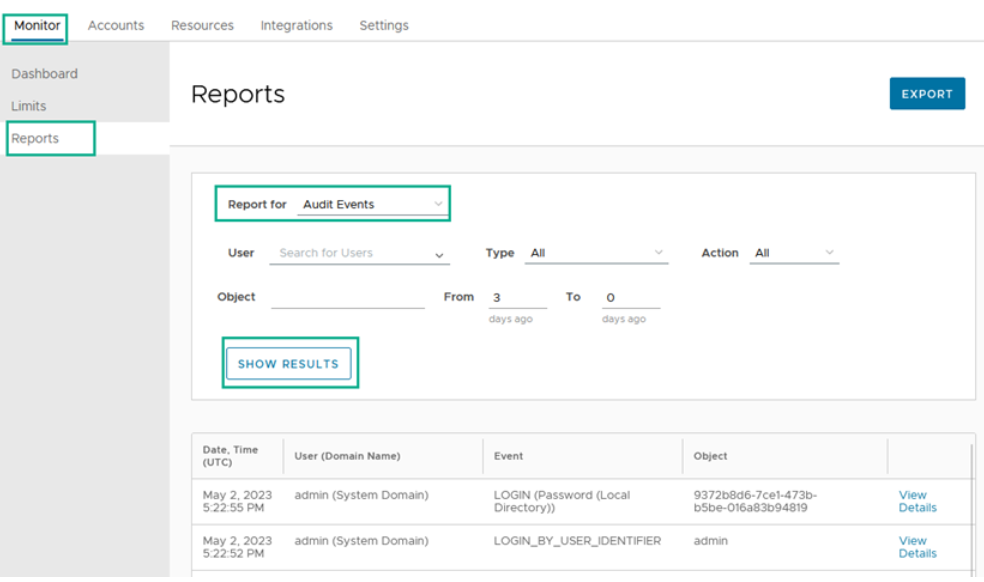
Renewed Omnissa Access reporting interface in the Omnissa Access console
Omnissa Access reporting received a renewed facelift for administrator users. This new design is up to date and allows for simple navigation through the following reports.
-
Recent Activity
-
Resource Usage
-
Resource Entitlements
-
Resource Activity
-
Group Membership
-
Users
-
Device Usage
-
Provisioning Status
-
Audit Events
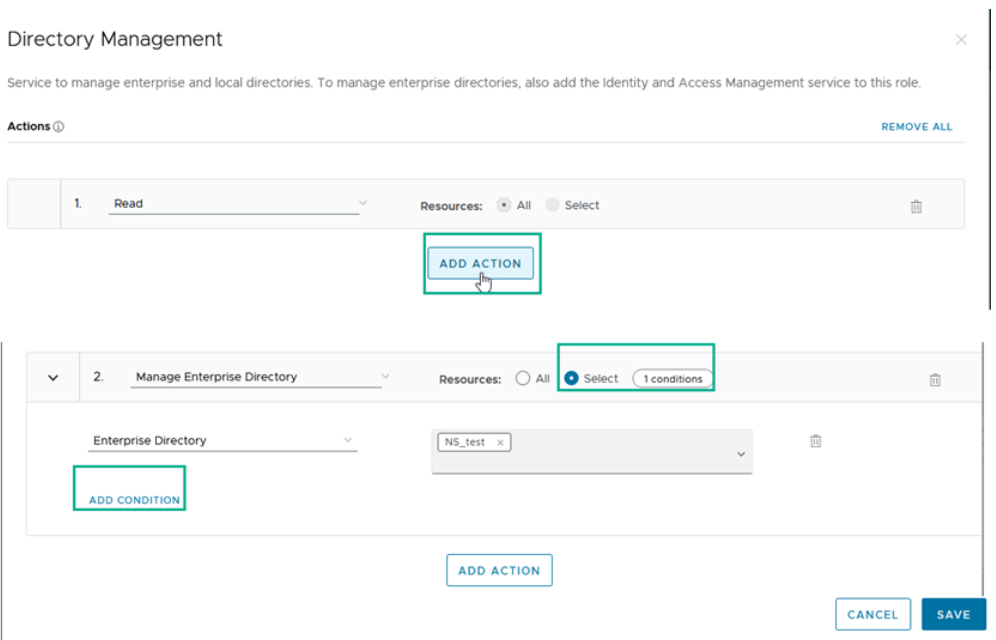
Actions can be reconfigured with ease in new Role configuration page in the Omnissa Access console
The new navigation for configuring Roles allows for all actions to be added, reconfigured, and removed for a service. Roles can be customized with specific actions for each service in any fashion. Users that can manage administrator roles will also be able to delete any or all of the actions configured for a service.
March 2023
Diminished functionality of unsupported Identity Manager Connectors
In the March release of Omnissa Access Cloud, any environment that is using unsupported Connectors no longer can create, edit, or delete directories. To continue the functionality of all features, a supported version of the Omnissa Access Connector must be in use. Every customer is strongly encouraged to migrate to the latest Connector as soon as possible.
The ability to synchronize pre-existing directories will continue to function for both scheduled and on-demand syncs. More information can be found at https://kb.omnissa.com/s/article/90808.
Refreshed Omnissa Access Navigation Pages
We are adding new navigation pages to the Omnissa Access console that were refreshed with an up-to-date design. The following pages have a fresh look and feel.
-
UEM Integration page
-
Directory page
-
Identity Provider page
The Auto Discovery and Terms of Use pages were removed as they are related to the Workspace ONE App that reached EOL. Information about the Workspace ONE App EOL can be found in the April 2022 release notes.
February 2023
New Option to Show Password on Login Screen
We are introducing a new toggle on the login screen to let users select to show the password when they are prompted to log in and authenticate using Omnissa Access services. This new feature will be available on authentication screens that use the password authentication method.
January 2023
Omnissa Access Now Supports FIDO2 Authentication on Mobile Browsers
Omnissa Access now allows FIDO2 authenticators to be registered and used for authentication on mobile browsers. Prior support of FIDO2 registration and authentication was limited to desktop browsers. With this release, end users can authenticate into Omnissa Access federated apps using a FIDO2 authenticator (i.e., YubiKey, Touch ID, Windows Hello, etc.) using mobile or desktop browsers. End users can also self-register a FIDO2 authenticator to be used as their primary authentication or as a second factor authentication.
Getting Started with Omnissa Identity Service
If you are a new customer of Omnissa Access and Workspace ONE UEM, we’ve added a service that will make user provisioning and federation easier! You can now leverage Omnissa Identity Service to configure a provisioned directory of users and groups using the SCIM 2.0 protocol in your Workspace ONE cloud admin console. Omnissa Identity Service will automatically provision users and groups, as well as authentication settings, to your Workspace ONE UEM and Omnissa Access admin consoles.
Supported identity providers and directory sources:
-
Azure AD, a cloud-based identity service in Microsoft Azure
-
Generic SCIM 2.0 Identity Source (tested for Okta)
For more information, see the Omnissa Identity Service Release Notes.
Before You Begin
Compatibility Matrix
Omnissa Product Interoperability Matrix provides details about the compatibility of current and previous versions of Omnissa products and components.
Omnissa Access Connector
See the Omnissa Access Connector Release Notes for information about the connector.
Documentation
Internationalization
See KB article 6000664: Announcing Omnissa Localization Support for information about localized content.
Support Contact Information
Contact the Support team when you need help with your Omnissa Access environment. See How to file a Support Request in Customer Connect and via Cloud Services Portal.
Was this page helpful?