| Hub Services | OCT 2026 |
Notice of DNS Record Deletion of Legacy Omnissa Access Domains
As announced previously in KB 6001323, legacy Omnissa Access tenant URLs have been disabled. As the final step in the URL migration process, DNS records for the legacy domains are now being deleted. This change affects the following products: Omnissa Access, Omnissa Workspace ONE Hub Services, and Omnissa Identity Service.
After the DNS records are deleted, attempts to access legacy URLs will result in a DNS resolution error. This behavior is expected.
The following table lists the impacted legacy domains along with their corresponding new URLs by region.
| Region | Legacy Domain (DNS Record Deleted) | New URL |
|---|---|---|
| Japan (Asia) | *.vmwareidentity.asia | *.jp.wss.workspaceone.com |
| Australia | *.vmwareidentity.com.au | *.au.wss.workspaceone.com |
| Ireland (Europe) | *.vmwareidentity.eu | *.ie.wss.workspaceone.com |
| Germany | *.vmwareidentity.de | *.de.wss.workspaceone.com |
| United Kingdom | *.vmwareidentity.co.uk | *.uk.wss.workspaceone.com |
| Canada | *.vmwareidentity.ca | *.ca.wss.workspaceone.com |
| US1 | *.vmwareidentity.com | *.us1.wss.workspaceone.com |
For more information, see KB 6001304.
What's New in October 2026
Notifications for newly-enrolled devices
Until now, a Hub Services notification only reached devices that were already part of the target audience when the notification was sent. It did not reach new devices added after the notification was first sent.
Administrators can now choose to have a notification also go to new members of its Organization Group or Platform audience, up to an expiration date they set. New members then see the notification in the For You tab of Intelligent Hub.
What's new:
- New option in the Notification Builder: For each notification, administrators can turn on delivery to new members who join the audience before a chosen expiration date.
- Applicable target audience types : All devices, Organisation Groups and Platform
For more information, see Creating Custom Notifications in Workspace ONE Hub Services.
September 2026
Cross-Device Quick Actions on Intelligent Hub Web portal
Users of Workspace ONE Intelligent Hub were previously able to execute Quick Actions only on and from the device that they were logged into. This posed a challenge for users who wanted to execute a Quick Action on one device while logged into another.
Now, end users can execute Quick Actions on any of their enrolled devices directly from the Intelligent Hub Web portal, not just the device they are currently logged into. This enables self-service troubleshooting and workflow execution across all assigned devices from a single browser session.
Supported platforms: iOS, Android, and Windows devices can be targeted from the Intelligent Hub Web portal. Quick Actions are currently not available for macOS devices.
For more information, see Configuring Workspace ONE Intelligent Hub Employee Self-Service Features in Hub Services.
Banners available for Intelligent Hub for iOS and Android
Banners can now be displayed on Intelligent Hub for iOS and Android, in addition to the Intelligent Hub web portal. The banners feature enables administrators to display important messages and announcements to end users directly within Intelligent Hub. For information on creating and managing banners in Workspace ONE Hub Services, see Managing Banners in Workspace ONE Hub Services.
August 2026
Hub Services Notifications: Combine Multiple Audience Types in a Single Notification
Administrators can now target multiple device-level audience groups — Organizational Groups, Smart Groups, and Platforms — within a single Hub Services notification. Previously, sending a notification to multiple groups required creating separate notifications for each audience, increasing administrative effort and fragmentation.
See Creating Custom Notifications in Workspace ONE Hub Services.
Device Wipe
End users can now initiate a Device Wipe directly from the Support tab in Intelligent Hub. In the Hub Services console, administrators can choose to add Device Wipe as an action available to end users. By default, end users do not see this device action. This capability was previously available only through the Self-Service Portal (SSP).
Known Issue: When enabled by a Hub Services administrator, the Device Wipe action is available to end users. There is a known issue where the Device Wipe action might also appear on devices enrolled in Work Profile mode.
See Configure Employee Self-Service Support for Workspace ONE Intelligent Hup App.
July 2026
Rename the For You tab
Hub Services administrators can now customize the name of the For You tab in the Intelligent Hub app. This gives organizations greater control over the end-user experience by letting them replace the default label with a name that better fits their use case — such as Notifications, Surveys, or Important Announcements. A new setting in the Hub Services console lets you define a custom name of up to 13 characters. In this release, the new name takes effect in the Intelligent Hub Web portal only.
For information, see Rename the For You Tab in Workspace ONE Intelligent Hub.
App Volumes support for Intelligent Hub Web — admin toggle
Hub Services administrators now have granular control over App Volumes support on the Intelligent Hub Web portal (browser) through a new Show App Volumes Apps toggle in the Hub Services console. This toggle lets you enable or disable the App Volumes integration for Hub Web users on Windows. When enabled, users can see and launch App Volume-type apps from within the Hub Web catalog.
Previously, App Volumes apps were disabled for all customers on the Intelligent Hub Web portal. Now, Hub Services admins can explicitly enable the feature, where applicable.
For information, see Customize the Workspace ONE Intelligent Hub App Catalog in Hub Services.
Upload S/MIME Certificates in Intelligent Hub
End users can now upload S/MIME certificates directly from the Intelligent Hub Web portal, enabling them to sign, encrypt, and decrypt corporate emails. This capability was previously available only through the Self-Service Portal (SSP).
See Configuring Workspace ONE Intelligent Hub Employee Self-Service Features in Hub Services for information.
June 2026
Reset option for Horizon Cloud desktops
End users can now reset their Horizon Cloud (formerly Horizon Cloud Next-Gen) virtual desktops directly from the Workspace ONE Intelligent Hub web portal. The reset action performs a hard reboot of the virtual machine, providing a quick self-service recovery option for dedicated desktops.
This feature does not apply to floating desktops, multi-session environments, or RDSH-published applications or desktops.
Caution: If a dedicated desktop has multiple assigned users, resetting it will abruptly disconnect any active session.
For more information, see Resetting Horizon Desktops.
Automatic Logout After Session or Idle Timeout in Intelligent Hub web portal
The Intelligent Hub web portal now supports automatic logout when a user's session expires or remains idle beyond a configurable timeout period. Administrators can enable this feature with a new toggle in the Hub Services console and customize the idle timeout duration.
For more information, see Configuring Automatic Logout for Intelligent Hub Web Portal.
May 2026
Email as a Notification Channel (BYO SMTP)
Administrators can now send Hub Services notifications via email in addition to push notifications, ensuring critical communications reach end users even when push notifications are disabled on their devices. This feature uses a Bring-Your-Own (BYO) SMTP configuration.
For more information, see Configure SMTP Settings for Hub Services.
Send Notifications to Multiple Groups
Administrators can now select multiple target audience groups of the same type when creating a notification, eliminating the need to recreate the same notification for each group.
- When building a notification, administrators select a single target audience type (Omnissa Access user groups, Organization Groups, or Smart Groups) and then choose multiple groups within that type.
- The notification is sent to all selected groups in a single action.
- The Notification List is updated to reflect the multi-group notification.
Previously, administrators could only target one group per notification and had to use the "Edit and Send" workaround to reach additional groups.
Launch Hub Services Admin Console in a New Tab
When an administrator clicks Manage Hub Experience from the account icon in the Workspace ONE Intelligent Hub web portal, the Hub Services admin console now opens in a new browser tab instead of replacing the current tab. This allows administrators to keep the Hub web portal open while managing Hub Services settings.
Dark Mode for the Hub Services Admin Console
The Hub Services admin console now supports a dark mode UI theme, providing improved comfort in low-light environments and a modern visual experience.
For more information, see Manage Personal Settings in Workspace ONE Hub Services.
Edit Default Categories in Hub Catalog (Browser only)
Previously, the Hub Catalog always displayed certain default categories – including Workspace ONE UEM-provided categories and system categories such as All Apps, Web Apps, and Virtual Apps – with no way for administrators to hide or control them. This often resulted in the same app appearing multiple times across default and custom categories.
With this enhancement, Hub Services now allows administrators to control the visibility of these default categories in the browser-based Hub Catalog.
March 2026
App Bundles
An App Bundle is a logical grouping or collection of component apps. Hub Services admins can now create an App Bundle for their App catalog users by grouping several apps delivered through various delivery mechanisms. For example, an App Bundle called Outlook might contain Microsoft 365 for Web, Outlook native app (for Windows), Boxer, and Outlook for Horizon as its component apps.
Catalog users can subsequently open an App Bundle to launch one of the component apps. Users can also select a default component app to auto-launch when the bundle is clicked.
In this release, App Bundles are supported on the Intelligent Hub web portal.
For more information, see Managing App Bundles in the Workspace ONE Intelligent Hub App Catalog.
Promotion of App Volumes Apps
Admins can now Promote App Volume apps, just like other types of apps. Omnissa App Volumes is an application packaging solution that provides real-time application delivery and life-cycle management for digital workspaces.
Known Issues
App Volumes apps not appearing in Intelligent Hub web portal
Due to recent browser security changes, App Volumes apps currently do not appear in the Intelligent Hub web portal. This is a temporary change and App Volumes apps will soon be back on the portal.
This issue does not change the visibility, usage, and launch of App Volumes apps from Intelligent Hub for Windows 26.02.1 or later. Customers can continue to see, promote, and launch these apps from Intelligent Hub for Windows.
February 2026
Announcement Banner
Bolstering the Notifications feature, admins can now display a banner in Intelligent Hub with important announcements affecting end users. The banner is displayed across tabs (such as Favorites, For You, and Apps) and is published as soon as the user logs in. Optionally, admins can add a link to redirect users to a Knowledge Base article or any URL. In this release, the banner is displayed on the Intelligent Hub web portal.
For more information, see Managing Banners in Workspace ONE Hub Services.
Note: Customers that have not yet migrated to the new Omnissa Access URLs must acknowledge the migration message in Omnissa Access to effectively use this feature.
December 2025
Support for launching Horizon Cloud published App Volumes from Intelligent Hub web portal
Hub Services now supports launching Horizon Cloud published App Volumes apps from the Intelligent Hub web portal. App Volumes-packaged Windows applications are available to users in the Intelligent Hub web portal in VDI desktops.
For information about configuring App Volumes in the Horizon Cloud service, see Configuring and Using App Volumes Integration. Also see Integrating Horizon Cloud with Workspace ONE Intelligent Hub.
Important: After you migrate to the new Omnissa Access and Hub Services URLs, for App Volumes applications to continue to appear in the Intelligent Hub portal, you must restart the VDI desktops. For information about the URL migration, see KB article 6001062: Upcoming URL Migration and Certificate Branding Migration.
Templates and Device Context
Previously, Hub Services templates were evaluated based on user context. Therefore, if a user was assigned an action, the action would be available to the user from every device. This was an issue because different devices (COPE versus BYOD, for example) should not have the same actions for end users to execute.
Now, the templates are evaluated per device. If an action is not available for a device, an end user will not have access to execute the action from any device. The list of device actions stays consistent regardless of where the user logs into Hub.
November 2025
Support for launching App Volumes from Intelligent Hub web portal
Hub Services now supports launching App Volumes apps configured in App Volumes Manager from the Intelligent Hub web portal. Omnissa App Volumes is an application packaging solution that provides real-time application delivery and life-cycle management for digital workspaces. App Volumes provides faster application delivery, and simplified and unified management of apps and users. With this update, users can launch their App Volumes apps from the Intelligent Hub web portal. App Volumes from Horizon, Citrix, and RDSH environments are supported with this update.
For more information, see:
- Integrate App Volumes Manager and Workspace ONE Intelligent Hub with Omnissa Access in the App Volumes documentation
- Providing Access to App Volumes Packaged Applications in Omnissa Access in the Omnissa Access documentation.
IMPORTANT: Due to recent browser security changes, App Volumes apps currently do not appear in the Intelligent Hub web portal. See What's New in March 2026 for details.
URL and Certificate Migration
As part of the migration from legacy domains to Omnissa domains, certificates and URLs are being updated in Omnissa Access. These changes also impact Hub Services. See KB article 6001062: Upcoming URL Migration and Certificate Branding Migration for detailed information about the migration process and timeline.
October 2025
Rich Text Notifications
Enhance the visual appeal of your notifications with rich text formatting. Notifications now support text in bold and italics styles. Text colors such as red, blue, and green are also available for the description. In this release, rich text notifications are being made available for notifications received on the Intelligent Hub web portal.
September 2025
Auto-launch for Custom Web Links
Intelligent Hub users can now auto-launch custom web links. This feature provides users the flexibility to configure the web links that they would like to open automatically as soon as they log into the Intelligent Hub web portal.
Users can configure a maximum of five web links to launch automatically upon login.
August 2025
Conditional Entitlements Phase 2: Show or Hide Apps based on Access Policies
Access policy rules set by admins in Omnissa Access determine which apps an end user can launch, based on factors such as their network range, device type, or group membership. The new conditional entitlements enhancement to the Hub Catalog improves the user experience by hiding apps that a user is restricted from launching based on Access policy rules.
This is Phase 2 of the two-phase rollout of conditional entitlements. Hub Services admins now have the option to either display (as locked) restricted apps or hide them entirely from end users.
July 2025
Configurable support contact information in Support tab
Intelligent Hub administrators (console admins) can now configure IT Support’s email ID and phone number for their users. Users can subsequently go to the Contact section under the Support tab to get help.
Before the release of this feature, console admins could not overwrite system defaults. Now, they can control whether users see system default support information or configured information. Together with templates, admins can configure unique support info for different user groups.
This feature is now available on the Intelligent Hub web portal. It is expected to be rolled out for all Hub clients at a later time.
Conditional Entitlements Phase 1: Lock Apps based on Access Policy
Access policy rules set by admins in Omnissa Access determine which apps an end user can launch, based on factors such as their network range, device type, or group membership. Currently, all apps are available to the user in the Hub catalog, and when they launch an app that is restricted by Access policy rules, they are denied access during the launch process.
The new conditional entitlements enhancement to the Hub catalog improves the user experience by locking (graying out) apps that a user is restricted from launching based on Access policy rules. The user interface only reflects existing restrictions that have been configured in the customer tenant, and does not change any behavior for unrestricted apps.
This is Phase 1 of a two-phase rollout of conditional entitlements. In Phase 2, Hub Services admins will have the option to either display (as locked) restricted apps or hide them entirely from end users.
This feature is currently limited to the Hub web portal only.
The scope of this feature is limited to only those apps on which Access policies are applicable.
June 2025
Launch Windows Native Apps from Hub
Intelligent Hub users can now install and subsequently launch a Workspace ONE UEM-managed Windows app from the Apps tab in Intelligent Hub. Before the release of this feature, users could install a Workspace UEM-managed app from Hub, search for that app from the Start menu, and then launch it. Now, users can launch the managed apps from the Hub app itself, significantly enhancing usability.
This feature is available for the Intelligent Hub web portal and the Windows native app.
May 2025
End User Rating and Statistics Report for Horizon Cloud Service Next-Gen resources
From Intelligent Hub, end users can now like or dislike (thumbs up or thumbs down) a Horizon Cloud Service Next-Gen app or desktop.
Hub Services admins can now download a consolidated report of all apps and their ratings statistics. The statistics include the number of likes and dislikes for each Horizon Cloud Service Next-Gen app.
Apple Books in iOS Hub
End users can now access Apple books on their iOS Hub app.
Email Recipients and Archive Notifications
Hub Services admins can now save email recipients to an archived notification so that an archived notification can be resent to the same audience.
April 2025
Promotion of Horizon Cloud Service Next-Gen apps
The Hub Services admin console now allows console administrators to promote Horizon Cloud Service Next-Gen desktops and apps! This new feature enhances the existing functionality of promoting native iOS, Android, and Windows apps, and websites.
Console administrators can now select Horizon Cloud Service Next-Gen apps within Promotions and bring virtual apps and desktops front and center for their users.
At this time, promoted Horizon Cloud Service Next-Gen apps and desktops will appear on the Hub web portal and Intelligent Hub app on Windows. For other platforms, please refer to their Release Notes.
Changes to CDN URLs
The Cloud Distribution Network (CDN) URLs are changing in keeping with new corporate brand guidelines. The old URLs will need to be replaced to ensure uninterrupted functionality. Refer to the following KB article for details: Upcoming Changes to the Cloud Distribution Network (CDN) URL for Omnissa Access and Hub Services (6000795).
February 2025
Ability to send Targeted Hub notifications via Email List
The IT Communications teams can now send Hub notifications to a subset of users based on their email addresses, streamlining the process and removing the need to create or maintain User Groups or Smart Groups just for sending notifications. This new feature allows admins to provide an email list, using the new ‘Email Recipients’ Target Audience Type, while creating the notification through the Hub Services Admin console, compose the notification message, and send it directly to the specified recipients.
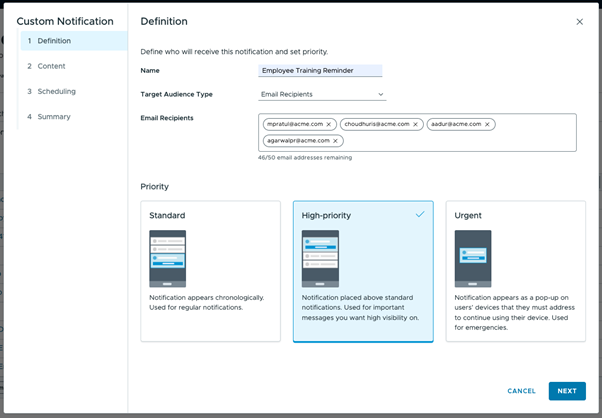
Ideal for one-time or ad-hoc communications, this feature saves time and reduces administrative effort. Admins need to make sure that they are providing a maximum of 50 email IDs which are valid and correctly formatted to send notifications using this functionality.
Enhanced Survey and Notification Analytics Data
To further enhance the insights provided by Hub Survey and Notification analytics, additional fields are now included in the analytics data sent to Intelligence. These new fields offer deeper visibility into device details and user contact information, enabling more comprehensive dashboards and reporting. With this enhancement, customers can better analyze the devices involved in surveys and notifications, and, if necessary, directly contact users to address specific issues or gather feedback.
The new fields are:
- User email address
- Device model
- Device OS Platform
- Device OS version
- Device friendly name
- Phone number
- Device Enrollment date and time
This improvement helps customers gain a clearer understanding of device attributes and user context, making Hub Survey and Notification dashboards even more valuable for decision-making and user engagement.
November 2024
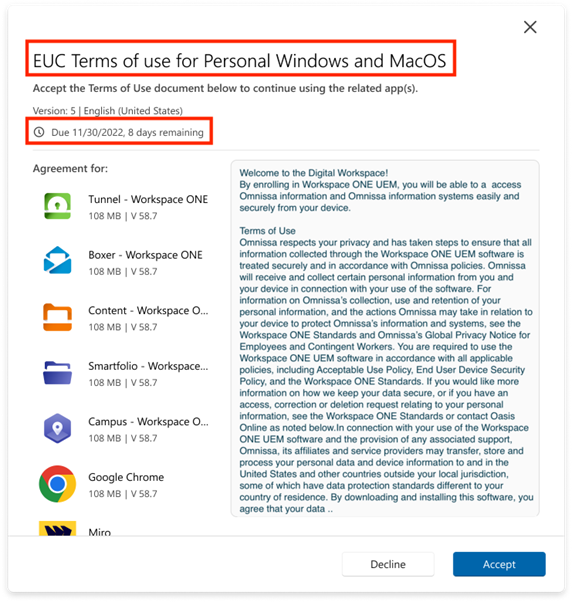
Enhancements to the Application Terms of Use for Hub Windows
The following improvements have been made to the Application Terms of Use functionality:
- Due Date Display: Pending Application TOU cards in the Hub app now display the due date, ensuring users are aware of the deadline to accept the TOU and take necessary action before the expiration.
- Dynamic TOU Title: The TOU title now accurately reflects the title set by the admin in the Workspace ONE UEM admin console, replacing the previous static, hard-coded title. This update ensures the displayed title matches what is configured in Workspace ONE UEM.
This enhancement requires Workspace ONE UEM version 2410 or higher.
Enhancements to the Enrollment Terms of Use for Hub Web and Windows
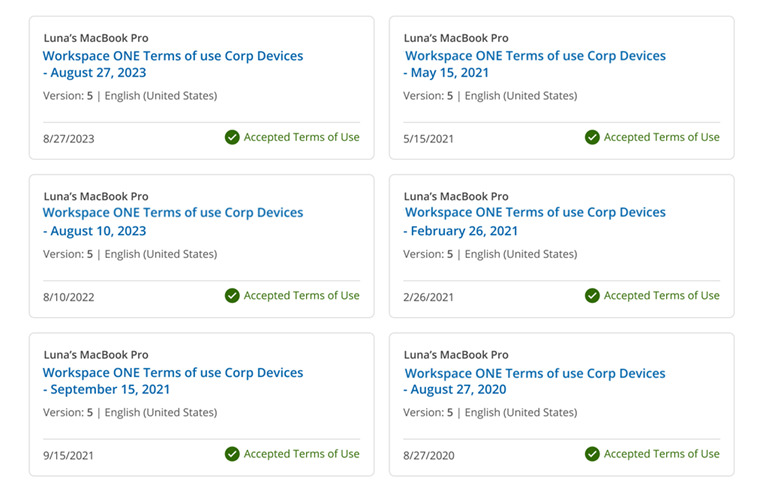
The following updates have been made to improve the Application Terms of Use (TOU) functionality:
- Access to Previously Accepted TOU: Users can now view previously accepted TOUs, which is beneficial for auditing and record-keeping.
- Dynamic TOU Titles: The TOU title now correctly reflects the title set by the admin in the Workspace ONE UEM console, replacing the old static, hard-coded title. This ensures that the displayed title is always aligned with the Workspace ONE UEM configuration.
This enhancement requires Workspace ONE UEM version 2410 or later.
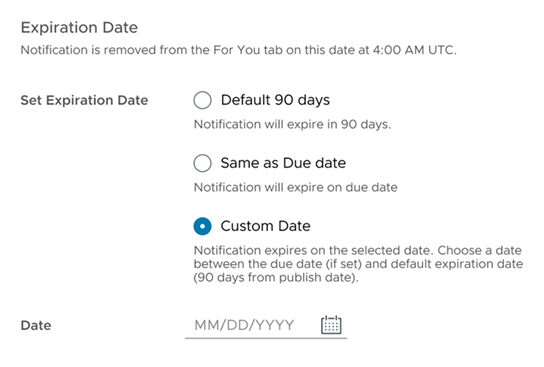
Support for Custom Notification Expiry Dates
The Hub Services admin console now enables administrators to set custom expiry dates for notifications. Once the specified expiry date is reached, notifications are automatically removed from the end user's view in both the For You and History sections. This feature allows administrators to better manage the visibility of notifications, ensuring that employees only see the most current and relevant information. By automatically clearing outdated messages, this enhancement helps reduce clutter and improves the overall user experience.
Support for Conditional Access for Horizon Cloud Service Next-Gen apps and desktops on Intelligent Hub Web and Windows
The Hub Services app catalog on the Intelligent Hub web portal and Intelligent Hub for Windows now applies Omnissa Access conditional access policies to Omnissa Horizon Cloud Service Next-Gen applications and desktops. This ensures that user access is securely managed and aligned with your organization’s security requirements. See the documentation for more information.
September 2024
Notification Deletion Now Available for Hub Services Admins
The Hub Services admin console now includes the ability for admins to delete previously sent notifications. Admins with super admin role can utilize this feature to remove notifications that were sent in error, contained incorrect information, or were distributed with ill intent. This deletion functionality ensures that admins can quickly and effectively retract messages that should no longer be visible to end-users, thereby maintaining the accuracy and integrity of communication within the platform.
Workspace ONE Intelligent Hub App Now Visible in the Hub Services App Catalog
The Workspace ONE Intelligent Hub app, when assigned through Workspace ONE UEM, will now be displayed in the Hub Services app catalog. Previously, the Intelligent Hub app did not appear in the catalog, limiting visibility to end-users. With this update, users can manually trigger updates to the Hub app, which is especially useful if there are issues with auto-pushed updates.
If admins prefer to revert to the previous behavior where the Hub app is hidden from end-users, they can utilize the Exclude Apps functionality to remove it from view. For more details on that, refer to the documentation topic Selectively Exclude Apps From Users in Intelligent Hub Catalog.
July 2024
Granular Control for Self-Service Actions
Workspace ONE Hub Services admins now have greater flexibility and granular control when configuring actions available through Employee Self-Service (Support tab). Previously, actions were grouped into broad categories of critical and non-critical toggles in the Hub Services admin console, which limited admins to enabling or disabling entire groups of actions rather than specific individual actions. This lack of precision often led to less effective management and control over the available actions for end users.
With this update, admins can now pick and choose specific actions they want to enable for end users, tailoring the self-service experience to better meet organizational needs and policies. For example, an admin can enable the Change Passcode action for a set of users or devices while keeping the Lock Device action disabled, thereby preventing unnecessary or potentially disruptive actions. This enhanced level of customization allows for more targeted and efficient management, improving both security and user experience by ensuring that only the necessary actions are accessible to end users.
Ability to Hide Apps from the App Catalog
The Hub Services admin console now allows admins to selectively hide apps from end users' view. This feature is particularly useful in scenarios where apps need to be assigned to specific devices, but admins want to manage their visibility in the catalog. By hiding these apps, admins can prevent user actions such as app updates or unintentional interactions, ensuring that app management remains centralized and controlled. This added flexibility allows for better oversight and maintenance, aligning app availability with organizational policies and strategies.
User Self-management of FIDO2 Keys
Workspace ONE Intelligent Hub web portal users can now manage their FIDO2 keys, configured in Workspace ONE Access for authentication, directly from the Hub web portal. Previously, only admins managed users' FIDO keys through the Workspace ONE Access admin console, which created a significant barrier to FIDO2 adoption. This limitation often resulted in end users having to submit support tickets for simple self-management tasks, such as replacing a FIDO2 key and customers had to deal with large volumes of such tickets.
With this enhancement, end users can fully manage their FIDO2 keys independently. They can view all registered keys, register new keys, and delete any previously registered keys. This newfound autonomy not only streamlines the user experience but also reduces the administrative burden, enabling smoother and more efficient authentication management.
Support Favorites and Horizon Launch Preferences for Horizon Next Gen apps
Workspace ONE Intelligent Hub web users can now mark Horizon Next Gen apps and desktops as favorites, providing them with the convenience of accessing and launching their favorited applications or desktops directly from the Favorites tab. This functionality mirrors the familiar process available for web applications, making it easier for users to organize and quickly find the apps and desktops they use most frequently.
In addition to this, the Hub web portal now supports the existing user preference for launching Horizon apps or desktops, extending this capability to Horizon Next Gen apps as well. Users are given the flexibility to choose whether they want to launch their Horizon Next Gen apps or desktops in a browser or a native client.
Support Workspace ONE Content URLs/Deep Links in Hub Helpful links
Hub Services admins can now configure a Workspace ONE Content application URL or deep link as a helpful link in the Support tab, enhancing the usability of the Helpful Links section.
May 2024
Device Enrollment Terms of Use support in Workspace ONE Intelligent Hub
Workspace ONE Intelligent Hub app users can now view and act on updates to the Terms of Use (TOU) created in the Workspace ONE UEM console for any of their enrolled devices directly within the Intelligent Hub app. Previously, this functionality was only available through the Self-Service Portal (SSP), requiring users to log in separately, often delaying critical actions on TOU updates. By integrating this feature into the Intelligent Hub app, we streamline it into the regular employee workflow, allowing for more immediate responses to TOU updates.
This functionality is currently available on the Intelligent Hub web portal and Intelligent Hub for Windows. Workspace ONE UEM version 24.2.0.8 and later supports this feature.
Application Terms of Use support in Workspace ONE Intelligent Hub
Users of the Hub native applications (i.e. Hub iOS, Android and Windows) can now view and act on updates to the Terms of Use (TOU) associated with any applications installed on their devices. Previously, Intelligent Hub prompted users for TOU action (acceptance or rejection) only during the initial app installation via the Hub catalog, with no way to address subsequent TOU updates. This new feature enables users to stay updated and respond to TOU changes at any time.
This functionality is currently available on Windows on all Intelligent Hub app versions. For iOS and Android, please refer to the iOS and Android Hub release notes for the Intelligent Hub version which adds support for this feature.
Workspace ONE UEM version 24.2.0.8 and later supports this feature.
NOTE: This was the last significant parity gap between the Hub Services app catalog and the legacy UEM app catalog, which is already scheduled for end-of-life See KB article 95774
Increase in limit for Employee Self-Service Helpful Links from 10 to 20
Hub Services admins can now configure up to 20 Helpful Links in the Employee Self-Service section of the Hub admin console, doubling the previous limit of 10 links. This increased capacity allows admins (UEM and Horizon) to provide more self-service content, such as knowledge bases (KBs), for end users in the Intelligent Hub Self-Support tab.
April 2024
Quick Actions in Support Tab on Windows
From the Hub Services console, admins can now place on-demand Freestyle Workflows in the Workspace ONE Intelligent Hub Support tab, enabling users to discover and use remediation workflows such as the following:
-
Fix my Wi-Fi to reinstall Wi-Fi profiles
-
Fix my VPN to reinstall VPN profile and VPN App
-
Clean my hard drive to run a script to delete temp folders
This helps IT and Service Desks to utilize Quick Actions as an effective method for ticket deflection to reduce their ticket volume.
KNOWN ISSUE: On Windows, Quick Actions status doesn’t update unless a Device Sync happens. End users can perform a device sync from the Device Details page in the Support tab.
Quick Actions Section in App Catalog on Windows and macOS
From the Hub Services console, admins can now create a new section in the Workspace ONE Intelligent Hub App Catalog tab for on-demand Freestyle Workflows, enabling users to discover and use workflows such as the following:
-
Install Productivity Apps to installs a group of apps, runs scripts and installs profiles
-
Configure my Desktop to run user profile scripts and install apps
This helps IT and Service Desks to utilize Quick Actions as an effective method for configuring their desktops effectively.
KNOWN ISSUE: On macOS App Catalog, the Quick Actions section title doesn’t show a user-friendly name.
Auto Launch of Apps from Hub Web
End users can now configure Apps from the catalog to be auto-launched when they log into the Intelligent Hub web portal. Users can configure up to 5 applications (web or virtual apps) that can be auto-launched.
NOTE: The end user will have to allow browser pop-ups to ensure seamless auto-launch experience.
October 2023
Customize the Dark Mode Navigation Bar Background and Font Color for Workspace One Intelligent Hub
Admins can customize the Dark Mode navigation bar background and font color from the Branding tab in the Hub Services admin console. When the Workspace ONE Intelligent Hub web portal is set to dark mode, the portal will reflect the colors defined in the console.
Note: This feature is currently supported only on the Hub web portal. For other Workspace ONE Intelligent Hub platforms, please refer to their release notes.
September 2023
Users can Lock their Devices from the Support Tab
The Workspace ONE Intelligent Hub web portal now allow users to perform a Lock Device action from the Support tab. This action is enabled by default and can be managed by the admin from the Hub Services Console (Employee Self-Service > Device Self-Service > Non-Critical Actions).
August 2023
Limit Devices in Staging Accounts from Viewing Other Devices
For devices that are enrolled in a staging account, the Workspace ONE Intelligent Hub app’s Support tab no longer list all devices enrolled in that staging account. Instead, the Support tab only reflect the current device to prevent any malicious user(s) from taking action on all the other managed devices shown on the Support tab for that account.
Note: This requires Workspace ONE UEM version 23.06 or later.
Quick Actions on the Support Tab (Tech Preview)
From the Hub Services console, admins can now place on-demand Freestyle Workflows in the Workspace ONE Intelligent Hub Support tab. This enables users to discover and use remediation workflows such as the following examples:
-
Fix my Wi-Fi to reinstall Wi-Fi profiles
-
Fix my VPN to reinstall VPN profile and VPN App
-
Clean my hard drive to run a script to delete temp folders
This helps IT and Service Desks to utilize Quick Actions as an effective method for ticket deflection to reduce their ticket volume.
NOTE : This feature is available on Windows with this Tech Preview release. For Tech Preview, this feature will be available to use on any preview Hub Services/Workspace ONE Access tenant and can be used with any Shared SaaS UEM UAT tenant version 23.08+.
Shift-Based Access Control with UKG Dimensions (Limited Availability)
The Shift-based Access Control feature enables customers to selectively restrict access to Hub Services and app entitlements to when the shift-based worker is working, while configuring access to other services and apps to be available on and off the clock. This version of Shift-based Access Control enables configurable restriction of Hub Services, notifications, app entitlements, and single sign-on when the user is not deemed to be working, as defined by the customers UKG Dimensions time and attendance system.
This version of Shift-based Access Control supports integration with UKG Dimensions and requires Hub Services 2307, Workspace ONE Access 2209, and Workspace ONE Intelligent Hub for iOS and Android 23.07.
NOTE : Please reach out to your account team for the steps required to enable Shift-based Access Control with the UKG Dimensions feature.
July 2023
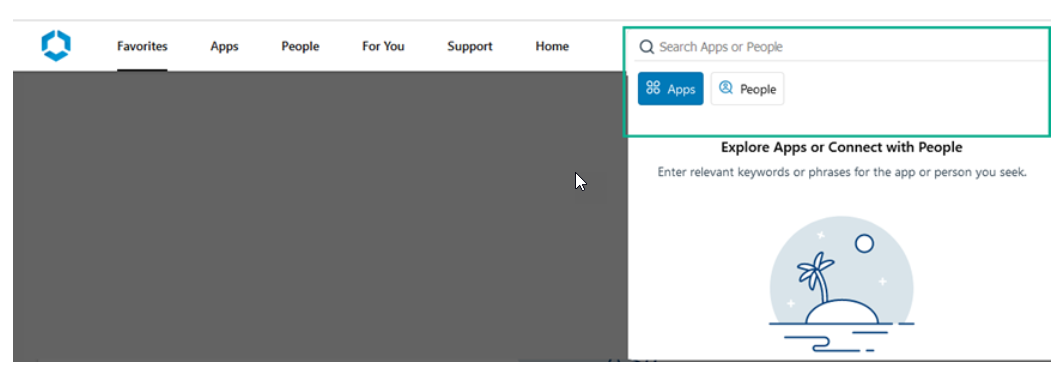
Improved Search Experience on Hub Web
The Search Bar in the Hub web portal has been moved to a more prominent location. App and People Search can now be performed easily and no longer requires end users to navigate to the Apps or People tabs to perform search.
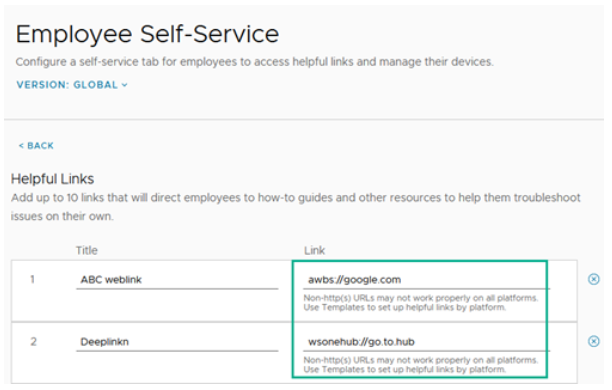
Add Hub Deep Links and Workspace ONE Web Deep Links in as Helpful Links in the Support Tab
Self Service Helpful links have been updated to support Workspace ONE Intelligent Hub and Workspace ONE Web apps' deep linking capabilities. This allows admins to setup helpful links that can seamlessly take their users to other parts of the Hub app using wsonehub://{deeplink} or launch web pages in a Web app using awb(s)://{url}.
June 2023
Additional Self-Service Capabilities in the Support Tab
The Workspace ONE Intelligent Hub web portal now allows users to take actions such as Clear Passcode and Make Noise from the Support tab. These actions are enabled by default and can be managed by the admin from the Hub Services Console (Employee Self-Service > Device Self-Service > Non-Critical Actions).
Hub Web App Catalog Supports Horizon Cloud Service – next-gen
Workspace ONE Intelligent Hub Web supports Horizon entitlements in the Hub App Catalog for customers who use Horizon Cloud Service – next-gen integration. For more information about Horizon Cloud Service – next-gen, see the Horizon Cloud Service – next-gen release notes and documentation. For known Workspace ONE Intelligent Hub App catalog gaps with using Horizon Cloud Service - next-gen, read KB article 92495.
April 2023
End-Users can take Self-Service Actions on Their Devices in the Hub Support Tab
Admins can enable self-service device actions in the Employee Self-Service tab in the Hub Services console to allow users to manage their devices.
The newest device self-service action that can be enabled is
- Critical Actions - Allow employees to perform the critical actions such as Delete Device, Enterprise Wipe.
When enabled, in the Workspace ONE Intelligent Hub app, end-users can view and take self-service actions to delete a device and to unenroll and remove all managed enterprise resources from the selected device. For example, users can delete their device if their device is lost or enterprise wipe their device to unenroll their device.
Note: This release is available on Hub Web and Windows platform. For other Hub platforms’ availability, please refer to their release notes. Workspace ONE UEM version 2302 and later supports this feature.
Admins can Archive Notifications in the Hub Services Admin Console
Notifications in the Hub Services console now includes an Archived section. Super admins can take the action to archive notifications from the Active list to the new Archived list. Being able to move notifications from active to archived allows for more flexibility and better organization of active notifications. Archiving a notification will not affect the user’s notifications in their Workspace ONE Intelligent Hub pages. The archive action and archived section are only accessible to super admins. Expired notifications will automatically move to the Archived section in the console after 90 days.
March 2023
Introducing Roles Based Access Control with Notification Target Audience Permissions
In the Admin Roles tab of the Hub Services console, super admins can now define and restrict the target audiences that admins can send notifications to. Super admins can choose whether to grant admins full or custom access to Organization groups, Smart groups, Workspace ONE Access groups, and platform target audience types. Admins who are granted limited target audience permissions will be able to only view, take action on, and send notifications to those target audiences. This allows super admins to limit admin permissions and ensure that admins are only able to send communications to groups that are relevant to their division, role, or region.
End of Life of Digital Badge (formerly Passport) on March 30th, 2023
Digital Badge (formerly Passport) reached its end of life on March 30th, 2023. For more information, please refer to this KB article.
January 2023
Windows Hub Support Details Reflect Organization Group that the Device is enrolled in
The Support tab in Workspace ONE Intelligent Hub for Windows now reflects the email and phone number contact details of the organization group that the Windows device is enrolled in.
Support for Device Ownership Selection when Adding a Device
When adding a new device from the Workspace ONE Intelligent Hub app, end users select the device ownership. The ownership types can be controlled by the Workspace ONE UEM (Unified Endpoint Management) admin through enrollment restriction for device ownership.
Compatibility
Web Browser Supported
-
Mozilla Firefox. The latest version.
-
Google Chrome. The latest two versions.
-
Safari. The latest two versions.
-
Microsoft Edge. The latest version.
Omnissa Product Interoperability Matrix provides details about the compatibility of current and previous versions of Omnissa products and components.
Documentation
Workspace ONE Hub Services documentation is in the Workspace ONE Documentation Center.
Internationalization
Localized Content for Omnissa Docs
See KB article 6000664: Announcing Omnissa Localization Support for information about localized content.
Support Contact Information
Contact Support at Omnissa Customer Connect when you need help with your Hub Services environment. See How to file a Support Request in Customer Connect and via Cloud Services Portal.
Was this page helpful?