You can register your callout REST URI to integrate your application management system with Omnissa Access.
Prerequisites
When you select the REST API approval engine, your application management system must be configured, and the URI available through the callout REST API that receives the requests from Omnissa Access.
Procedure
-
In the Omnissa Access console, select Resources > Web Apps, then click Settings.
-
In the Settings dialog box, select Approvals.
-
Set Enable Approvals to Yes.
-
From the Approval Engine drop-down menu, select REST API.
-
Configure the following text boxes.
Option Description URI Enter the callback URI of the REST resource that listens for the callout request. User Name (Optional) If the REST API requires a user name and password to access, enter the name here. If no authentication is required, you can leave user name and password blank. Password (Optional) Enter the password of the user. PEM-format SSL Certificate (Optional) If your REST resource is running on a server that has a self-signed certificate or a certificate not trusted by a public certificate authority and is using HTTPS, add the SSL certificate in PEM format here. 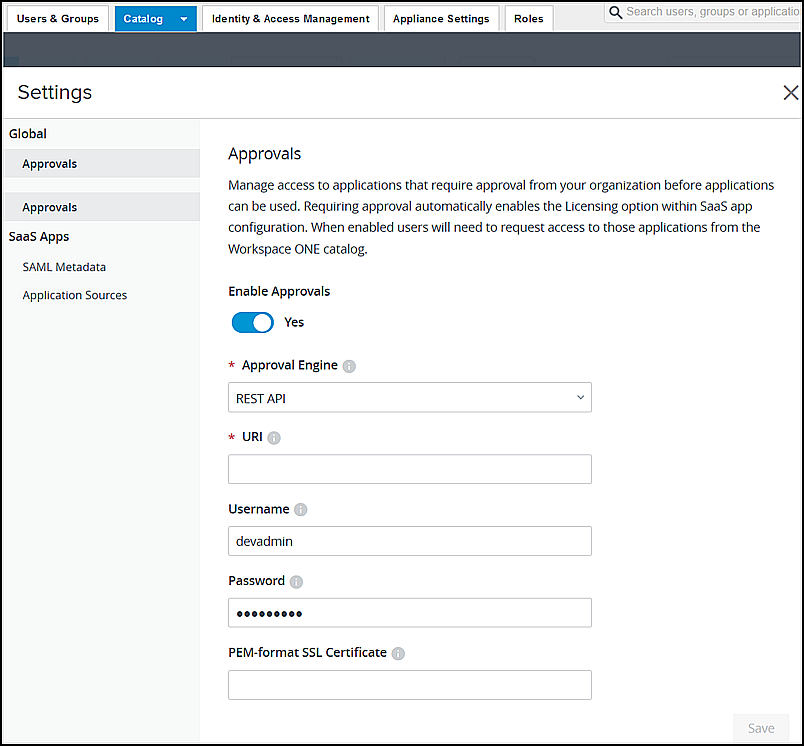
What to do next
Go to the apps pages and configure the Licensing options for those apps that require approval before users can use the app.
Was this page helpful?