You can configure Horizon and Omnissa Access to provide users the ability to reset an unresponsive Horizon desktop from the Omnissa Intelligent Hub app or portal.
You configure this setting in the Horizon Console, not in the Omnissa Access console. The configuration applies to both Horizon and Omnissa Access. In the Omnissa Access console, you can view whether a specific desktop is resettable or not.
The option to reset desktops from Omnissa Access is supported for:
- Horizon 7.x or later pods
- Dedicated and floating Horizon desktops
Prerequisites
- Configure Horizon to allow users to reset their desktops. See the documentation for Omnissa Horizon.
- For Horizon desktops to be resettable by users, the client access FQDNs for the respective pods must have trusted certificates. If the URLs have root-signed or self-signed certificates, configure Omnissa Access to trust those certificates. See Omnissa Access Installation and Configuration for information about adding a root certificate.
Procedure
-
Verify that Omnissa Access lists the desktop as resettable by users.
-
In the Omnissa Access console, select Resources > Virtual Apps.
-
Click the icon in the Type column heading and search for the desktop by name or select Horizon Desktop to view all Horizon desktops.
-
Click the desktop.
-
In the Definition section of the page, verify that the Reset Allowed setting is set to Enabled.
If it is set to Disabled, Horizon is not configured to allow users to reset the desktop.
-
What to do next
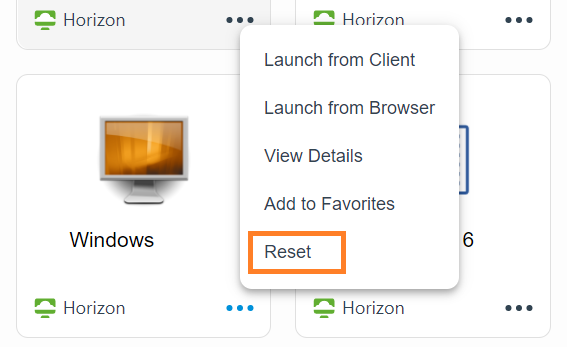
If a Horizon desktop becomes unresponsive, administrators or users can reset the desktop by using the Reset command.
The Reset command is available for the desktop in the Omnissa Intelligent Hub portal or app. The option does not appear for desktops for which reset is not allowed.
Was this page helpful?