您可以在部署之前准备 Azure 环境。
步骤
-
添加一个名为 Azure 资源组的组以在其中部署 Unified Access Gateway 设备。您可以使用 Azure 门户 Web 界面或通过运行以下示例中的 PowerShell 命令来添加:
版本 命令 PowerShell 5 $resourceGroup="uagrg"$location="uk south" New-AzureRmResourceGroup -Name $resourceGroup -Location $locationPowerShell 7 $resourceGroup="uagrg" $location="uk south" New-AzResourceGroup -Name $resourceGroup -Location $location-
添加一个存储帐户,并在该存储帐户中添加一个名为
vhds的 blob 容器。此容器用于存储 Unified Access Gateway 映像。您可以使用 Azure 门户 Web 界面或通过运行以下示例中的 PowerShell 命令来添加:版本 命令 PowerShell 5 New-AzureRmStorageAccount -ResourceGroupName $resourceGroup -AccountName uagstore `-Location $location -SkuName Standard_LRS New-AzureRmStorageContainer -Name vhds -ResourceGroupName $resourceGroup-StorageAccountName uagstore</code></pre></td> </tr> <tr> <td>PowerShell 7</td> <td> <pre><code>New-AzStorageAccount -ResourceGroupName $resourceGroup -AccountName uagstore-Location $location -SkuName Standard_LRS New-AzRmStorageContainer -Name vhds -ResourceGroupName $resourceGroup ` -StorageAccountName uagstore注意:对于高工作负载,为了最大程度地降低延迟,可以使用 Premium_LRS 来代替 Standard_LRS 作为存储帐户类型。
- 创建具有默认子网的虚拟网络。
版本 命令 PowerShell 5 New-AzureRmVirtualNetwork -Name VirtualNetwork -ResourceGroupName $resourceGroup ` -Location $location -AddressPrefix "10.0.0.0/16"PowerShell 7 New-AzVirtualNetwork -Name VirtualNetwork -ResourceGroupName $resourceGroup ` -Location $location -AddressPrefix "10.0.0.0/16"- 或者,虚拟网络可以具有指定的子网,以便可以按以下方式指定这些子网。
版本 命令 PowerShell 5 $frontendSubnet = New-AzureRmVirtualNetworkSubnetConfig -Name frontendSubnet ` -AddressPrefix "10.0.1.0/24" $backendSubnet = New-AzureRmVirtualNetworkSubnetConfig -Name backendSubnet ` -AddressPrefix "10.0.2.0/24" New-AzureRmVirtualNetwork -Name VirtualNetwork -ResourceGroupName $resourceGroup ` -Location $location -AddressPrefix "10.0.0.0/16" -Subnet $frontendSubnet,$backendSubnetPowerShell 7 $frontendSubnet = New-AzVirtualNetworkSubnetConfig -Name frontendSubnet ` -AddressPrefix "10.0.1.0/24" $backendSubnet = New-AzVirtualNetworkSubnetConfig -Name backendSubnet ` -AddressPrefix "10.0.2.0/24" New-AzVirtualNetwork -Name VirtualNetwork -ResourceGroupName $resourceGroup ` -Location $location -AddressPrefix "10.0.0.0/16" -Subnet $frontendSubnet,$backendSubnet-
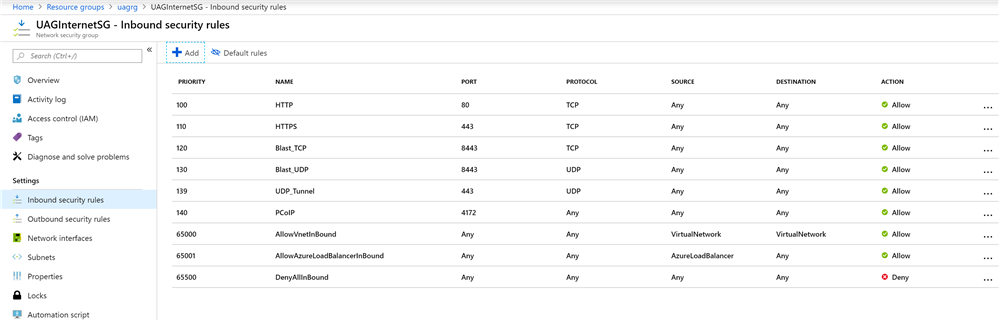
如果要直接从 Internet 访问 Unified Access Gateway 设备,请添加一个名为 UAGInternetSG 的安全组,以控制从 Internet 到每个 Unified Access Gateway 的入站端口访问。您可以使用门户或通过 PowerShell 添加安全组。此安全组可由多个 Unified Access Gateway 设备共享。例如,对于 Horizon 访问,允许以下端口:
- HTTPS - TCP 443
- HTTP - TCP 80
- Blast - TCP 8443
- Blast/BEAT - UDP 8443
- UDP 隧道 - UDP 443
- PCoIP - TCP 和 UDP 4172
-
(可选)运行以下命令之一以添加公共 IP 地址对象。
版本 命令 PowerShell 5 New-AzureRmPublicIpAddress -Name UAG1PublicIP -ResourceGroupName $resourceGroup -AllocationMethod Static -Location $locationPowerShell 7 New-AzRmPublicIpAddress -Name UAG1PublicIP -ResourceGroupName $resourceGroup -AllocationMethod Static -Location $location对于可用区,请运行以下命令以添加公共 IP 地址对象。
版本 命令 PowerShell 5 $resourceGroup="uagrg" $ipName="UAG1PublicIP" $location="uk south" $alloc="Static" $sku="Standard" $zone="3" New-AzureRmPublicIpAddress -ResourceGroupName $resourceGroup -Name $ipName -Location $location -AllocationMethod $alloc -Sku $sku -Zone $zonePowerShell 7 $resourceGroup="uagrg" $ipName="UAG1PublicIP" $location="uk south" $alloc="Static" $sku="Standard" $zone="3" New-AzPublicIpAddress -ResourceGroupName $resourceGroup -Name $ipName -Location $location -AllocationMethod $alloc -Sku $sku -Zone $zone有关 PowerShell 命令的更多信息,请参阅 Microsoft Azure PowerShell 文档。
结果
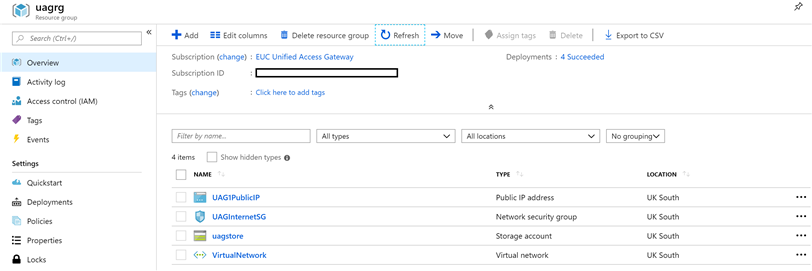
对象将显示在 Azure 门户中。
-
此页面对您有帮助吗?