您可以在部署前準備 Azure 環境。
程序
-
新增一個名為 Azure 資源群組的群組,以在其中部署 Unified Access Gateway 應用裝置。您可以使用 Azure 入口網站 Web 介面,或執行以下範例中的 PowerShell 命令來新增:
版本 命令 PowerShell 5 $resourceGroup="uagrg"$location="uk south" New-AzureRmResourceGroup -Name $resourceGroup -Location $locationPowerShell 7 $resourceGroup="uagrg" $location="uk south" New-AzResourceGroup -Name $resourceGroup -Location $location-
新增一個儲存區帳戶,並在該儲存區帳戶中新增一個名為
vhds的 Blob 容器。此容器用來儲存 Unified Access Gateway 映像。您可以使用 Azure 入口網站 Web 介面,或執行以下範例中的 PowerShell 命令來新增:版本 命令 PowerShell 5 New-AzureRmStorageAccount -ResourceGroupName $resourceGroup -AccountName uagstore `-Location $location -SkuName Standard_LRS New-AzureRmStorageContainer -Name vhds -ResourceGroupName $resourceGroup-StorageAccountName uagstore</code></pre></td> </tr> <tr> <td>PowerShell 7</td> <td> <pre><code>New-AzStorageAccount -ResourceGroupName $resourceGroup -AccountName uagstore-Location $location -SkuName Standard_LRS New-AzRmStorageContainer -Name vhds -ResourceGroupName $resourceGroup ` -StorageAccountName uagstore**附註:**若要在高工作負載情況下將延遲降至最低,可將儲存區帳戶類型從 **Standard\_LRS** 改為使用 **Premium\_LRS**。3. 建立具有預設子網路的虛擬網路。
<table>
<thead>
<tr>
<th>版本</th>
<th>命令</th>
</tr>
</thead>
<tbody>
<tr>
<td>PowerShell 5</td>
<td>    <pre><code>New-AzureRmVirtualNetwork -Name VirtualNetwork -ResourceGroupName $resourceGroup `
-Location $location -AddressPrefix "10.0.0.0/16" PowerShell 7
New-AzVirtualNetwork -Name VirtualNetwork -ResourceGroupName $resourceGroup ` -Location $location -AddressPrefix "10.0.0.0/16"-
或者,虛擬網路可以具有指定的子網路,以便可以指定這些子網路,如下所示。
版本 命令 PowerShell 5 $frontendSubnet = New-AzureRmVirtualNetworkSubnetConfig -Name frontendSubnet `-AddressPrefix "10.0.1.0/24" $backendSubnet = New-AzureRmVirtualNetworkSubnetConfig -Name backendSubnet-AddressPrefix "10.0.2.0/24" New-AzureRmVirtualNetwork -Name VirtualNetwork -ResourceGroupName $resourceGroup-Location $location -AddressPrefix "10.0.0.0/16" -Subnet $frontendSubnet,$backendSubnetPowerShell 7 $frontendSubnet = New-AzVirtualNetworkSubnetConfig -Name frontendSubnet-AddressPrefix "10.0.1.0/24" $backendSubnet = New-AzVirtualNetworkSubnetConfig -Name backendSubnet-AddressPrefix "10.0.2.0/24" New-AzVirtualNetwork -Name VirtualNetwork -ResourceGroupName $resourceGroup ` -Location $location -AddressPrefix "10.0.0.0/16" -Subnet $frontendSubnet,$backendSubnet-
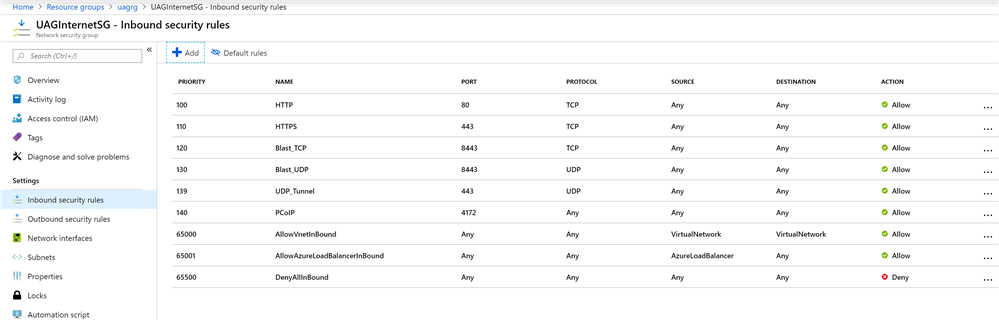
如果要直接從網際網路存取 Unified Access Gateway 應用裝置,請新增一個名為 UAGInternetSG 的安全群組,以控制從網際網路到每個 Unified Access Gateway 的輸入連接埠存取。您可以使用入口網站或透過 PowerShell 來新增安全群組。此安全群組可供多個 Unified Access Gateway 應用裝置共用。例如,對於 Horizon Access,允許以下連接埠:
- HTTPS - TCP 443
- HTTP - TCP 80
- Blast -TCP 8443
- Blast/BEAT UDP 8443
- UDP Tunnel - UDP 443
- PCoIP - TCP 和 UDP 4172
-
(選用) 執行下列其中一個命令,以新增公用 IP 位址物件。
版本 命令 PowerShell 5 New-AzureRmPublicIpAddress -Name UAG1PublicIP -ResourceGroupName $resourceGroup `-AllocationMethod Static -Location $locationPowerShell 7 New-AzRmPublicIpAddress -Name UAG1PublicIP -ResourceGroupName $resourceGroup ` -AllocationMethod Static -Location $location對於可用性區域,請執行下列命令以新增公用 IP 位址物件。 <table> <thead> <tr> <th>版本</th> <th>命令</th> </tr> </thead> <tbody> <tr> <td>PowerShell 5</td> <td> <pre><code>$resourceGroup="uagrg"$ipName="UAG1PublicIP" $location="uk south" $alloc="Static" $sku="Standard" $zone="3"
New-AzureRmPublicIpAddress -ResourceGroupName $resourceGroup -Name $ipName -Location $location -AllocationMethod $alloc -Sku $sku -Zone $zone PowerShell 7
$resourceGroup="uagrg" $ipName="UAG1PublicIP" $location="uk south" $alloc="Static" $sku="Standard" $zone="3"New-AzPublicIpAddress -ResourceGroupName $resourceGroup -Name $ipName -Location $location -AllocationMethod $alloc -Sku $sku -Zone $zone如需 PowerShell 命令的詳細資訊,請參閱 [Microsoft Azure PowerShell 說明文件](https://docs.microsoft.com/en-us/powershell/azure/?view=azps-8.2.0)。結果
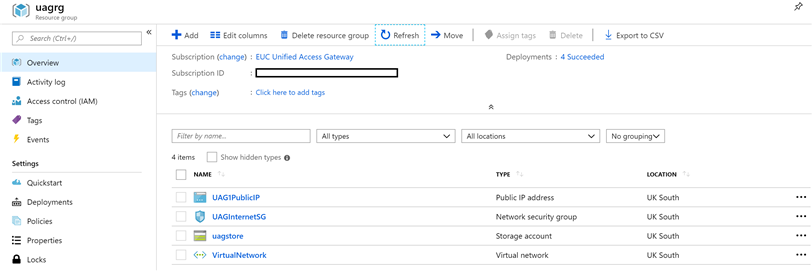
物件會顯示在 Azure 入口網站中。
-
-
-
此頁面對您有幫助嗎?