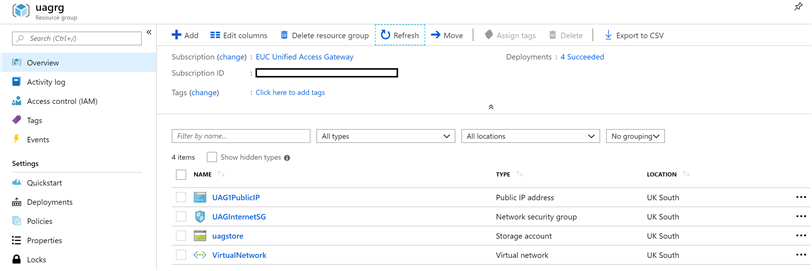
You can prepare the Azure environment before deployment.
Procedure
- Add a group named Azure Resource Group in to which Unified Access Gateway appliances are deployed. You can add using the Azure Portal web interface, or by running the PowerShell command as in this example:
| Version |
Command |
| PowerShell 5 |
$resourceGroup="uagrg"
$location="uk south"
New-AzureRmResourceGroup -Name $resourceGroup -Location $location
|
| PowerShell 7 |
$resourceGroup="uagrg"
$location="uk south"
New-AzResourceGroup -Name $resourceGroup -Location $location
|
2. Add a storage account, and a blob container called `vhds` within that storage account. It is to store the Unified Access Gateway images. You can add using the Azure Portal web interface, or by running the PowerShell commands as in this example:
| Version |
Command |
| PowerShell 5 |
New-AzureRmStorageAccount -ResourceGroupName $resourceGroup -AccountName uagstore `
-Location $location -SkuName Standard_LRS
New-AzureRmStorageContainer -Name vhds -ResourceGroupName $resourceGroup `
-StorageAccountName uagstore
|
| PowerShell 7 |
New-AzStorageAccount -ResourceGroupName $resourceGroup -AccountName uagstore `
-Location $location -SkuName Standard_LRS
New-AzRmStorageContainer -Name vhds -ResourceGroupName $resourceGroup `
-StorageAccountName uagstore
|
Note: For minimal latency with high workloads, Premium_LRS can be used in place of Standard_LRS for the storage account type.
3. Create a Virtual Network with a default subnet.
| Version |
Command |
| PowerShell 5 |
New-AzureRmVirtualNetwork -Name VirtualNetwork -ResourceGroupName $resourceGroup `
-Location $location -AddressPrefix "10.0.0.0/16"
|
| PowerShell 7 |
New-AzVirtualNetwork -Name VirtualNetwork -ResourceGroupName $resourceGroup `
-Location $location -AddressPrefix "10.0.0.0/16"
|
4. Alternatively, the virtual network can have specified subnets so they can be specified as follows.
| Version | Command |
|---|
| PowerShell 5 | $frontendSubnet = New-AzureRmVirtualNetworkSubnetConfig -Name frontendSubnet `
-AddressPrefix "10.0.1.0/24"
$backendSubnet = New-AzureRmVirtualNetworkSubnetConfig -Name backendSubnet `
-AddressPrefix "10.0.2.0/24"
New-AzureRmVirtualNetwork -Name VirtualNetwork -ResourceGroupName $resourceGroup `
-Location $location -AddressPrefix "10.0.0.0/16" -Subnet $frontendSubnet,$backendSubnet
|
| PowerShell 7 | $frontendSubnet = New-AzVirtualNetworkSubnetConfig -Name frontendSubnet `
-AddressPrefix "10.0.1.0/24"
$backendSubnet = New-AzVirtualNetworkSubnetConfig -Name backendSubnet `
-AddressPrefix "10.0.2.0/24"
New-AzVirtualNetwork -Name VirtualNetwork -ResourceGroupName $resourceGroup `
-Location $location -AddressPrefix "10.0.0.0/16" -Subnet $frontendSubnet,$backendSubnet
|
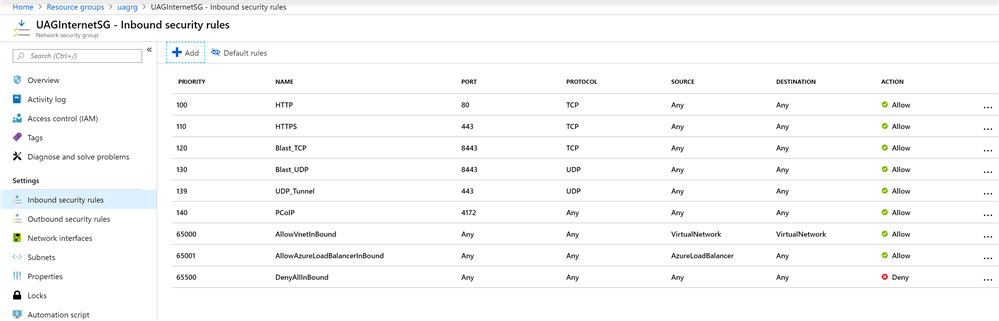
5. If the Unified Access Gateway appliance is to be directly accessed from the Internet, add a security group called
UAGInternetSG to control the inbound port access from the Internet to each Unified Access Gateway. You can add a security group using the portal or with PowerShell. This security group can be shared by several Unified Access Gateway appliances. For example, with the Horizon access, allow the following ports:
- HTTPS - TCP 443
- HTTP - TCP 80
- Blast -TCP 8443
- Blast/BEAT UDP 8443
- UDP Tunnel - UDP 443
- PCoIP - TCP and UDP 4172
- (Optional) Run either of the following command to add a public IP address object.
| Version |
Command |
| PowerShell 5 |
New-AzureRmPublicIpAddress -Name UAG1PublicIP -ResourceGroupName $resourceGroup `
-AllocationMethod Static -Location $location
|
| PowerShell 7 |
New-AzRmPublicIpAddress -Name UAG1PublicIP -ResourceGroupName $resourceGroup `
-AllocationMethod Static -Location $location
|
For Availability Zone, run the following command to add a public IP address object.
| Version | Command |
|---|
| PowerShell 5 | $resourceGroup="uagrg"
$ipName="UAG1PublicIP"
$location="uk south"
$alloc="Static"
$sku="Standard"
$zone="3"
New-AzureRmPublicIpAddress -ResourceGroupName $resourceGroup -Name $ipName
-Location $location -AllocationMethod $alloc -Sku $sku -Zone $zone
|
| PowerShell 7 | $resourceGroup="uagrg"
$ipName="UAG1PublicIP"
$location="uk south"
$alloc="Static"
$sku="Standard"
$zone="3"
New-AzPublicIpAddress -ResourceGroupName $resourceGroup -Name $ipName -Location
$location -AllocationMethod $alloc -Sku $sku -Zone $zone
|
For more information about the PowerShell commands, see
Microsoft Azure PowerShell Documentation.
Results
The objects are displayed in the Azure portal.