You can entitle individual users or a group by assigning them to the AirWatch Provisioning app. When you entitle a group, the members of the group are provisioned as users, if they do not exist in Workspace ONE UEM.
Procedure
-
Log in to the Omnissa Access console.
-
Select the Resources > Web Apps tab.
-
Select the check box next to AirWatch Provisioning in the application list. Then click Assign.
-
Select users and groups by entering the name in the text box and selecting from the results. To select all users in your organization, enter
ALL USERSin the text box.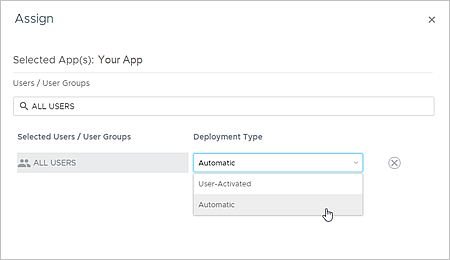
-
Under Deployment Type, select Automatic.
If you leave the default as User-Activated, the user cannot be provisioned in Workspace ONE UEM.
-
Click Save.
Users that are assigned to the app are provisioned in Workspace ONE UEM when they are entitled to the app.
Group memberships are also provisioned to Workspace ONE UEM for the groups that you add in the Group Provisioning page.
Was this page helpful?