You can provision users and groups from Okta to Omnissa Access using the Workspace ONE application that is available in the Okta Integration Network (OIN). The Workspace ONE application uses System for Cross-domain Identity Management (SCIM) provisioning, which is an open standard for automating the exchange of user identity information.
To configure SCIM provisioning from Okta to Omnissa Access, you perform prerequisite tasks in Omnissa Access first and then configure the Workspace ONE application in Okta.
This diagram shows a high-level overview of the provisioning process:
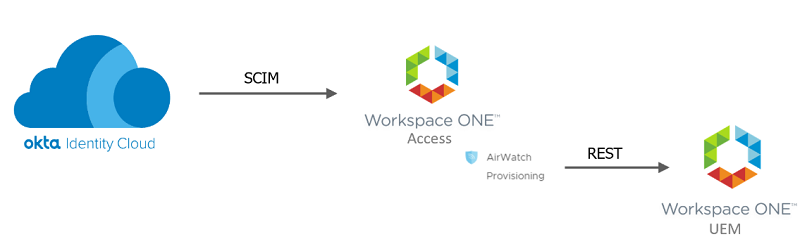
- Okta is configured to use the Workspace ONE provisioning application.
- Okta provisions the user to Omnissa Access using SCIM.
- The AirWatch Provisioning adapter in Omnissa Access provisions the user to Omnissa Workspace ONE® UEM, if Workspace ONE UEM is part of your Workspace ONE-Okta integration.
Note: This document only covers SCIM user provisioning from Okta to Omnissa Access. If you are also using Workspace ONE UEM and want to provision users from Omnissa Access to Workspace ONE UEM, see Configuring AirWatch Provisioning App in Omnissa Access.
Supported Features
The Workspace ONE application in the Okta Integration Network supports the following features:
- Create users
- Update user attributes
- Deactivate users
- Create groups
- Add or remove group members
Note:
Using the same Okta group for assignments and for group push is not currently supported. To maintain consistent group membership between Okta and Omnissa Access, you must create a separate group that is configured to push groups to Omnissa Access.
Requirements
- A Omnissa Access SaaS tenant
- An Okta tenant
- (Optional) Workspace ONE UEM SaaS tenant or version 19.09 or later for dedicated or on premise
- Download and install the Postman app.
About This Document
Follow the procedures in the order in which they are listed in this document. Before you configure the Workspace ONE application in the Okta Admin console, you must perform the following prerequisite tasks in Omnissa Access:
- Create an OAuth 2.0 client.
- Generate an OAuth bearer token (requires Postman).
- Create a directory of type Other (requires Postman).
Related Documentation
Was this page helpful?