When users launch a Citrix-published desktop or application from the Omnissa Intelligent Hub portal or app, an ICA file is downloaded and passed to the Citrix Workspace app or Citrix Receiver. Citrix Workspace app and Citrix Receiver are native OS applications which launch Citrix-published desktops and applications. The launch experience varies across different platforms and browsers.
Launch Process
Depending on the platform and browser, the application or desktop is launched differently. In some cases the application or desktop is launched directly. In other cases, the user needs to associate the .ica file type with the Citrix Workspace app or Citrix Receiver first so that the application or desktop can be launched directly. In a few cases, the user needs to click the downloaded ICA file to launch the application or desktop. See the table for detailed information.
| Platform | Browser | How the application or desktop is launched | Action Required |
|---|---|---|---|
| Windows | Firefox | Launches the application or desktop directly | None |
| Chrome | Launches the application or desktop directly. | None | |
| Internet Explorer | Downloads the ICA file with a .ica extension. After the file type is associated with the Citrix Workspace app or Citrix Receiver, launches the application or desktop automatically. | In the browser, associate the .ica file type with the Citrix Workspace app or Citrix Receiver. | |
| Edge | Launches the application or desktop directly. | None | |
| Mac | Safari, Firefox | Launches the application or desktop directly | None |
| Chrome | Launches the application or desktop directly | None | |
| Windows Surface | Chrome | Downloads the ICA file with a .ica extension. After the file type is associated with the Citrix Workspace app or Citrix Receiver, launches the application or desktop automatically. | In the browser, associate the .ica file type with the Citrix Workspace app or Citrix Receiver. |
| Android | Chrome | Downloads the ICA file | Click the ICA file to launch the desktop or application. |
| iOS | Safari | Downloads the ICA file | Click the ICA file to launch the desktop or application. |
| Chrome | Unable to download the ICA file | This scenario is not supported. |
Allowing Citrix Workspace app or Citrix Receiver Plugin on Firefox
On Firefox, when users launch a Citrix-published application, they are prompted to allow the Citrix Workspace app or Citrix Receiver plugin.
Allow https://IdentityManagerHostname to run Citrix Receiver?
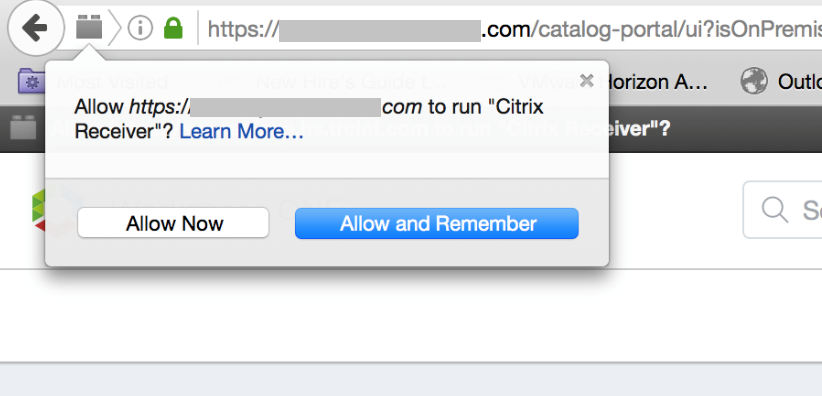
Users must click Allow Now or Allow and Remember to launch the application.
Was this page helpful?