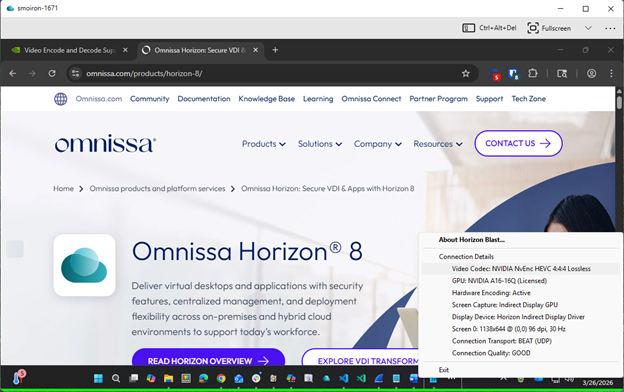
You can activate the Horizon Blast display protocol to use an encoding approach called progressive build, or build-to-lossless. This feature provides a highly compressed initial image, called a lossy image, that is then progressively built to a full lossless state. Lossless mode ensures that every frame transmitted from the virtual desktop to the client is delivered without any visible quality loss or compression artifacts. A lossless state means that the image appears with the full fidelity intended.
To activate lossless compression for Horizon Blast, configure the corresponding setting on the agent machine:
-
Windows agent: Activate the Build to Lossless GPO setting as described in Horizon Blast Policy Settings.
Alternatively, you can set the
EncoderBuildToLosslesskey to1in theHKEY_LOCAL_MACHINE\SOFTWARE\Omnissa\Horizon\Blast\Configfolder in the Windows registry on the agent machine. The default value is0(deactivated), which means that lossless compressed is turned off.Configuration changes to lossless compression take place immediately on the Windows desktop.
-
Linux agent: Set the RemoteDisplay.buildToLossless configuration option to
truein/etc/omnissa/config.Configuration changes to lossless compression take place after logging out and logging back in to the Linux desktop.
Note: Enabling lossless compression for Horizon Blast causes an increase in bandwidth and CPU usage.
Enabling Client-Side Lossless Indicator
End users might benefit from a visual client-side indicator (Lossless Indicator) that confirms lossless mode is enabled and active.
To enable the Lossless Indicator, update the client configuration file as shown below:
%APPDATA%\Omnissa\config.ini
RemoteDisplay.showLosslessIndicator=1
The lossless indicator, a subtle and unobtrusive colored line at the bottom of the window or application, can be customized in the same configuration file:
-
Indicator thickness (up to 10 pixels):
viewClient.losslessHeight=10 -
Indicator color (ARGB value):
viewClient.losslessColor=0x8800FF00
Was this page helpful?