You can use Windows Performance Monitor (perfmon) to examine performance statistics for a Horizon Blast session.
Blast networking performance and diagnostic counters are primarily collected and published at the scope of a desktop session logged in from the remote client.
You can find these performance counters in perfmon. Counter names start with Horizon Blast
The following metrics are available for all remote features:
- Transmitted Bytes
- Received Bytes
- Transmitted Packets
- Received Packets
Imaging and Horizon Blast Session counters display additional metrics. For details, see https://kb.omnissa.com/s/article/89350.
The following performance counters for each remote desktop feature over Horizon Virtual Channel (also known as VVC) in perfmon show the non-zero performance metrics while the feature is running:
-
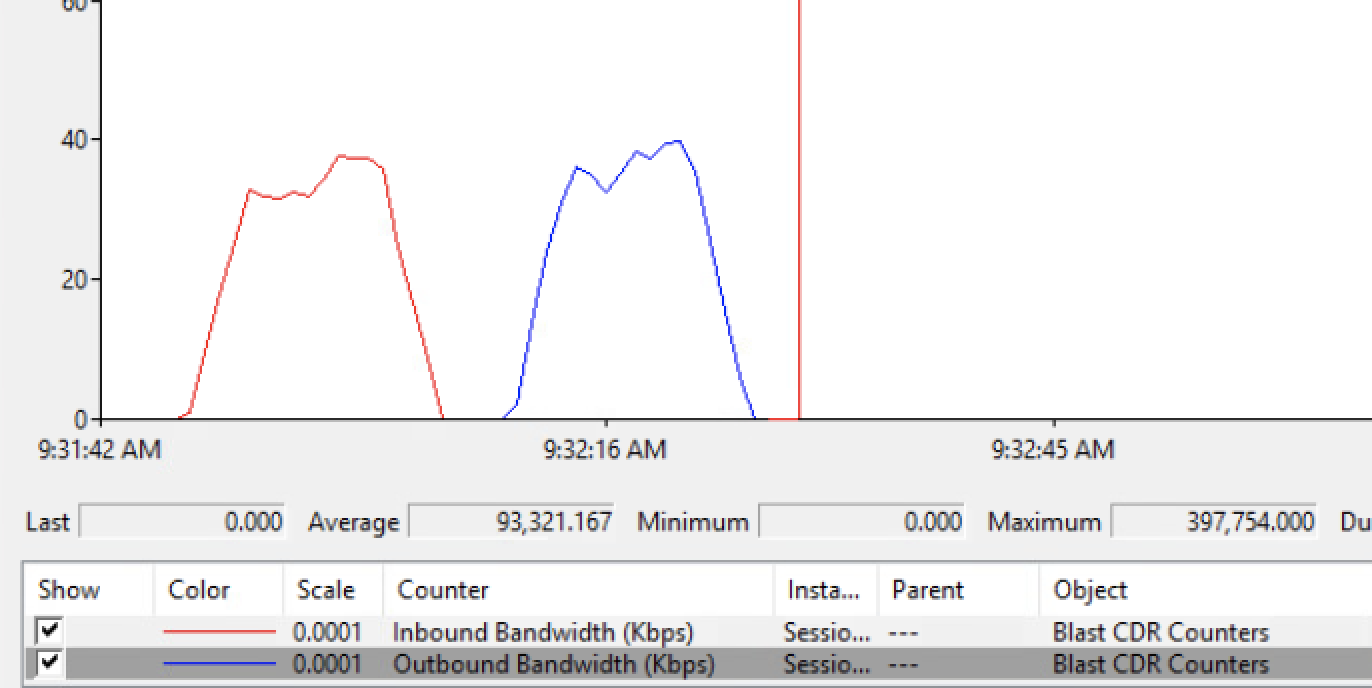
Incoming and Outgoing Bandwidth (kbps): Rolling bandwidth calculation over constant number of samples. Each sample saves bytes transferred and timestamps for accurate bandwidth measurement, providing a snapshot of the most active channels at any given time and their performance characteristics. For example, you can compare file-copy speeds of USB and Client Drive Redirection for identical files. This graph shows the time, direction, duration, and in/out bandwidth numbers for CDR file transfers.
-
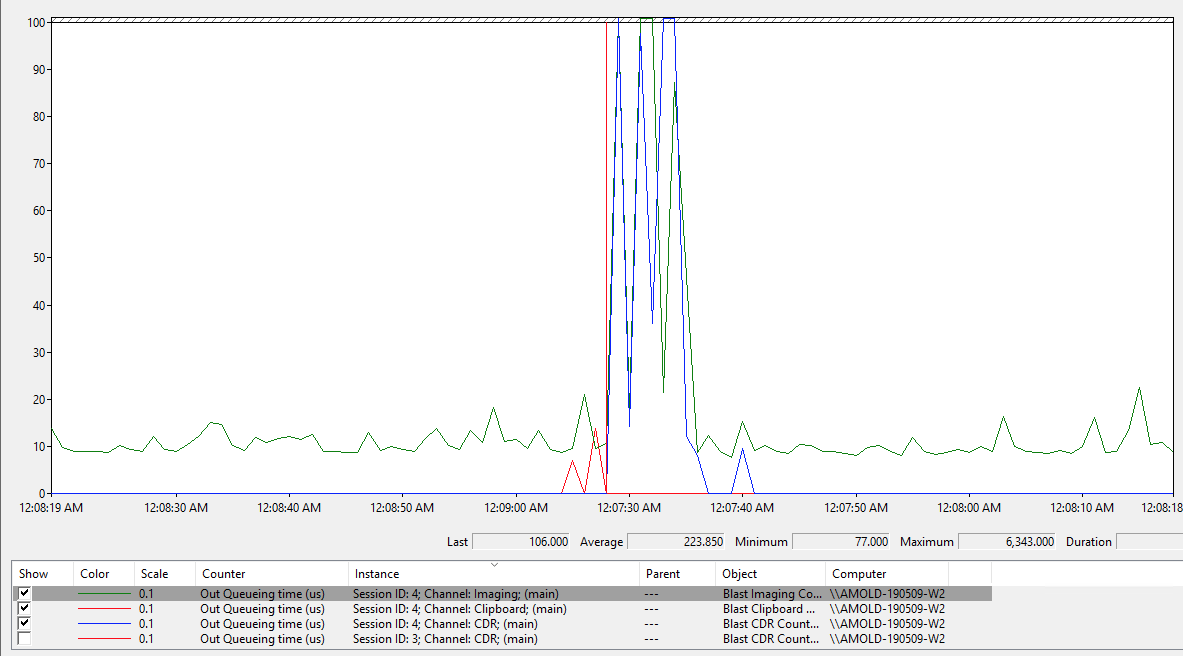
Out Queueing time (us): Time between outbound IO request entering and completing VVC, providing insight into how different loads impact the overall end user experience and if the scheduling policy is working as expected. This graph shows Imaging (vnc/encoder) packets sent out at a fixed pace until CDR transfer occurs and impacts latency by a significant factor (>10x, max >60x).
You can see partner VVC plugins and features with their feature names in Horizon Blast Other Features. Partner features built on top of VdpService and RdpVcBridge interfaces get automatically enrolled for metric collection.
Remote Features and Corresponding VVC Names
| Feature | VVC Name |
|---|---|
| Client Drive Redirection File association | tsdr |
| HTML5 Redirection Browser Content Redirection Microsoft Teams Redirection Geolocation Redirection | html5mmr |
| Real-Time Audio-Video | RTAV |
| Serial Port Redirection Scanner Redirection | NLR3hv, NLW3hv |
| Skype for Business Redirection | rpcme |
| Smart Card Redirection | "Smart Card Virtual Channel" |
| TSMMR (Windows Media Player Redirection) | tsmmr |
| Unity Touch/ Seamless Windows | OmnissaRde UNITY_UPDATE_CHA |
| URL Content Redirection Unity / Seamless Windows Watermark Input Tracker SDO Sensor | OmnissaRde |
| USB Redirection | UsbRedirection |
| Integrated Printing | PrintRedir |
Was this page helpful?