This topic describes how to modify the color of active tabs in the Administration Console.
To modify the color of active tabs, edit the stylesForCustomBranding.css file in both tenant appliances in the organization:
$> /usr/local/desktone/release/dt-platform-20_2_0/deploy/dt-tenant-node-20.2.0-bin/horizonadmin/static/css/production/ stylesForCustomBranding.css
Edit the appropriate section of code so that it is similar to the following example, uncommenting the line containing background-color and changing the color value.
.tabstrip .atk-tabs .line-container,
.tabstrip .atk-tabs .atk-tab:not(.active):hover:after {
  background-color: red !important; }
The following images show an example of the appearance of the page when the code has been edited as shown above.
| BEFORE | AFTER |
|---|---|
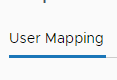 | 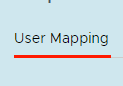 |
Was this page helpful?