Assist configuration is a feature within the Unified Endpoint Management console that allows administrators to activate or deactivate specific features and tools. It provides granular control over tools, features, and privacy settings at the Organization Group and Smart Group levels. This feature is available through UEM Configurations, offering greater flexibility for tailored deployments.
Configurations can be set up for smart groups within the current organization group, affecting the devices within those smart groups.
For information on the various tools and features available on the Workspace ONE Assist console, see Start an Assist Session.
Create new configurations
To create new configurations:
-
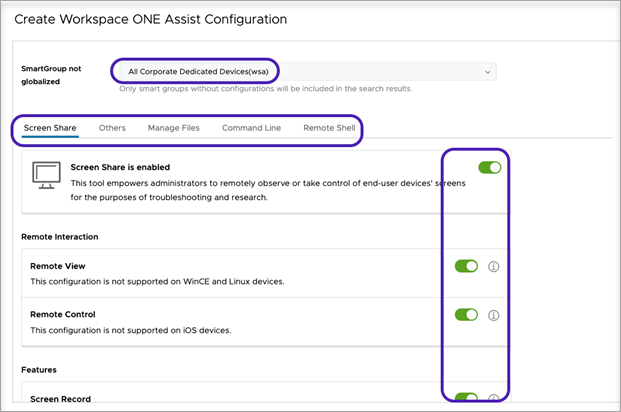
In the Workspace ONE UEM console, navigate to Settings > Configurations > Assist configurations. The configuration page appears.
-
Select Create New and enter the organization group or smart group name.
-
Toggle to activate and deactivate the features and tools. Select Save.
Modify existing configuration
You can modify your existing configurations to meet any specific requirement or even delete a configuration that you no longer need.
To edit or delete the existing configurations:
- In the Workspace ONE UEM console, navigate to Settings > Configurations > Assist configurations.
- Select View Configuration Smart Groups List.
- From the configurations list, select the configuration you want to modify. Click Edit or Delete.
Unattended Mode
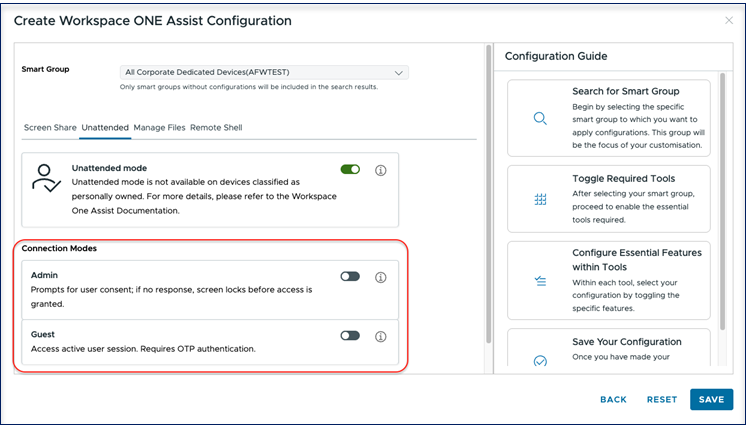
The Unattended mode allows connecting to groups of devices where the user's authorization is not required. This mode is not available for personally owned devices.
When you toggle the Unattended mode setting, two connection modes become available:
- Admin Mode: Notifies the device user when a connection is attempted. If no response is received, the screen is locked, and the session connects automatically. Ideal for shared devices.
- Guest Mode: Allows console users to join existing user sessions by entering an OTP. Ideal for kiosks, signage, and POS devices.
Was this page helpful?