You can configure and enroll rugged devices automatically by editing a previously existing staging package with the Sideload option as the staging enrollment type in the Enrollment Configuration wizard.
PREREQUISITES
You must either have a previously existing staging package or you must create a new staging package before you can attach the sideload option to it. This step is not optional Create this new staging package by following the instructions in Stage Devices With a Manually Created Staging Package.
The staging user for the staging package must be a basic user account. Do not use staging users or multi-user staging.
Following these steps for an Android staging package results in downloading a sideload staging package specifically for Zebra devices.
See also Enroll Honeywell Devices with Sideload Staging, Android and Enroll Platform OEM Devices with Sideload Staging, Android.
PROCEDURE
-
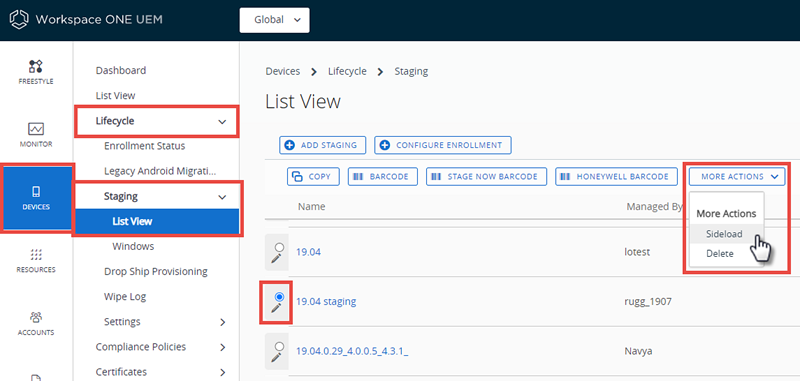
Navigate to Devices > Lifecycle > Staging > List View.
-
Select an existing staging package that you want to attach a sideload option for. Select the More Actions button and select Sideload from the drop-down.
-
Select the Organization Group to which this staging applies.
-
(Optional for Android and Windows Rugged, not supported for QNX) Enable Universal Barcode to enable a universal enrollment so devices can be enrolled without automatically assigning an organization group.
The universal barcode allows you to enroll devices without needing a Sideload enrollment for each organization group.
The Hub prompts you to enter an organization group after beginning the staging process.
-
Select Download to start downloading the zip file of the staging sideload.
Was this page helpful?