Omnissa Access supports Cross-Origin Resource Sharing (CORS) for OAuth 2.0 and OpenID Connect (OIDC) endpoints. This support enables browser-based applications such as single-page applications (SPAs), hosted on approved domains, to securely call Omnissa Access for tokens and user information directly from the browser.
CORS is a browser-based security mechanism that enables a web browser to perform cross-domain requests using HTTP headers. With CORS, web applications in one domain can access resources in a different domain.
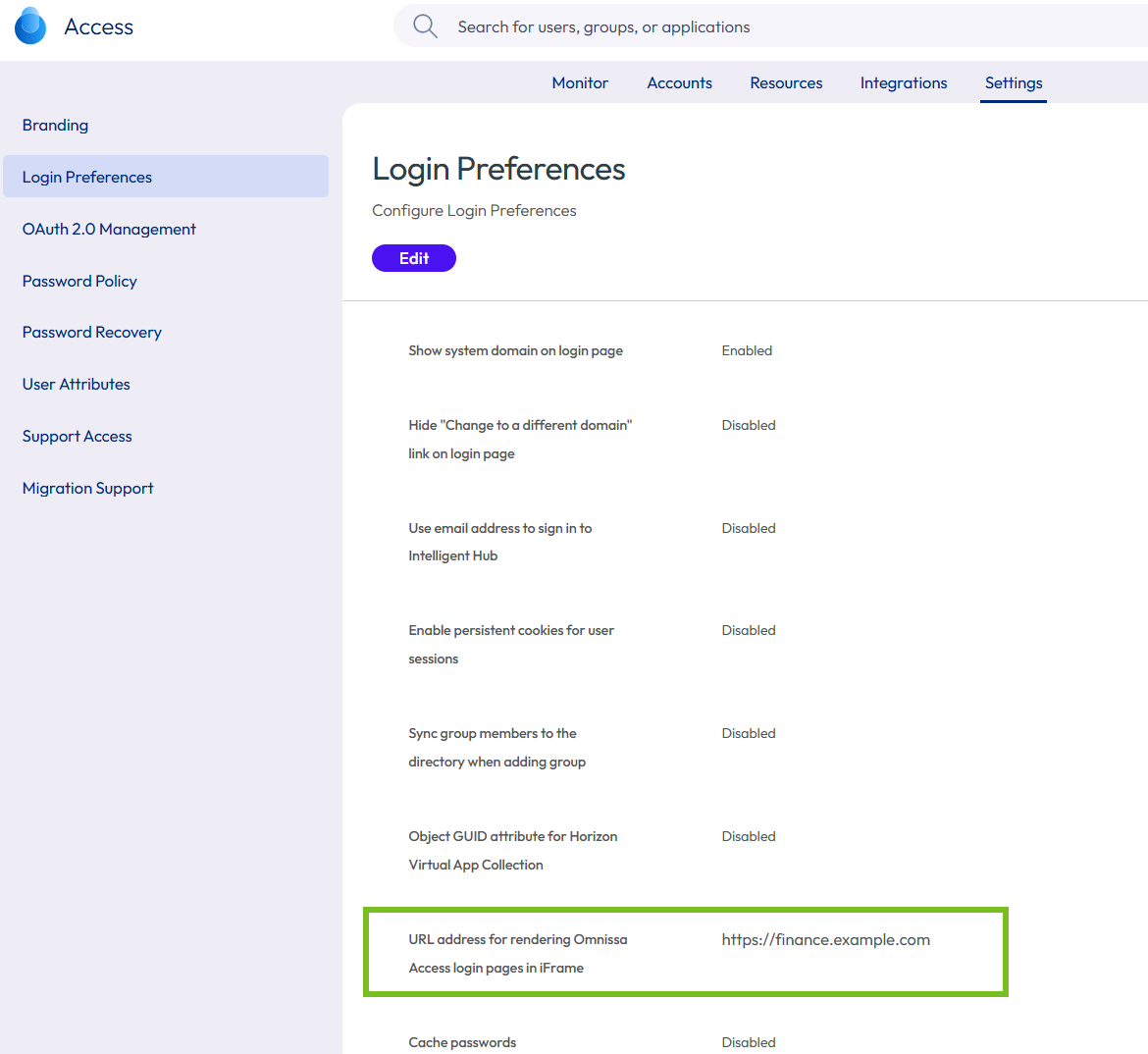
In Omnissa Access, you can enable CORS support for specific cross-origin domains by configuring them in the Settings > Login Preferences > URL address for rendering Omnissa Access login pages in iFrame option in the admin console. Browsers running applications in one of these domains will be able to successfully communicate with the Omnissa Access tenant to request an access token as part of the OAuth 2.0 authorization flow.
For example, if your Omnissa Access tenant domain is https://example.wss.workspaceone.com, to support requests from an application running in the domain https://finance.example.com, you would add https://finance.example.com to the URL address for rendering Omnissa Access login pages in iFrame list on the Login Preferences page. Cross-domain requests from domains that are not on the list will be rejected.
Requirements for configuring a cross-origin domain in Omnissa Access
When you add domains to the URL address for rendering Omnissa Access login pages in iFrame list, follow these requirements:
- You must specify a fully-qualified domain name (FQDN), such as
https://finance.example.com. - The URL must include only the protocol, domain, and optional port. Do not include paths, query parameters, or fragments.
- To specify a port, use the format
https://FQDN:port. For example,https://finance.example.com:8443. - Only the HTTP and HTTPS protocols are supported.
- Wildcards are not supported.
CORS-enabled OAuth 2.0 and OIDC endpoints
The following Omnissa Access endpoints support CORS when called from approved cross-origin domains:
| Endpoint | Supported Methods |
|---|---|
/acs/authorize | GET, OPTIONS |
/acs/token | POST, OPTIONS |
/acs/userinfo | GET, POST, OPTIONS |
/acs/openid/logout | GET, POST, OPTIONS |
/acs/revoke | POST, OPTIONS |
/acs/.well-known/openid-configuration | GET, OPTIONS |
/acs/jwks | GET, OPTIONS |
See the Omnissa Access API Reference for more information about Omnissa Access APIs.
Important: When integrating browser-based applications with Omnissa Access, use the OAuth 2.0 Authorization Code flow with Proof Key for Code Exchange (PKCE), which is the recommended standard. The Implicit Grant flow is no longer recommended by the OAuth standards and is deprecated in the OAuth 2.1 specification.
Procedure
-
In the Omnissa Access console, navigate to Settings > Login Preferences.
-
Click Edit.
-
In the URL address for rendering Omnissa Access login pages in iFrame text box, enter the URL from which you want to allow cross-origin requests.
Make sure the URL follows the requirements listed above.
-
To add multiple URLs, click the + icon and add the values.
-
Click Save to save your changes.
For example:
Was this page helpful?