在 Omnissa Access 服务中配置 Microsoft 365 应用程序以进行单点登录之前,与 Microsoft 服务提供商协作,确保受管的 Microsoft 365 环境设置正确。
**注意:**Microsoft 已停用 MSOnline (Connect-MsolService/Set-MsolDomainAuthentication) 和 AzureAD PowerShell 模块。现在,所有域联合管理都使用 Microsoft.Graph.Identity.DirectoryManagement 模块通过 Microsoft Graph API 来进行。本指南反映了当前支持的工作流。
必备条件
- Microsoft 365 订阅:Business Premium 或更高版本。
- Entra ID 租户管理员访问:全局管理员或域管理员角色。
- PowerShell 版本 5.1 或更高版本。建议使用版本 7.0 或更高版本 (
pwsh)。 - Microsoft Graph PowerShell 模块:
Microsoft.Graph.Identity.DirectoryManagement。 - Entra API 权限:
Domain-InternalFederation.ReadWrite.All和Domain.ReadWrite.All(委派或应用程序)。 - Omnissa Access 租户:为 Microsoft 365 配置了 WS-Fed/SAML 应用程序的活动租户。
- 目标域:在要联合的 Entra 租户中注册的域(例如,
corp.example.com)。 - 属性:已启用
userPrincipalName和objectGUID或sourceAnchor。
**注意:**要确认已安装的 PowerShell 版本,请运行 $PSVersionTable.PSVersion 并验证主要版本是否为 7 或更高版本。PowerShell 7 可从官方 GitHub 版本页面获取。
获取 Omnissa Access IdP 元数据和签名证书
Microsoft 365 应用程序的单点登录配置需要 Omnissa Access 签名证书和端点 URI。IdP 元数据 URL 在一个位置提供了所有这些值。
-
登录 Omnissa Access 管理控制台。
-
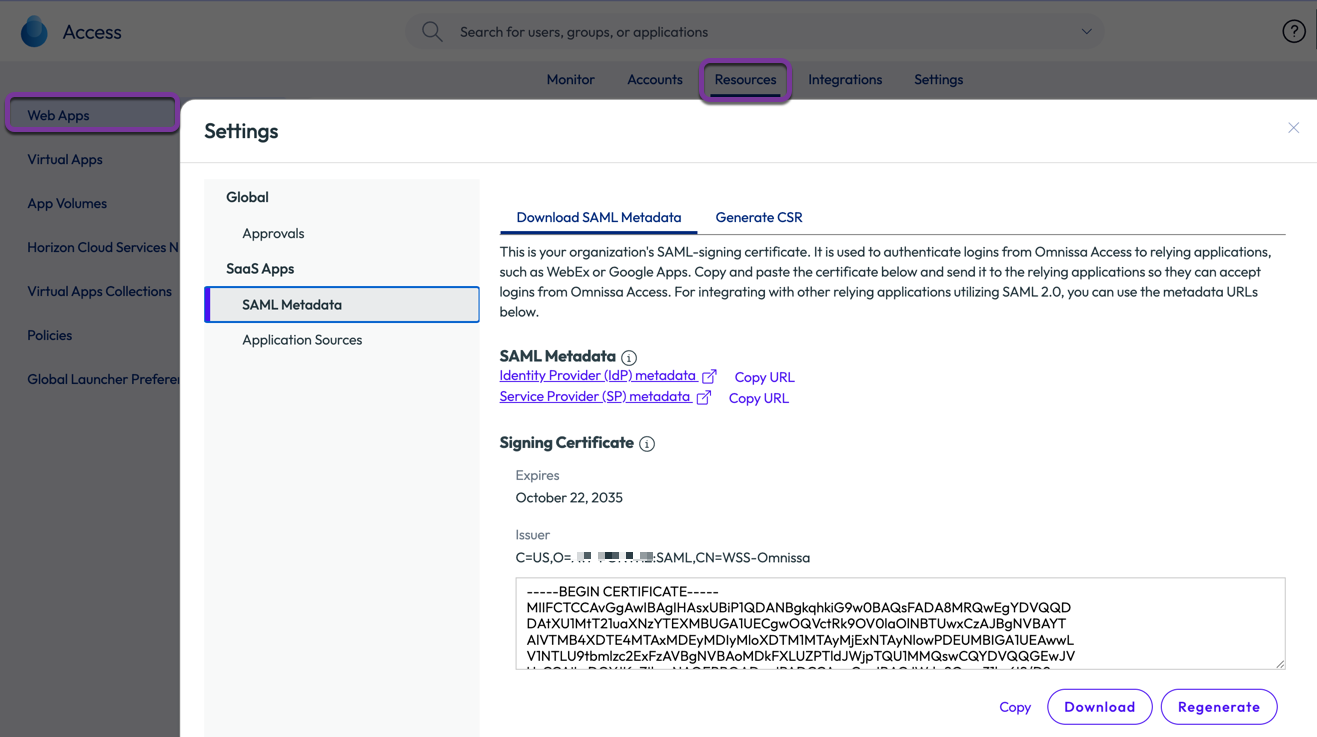
导航到资源 > Web 应用程序 > 设置。
-
单击 SAML 元数据。
-
复制身份提供程序 (IdP) 元数据 URL。它遵循以下模式:
https://<your-access-tenant>/SAAS/API/1.0/GET/metadata/idp.xml例如:
https://mycompany.workspaceoneaccess.com/SAAS/API/1.0/GET/metadata/idp.xml -
在浏览器中打开该 URL 以确认其返回 XML 文档。该文档应显示
<EntityDescriptor>根元素,其中包含带有签名证书的<KeyDescriptor>节点。 -
从该 XML 中,复制签名证书,即第一个
<ds:X509Certificate>元素中的 Base64 内容。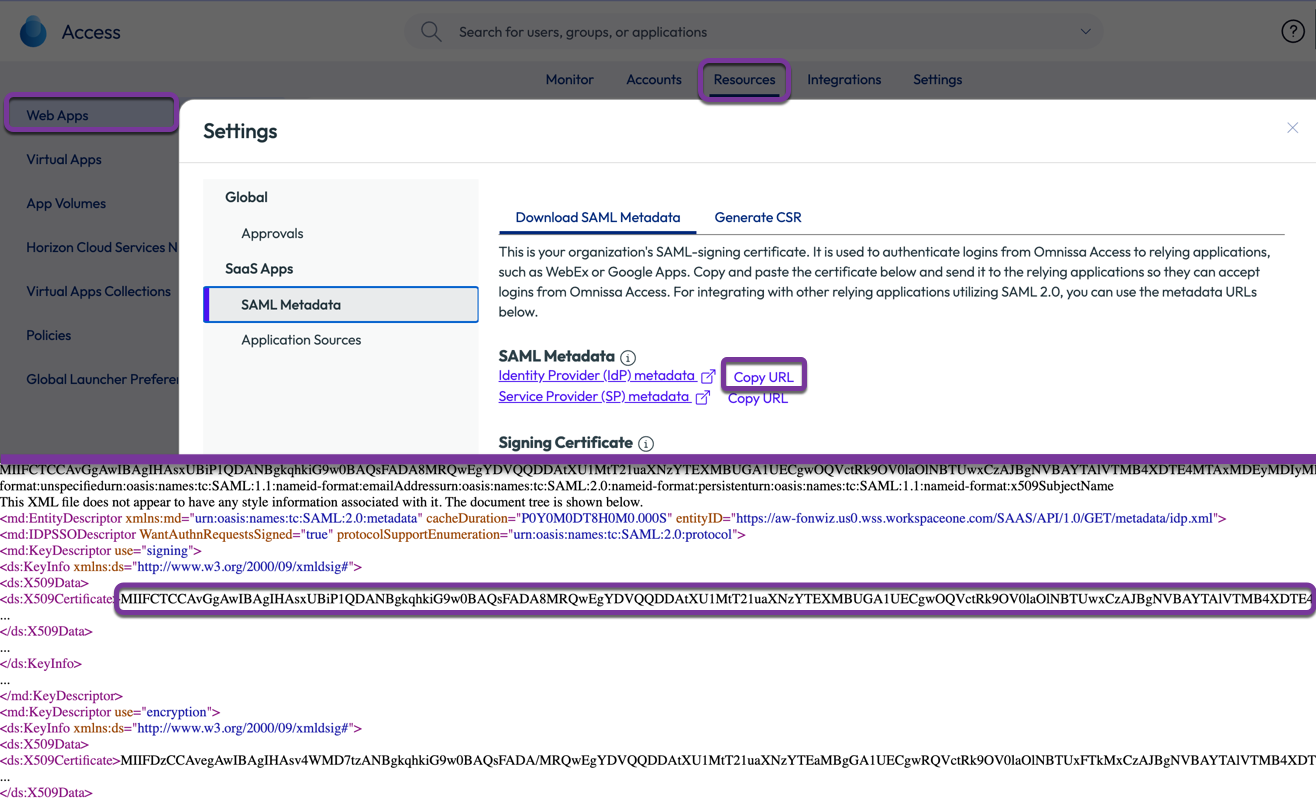
**重要信息:**请完全按原样复制证书值,不要包含空格、
-----BEGIN CERTIFICATE-----/-----END CERTIFICATE-----标头和换行符。整个值必须是单个未中断的 Base64 字符串。在下一步中构建联合配置负载时,将使用此签名证书值。
安装并导入 Microsoft Graph 模块
# Install if not already present
Install-Module Microsoft.Graph.Identity.DirectoryManagement -Scope CurrentUser -Force

# Import
Import-Module Microsoft.Graph.Identity.DirectoryManagement
在 Microsoft Entra ID 中配置联合域
将 Microsoft 365 受管域转换为联合域以启用单点登录。有两个配置途径可用:一个是直接完成每个步骤的手动 Graph PowerShell 过程(选项 A),另一个是开源自动化脚本(选项 B)以供参考。
如果要配置多个租户,请将每个受管域转换为联合域,并单独更新每个域的设置。
选项 A — 手动 Graph PowerShell(推荐)
连接到 Microsoft Graph
Connect-MgGraph `
  -TenantId "12345678-1234-1234-1234-123456789012" `
  -Scopes "Domain-InternalFederation.ReadWrite.All", "Domain.ReadWrite.All"
这将打开浏览器登录提示。使用全局管理员或域管理员帐户。
列出已验证的域
Get-MgDomain | Select-Object Id, AuthenticationType, IsVerified
先确认目标域显示在输出中且 IsVerified = True,然后再继续。
从 Omnissa Access IdP 元数据中收集端点值
所有端点 URL 均派生自 Omnissa Access 基础主机名 (<access-host>):
| BodyParameter 字段 | 值 |
ActiveSignInUri | https://<access-host>/SAAS/auth/wsfed/active/logon |
PassiveSignInUri | https://<access-host>/SAAS/API/1.0/POST/sso |
SignOutUri | https://<access-host>/SAAS/auth/wsfed/active/logon |
MetadataExchangeUri | https://<access-host>/SAAS/auth/wsfed/services/mex |
IssuerUri | https://<your-domain>.<access-host>(例如,https://corp.example.com.mycompany.workspaceoneaccess.com) |
PreferredAuthenticationProtocol | wsFed |
**注意:**针对同一 Omnissa Access 租户联合多个域时,每个域都需要在被动端点和 MEX 端点上具有其自身的 domainid 查询参数。例如:https://<access-host>/SAAS/API/1.0/POST/sso?domainid=corp.example.com。为每个域相应地更新 PassiveSignInUri 和 MetadataExchangeUri。
注意:PreferredAuthenticationProtocol 是必需参数。Entra ID 接受不含该参数的负载,但 SP/RP 启动的身份验证流会失败,即使对象显示 wsFed 也是如此。
构建 BodyParameter 负载
$bodyParameter = @{
    DisplayName                     = "Example Corp"
    ActiveSignInUri                 = "https://mycompany.workspaceoneaccess.com/SAAS/auth/wsfed/active/logon"
    PassiveSignInUri                = "https://mycompany.workspaceoneaccess.com/SAAS/API/1.0/POST/sso"
    SignOutUri                      = "https://mycompany.workspaceoneaccess.com/SAAS/auth/wsfed/active/logon"
    IssuerUri                       = "https://corp.example.com.mycompany.workspaceoneaccess.com"
    MetadataExchangeUri             = "https://mycompany.workspaceoneaccess.com/SAAS/auth/wsfed/services/mex"
    SigningCertificate              = "<base64-cert-from-idp-metadata>"
    PreferredAuthenticationProtocol = "wsFed"
    FederatedIdpMfaBehavior         = "acceptIfMfaDoneByFederatedIdp"
}
FederatedIdpMfaBehavior 选项
| 值 | 行为 |
acceptIfMfaDoneByFederatedIdp | (默认)Entra 接受由 Omnissa Access 执行的 MFA。 |
enforceMfaByFederatedIdp | Entra 要求 MFA 始终由 Omnissa Access 执行。 |
rejectMfaByFederatedIdp | Entra 忽略 Omnissa Access 中的 MFA 声明并执行自身的 MFA。 |
创建联合配置
New-MgDomainFederationConfiguration `
  -DomainId "corp.example.com" `
  -BodyParameter $bodyParameter
这将在 Entra ID 中为目标域创建 WS-Fed 联合配置。
选项 B — 社区自动化脚本
作为参考,提供了一个 PowerShell 脚本 (New-MgDomainFederation.ps1),此脚本可在一次运行中自动执行元数据提取、负载构建和 Graph API 调用。
**注意:**此脚本作为开源示例提供,不是正式支持的 Omnissa 产品功能。在生产环境中使用之前,请仔细查看。
可从以下位置获取此脚本及其文档和用法示例:
https://github.com/euc-oss/euc-samples/tree/main/Access-Samples/Entra-Domain-Federation-Management
验证联合配置
运行任一选项后,验证联合配置。
Get-MgDomainFederationConfiguration -DomainId "corp.example.com" |
  Select-Object DisplayName, IssuerUri, ActiveSignInUri, PassiveSignInUri, MetadataExchangeUri, SigningCertificate
检查以下情况:
IssuerUri与创建期间设置的值匹配。ActiveSignInUri和PassiveSignInUri指向 Omnissa Access 租户。SigningCertificate已填充(非空)。- 域的
AuthenticationType已更改为Federated:
Get-MgDomain -DomainId "corp.example.com" | Select-Object Id, AuthenticationType
预期输出:
Id                  AuthenticationType
--                  ------------------
corp.example.com    Federated
故障排除
| 症状 | 可能的原因 | 解决方案 |
Connect-MgGraph 因权限不足而失败 | 帐户缺少域管理员或全局管理员角色 | 使用正确的管理员帐户登录 |
New-MgDomainFederationConfiguration 返回 400 错误 | 尚未在 Entra 中验证域,或者联合配置已存在 | 运行 Get-MgDomain 以确认域状态;使用 Update-MgDomainFederationConfiguration 更新现有配置 |
| 拒绝签名证书值 | 证书包含空格或页眉/页脚行 | 确保该值是单个未中断的 Base64 字符串,且不含 -----BEGIN CERTIFICATE----- 包裹标记 |
| 用户在联合后看到错误 | Omnissa Access 与 Entra 之间存在时钟偏差 | 在 Omnissa Access 服务器上确认 NTP 同步;Entra 允许的最大时钟偏差为 5 分钟 |
AuthenticationType 仍为 Managed | 已创建联合配置,但未更新域身份验证类型 | 确认 New-MgDomainFederationConfiguration 已完成而未出现错误 |
旧版参考 — 将旧 MSOnline 参数映射到新 Graph 参数
对于使用已停用的 Set-MsolDomainAuthentication cmdlet 构建的现有配置,下表提供了旧版参数与新的 Graph 方法之间的映射。
| 旧版 Set-MsolDomainAuthentication | 新的 New-MgDomainFederationConfiguration BodyParameter 字段 |
-DomainName | -DomainId(cmdlet 参数,不在 BodyParameter 中) |
-Authentication Federated | 通过调用 New-MgDomainFederationConfiguration 隐含 |
-IssuerUri | IssuerUri |
-FederationBrandName | DisplayName |
-PassiveLogOnUri | PassiveSignInUri |
-ActiveLogOnUri | ActiveSignInUri |
-LogOffUri | SignOutUri |
-MetadataExchangeUri | MetadataExchangeUri |
-SigningCertificate | SigningCertificate |
| (不可用) | PreferredAuthenticationProtocol — 设置为 wsFed |
| (不可用) | FederatedIdpMfaBehavior — 控制 MFA 声明处理 |
其他资源
- New-MgDomainFederationConfiguration cmdlet 参考
- Microsoft Graph PowerShell SDK 安装指南
- Omnissa Access 管理控制台:资源 > Web 应用程序 > 设置 > SAML 元数据
Was this page helpful?