Omnissa Horizon Cloud supports the Horizon Control Plane, which is a cloud-hosted control plane that provides SaaS services for use with your Horizon 8 cloud-connected and supported cloud-native DaaS Horizon Cloud deployments.
What is Horizon Cloud
Horizon Cloud connects its cloud-managed control plane with the underlying infrastructure that hosts your desktops and applications. Horizon Cloud uses capacity providers, such as public cloud services or on-premises platforms, to supply the capacity-type compute, storage, and networking resources for your deployments.
Key aspects of Horizon Cloud include the following:
-
Unified management through the cloud: The Horizon Cloud Control Plane centralizes management, monitoring, and orchestration of all your Horizon Edges, even when your capacity spans multiple platforms or locations.
-
Consistent deployment framework: While each capacity provider has its own requirements and terminology, the Horizon Cloud model remains consistent. You always prepare your capacity, configure identity and networking, and register your provider with Horizon Cloud through a common workflow.
-
Scalability and flexibility: You can deploy one or many Horizon Edges, mix capacity providers, and scale up over time as your needs evolve. New capacity providers can be added without altering your existing deployments.
After your successful onboarding, deployment begins with the creation of a Horizon Edge. A Horizon Edge represents the point where Horizon Cloud integrates with your chosen capacity provider, whether that capacity resides in a public cloud, a private data center, or another supported platform. You'll then configure your IDP, configure resources and integrations, monitor and manage your resources, and so on.
Overview of the Getting Started Process for New Customers
It's important to visualize what the Horizon Cloud onboarding and deployment process looks like. This is particularly helpful for new customers who are onboarding themself and their organization to Horizon Cloud and just beginning their Horizon Cloud journey.
Let's break the process into 4 main steps as seen below.
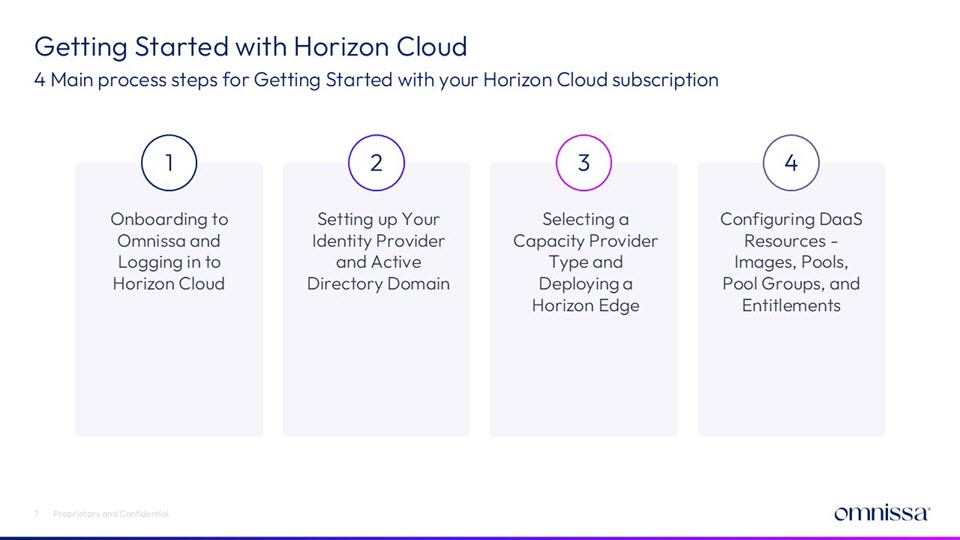
1. Onboarding to Omnissa and Logging in to Horizon Cloud
Of course, there are prerequisites that are dependent on your specific host environment and any subscriptions that you need to access within that environment. And if you are coming to Horizon Cloud from a Horizon 8 on-premises environment and want to use Horizon Cloud as a paired workspace, you must also meet Horizon 8 prerequisites. But generally, the overall onboarding process is pretty similar.
-
Your first step is to respond to the onboarding email that you will have received from Omnissa when you purchased your Horizon Cloud subscription. Respond to the prompts and links in that email to access your Omnissa Connect account and perform any needed configuration. For help with this step, see Onboarding to Horizon Cloud and Omnissa Connect.
-
Next, you'll want to follow various onscreen prompts to log in for the first time to your Horizon Cloud service subscription. See Log in to Horizon Cloud.
After you have successfully onboarded to Omnissa and logged in to Horizon Cloud, you are ready to configure your identity provider settings for user identity and access management and the Active Directory Domain for machine identity management.
Note that the Horizon Cloud user interface is referred to as the Horizon Universal Console, which is a term you'll see a lot in the documentation.
2. Setting up Your Identity Provider and Active Directory Domain
As the next step in your initial setup process, you'll want to configure identity and access management. Configure identity settings for user identity management and Active Directory Domain settings for machine identity management.
-
To configure user identity, see Setting Up Your Identity Provider.
-
To configure machine identity, see Setting up Your Active Directory Domain.
3. Selecting a Capacity Provider Type and Deploying a Horizon Edge
Your next step, and you are guided through much of this step by on-screen prompts, is to select a capacity provider type for your Horizon Edge. Your selection determines a capacity-specific workstream. The workflow is essentially the same regardless of capacity type, but the information that you are prompted to specify varies by provider. The Horizon 8 cloud-connected provider types, which have a highly integrated relationship with Horizon 8 on-premises resources, vary somewhat from the process flow of the native cloud provider types. The user interface is designed to step you neatly through the Horizon Edge definition and deployment process.
-
Review the prerequisites and checklists.
- For Horizon 8 cloud-connected provider type prerequisites, see Getting Started with a Horizon 8 Edge Deployment.
- For Microsoft Azure provider type prerequisites, see Getting Started with Horizon Cloud on Microsoft Azure Edge Deployment.
- For Amazon WorkSpaces Core provider type prerequisites, see Getting Started with Horizon Cloud on Amazon WorksSpaces Core Edge Deployment.
- For vSphere provider type prerequisites, see Getting Started with Horizon Cloud on vSphere Edge Deployment.
- For OpenStack provider type prerequisites, see Getting Started with a OpenStack Edge Deployment.
- For Nutanix provider type prerequisites, see Getting Started with Horizon Cloud on Nutanix Edge Deployment.
-
Create and deploy the Horizon Edge for your chosen capacity provider type.
- To create the Horizon 8 cloud-connected provider type Horizon Edge deployment, see Add and Deploy a Horizon 8 Edge.
- To create the Microsoft Azure provider type Horizon Edge deployment, see Add and Deploy a Microsoft Azure Edge.
- To create the Amazon WorkSpaces Core provider type Horizon Edge deployment, see Add and Deploy an Amazon WorkSpaces Core Edge.
- To create the vSphere provider type Horizon Edge deployment, see Add and Deploy a Horizon Edge for vSphere.
- To create the OpenStack provider type Horizon Edge deployment, see Add and Deploy a Horizon Edge for OpenStack.
- To create the Nutanix provider type Horizon Edge deployment, see Add and Deploy a Horizon Edge for Nutanix.
4. Configuring DaaS Resources - Images, Pools, Pool Groups, and Entitlements
Now that you have created and deployed your Horizon Edge, it's time to configure image and pool resources, add pools to pool groups, and entitle users to your pool groups.
You'll note that while image definition is somewhat unique for each Edge capacity type, pool and pool group definition tends to be more agnostic. Capacity-type behavior that is specific to a provider type is evident in stepped workflows in the product UI and in the product documentation.
-
Create and configure image resources.
- For image definition related to Horizon 8 type Horizon Edges, see Managing Images for Horizon 8 Cloud-Connected Deployment.
- For image definition related to Horizon Cloud on on Microsoft Azure, see Managing Images for Microsoft Azure Provider Deployments.
- For image definition related to Horizon Cloud on Amazon WorkSpaces Core, see Managing Images for Amazon WorkSpaces Core Provider Deployments.
- For image definition related to Horizon Cloud on vSphere, see Managing Images for vSphere Provider Deployments .
- For image definition related to Horizon Cloud on OpenStack, see Managing Images for OpenStack Provider Deployments.
- For image definition related to Horizon Cloud on Nutanix, see Managing Images for Nutanix Provider Deployments.
-
Create and configure pool resources.
- For pool definition related to Horizon 8, Microsoft Azure, and Amazon WorkSpaces Core, see Creating or Editing a Pool.
- For pool definition related to vSphere type Horizon Edges, see Creating a Pool for vSphere Provider.
- For pool definition related to OpenStack type Horizon Edges, see Creating a Pool for OpenStack Provider.
- For pool definition related to Nutanix type Horizon Edges, see Creating a Pool for Nutanix Provider.
-
To define pool groups and entitle users to access those pool groups, see Creating or Editing a Pool Group.
How the Horizon Cloud Documentation Works
The Horizon Cloud product documentation is split between two publications - this Getting Started with Horizon Cloud guide and the companion Using and Managing Horizon Cloud. It also contains a Horizon Cloud Release Notes publication for communicating new enhancements and product announcements to you for each Horizon Cloud release. Horizon Cloud typically releases updates each month.
-
Getting Started with Horizon Cloud contains information about the various prerequisites that you need to have in place for each capacity type, identity and access management (IAM) configuration options and the onboarding process that you must complete before you can begin working within your Horizon Cloud product. Once onboarded, you can move on to the companion Using and Managing Horizon Cloud to begin defining resources and creating deployments.
-
Using and Managing Horizon Cloud contains information about creating capacity type-specific resources - including Horizon Edges, images, and pools - configuring pool groups and user entitlements, working with integrations such as App Volumes and Microsoft 365, managing and monitoring Horizon Cloud artifacts, and supporting your organization's end users.
Where to Find Additional Information
As you begin your Horizon Cloud journey, you'll ideally refer back to Horizon Cloud product documentation to help answer questions you may have about various functions and use cases. As you integrate your Horizon Cloud subscription more fully with other Omnissa solutions, you'll likely refer to the overall Omnissa product documentation to discover more about these related products.
As well, you'll find many information-rich articles and videos about Horizon Cloud and related product solutions at sites such as Omnissa Tech Zone, Omnissa Community, and Omnissa Learning.
Architectural and Configuration Resources
The following Tech Zone articles contain particularly helpful overview information for both new and seasoned Horizon Cloud administrators:
Was this page helpful?