Just as you can set rate limits on the Omnissa Access service, you can set rate limits on the Omnissa Access connector.
For the connector, you can set a limit on the number of login requests that are allowed per minute. When the limit is reached, subsequent requests are denied. Setting rate limits helps prevent overload of the system.
For example, if you set the rate limit for login requests to 100, the first 100 login requests per minute are accepted but requests 101-n are denied.
For a Omnissa Access connector cluster, the limit applies to each node in the cluster. For example, if you set the login request rate limit to 100 for a cluster that has NodeA, NodeB, and NodeC, NodeA can process 100 login requests per minute, NodeB can process 100 login requests per minute, and NodeC can process 100 login requests per minute. You cannot set separate login limits per node.
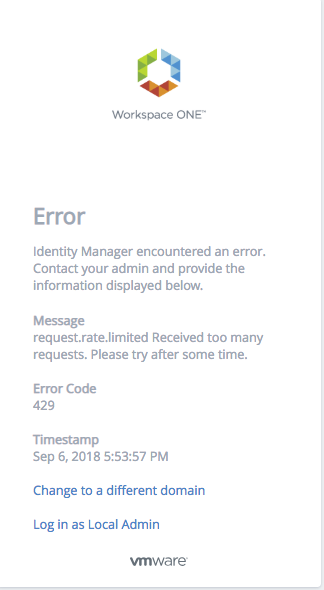
When the limit is reached and requests are denied, end users see the following error message:
No rate limits are set by default.
You set rate limits using a REST API. Use a REST client such as Postman to make the calls to the Omnissa Access service.
Changes take effect after about an hour. If you want the changes to take effect immediately, run the install_dir\usr\local\horizon\scripts\horizonService.bat restart script to restart the Windows connector.
Setting Rate Limits
Use this API to set rate limits for the Omnissa Access connector .
Endpoint: https://hostname/SAAS/jersey/manager/api/system/tuning/resiliency/tenant/orgResiliencyConnectorConfiguration?tenantId=tenantId
Method: PUT
Description: Sets the maximum number of login requests allowed per minute by the Omnissa Access connector.
Headers:
| Content-Type | *Please contact Support for the correct input.* |
| Accept | *Please contact Support for the correct input.* |
| Authorization | HZN cookie_value
To get the cookie_value, log into the Omnissa Access service as the tenant administrator, that is, the admin user that is created when you first install Omnissa Access, and obtain the value of the HZN cookie from your browser's cookie cache. |
Path Parameters:
hostname | The fully-qualified domain name of the Omnissa Access service or load balancer. |
tenantId | The tenant ID of the Omnissa Access service. The tenant ID is the tenant name that appears in the top-right corner of the Omnissa Access console. |
Request Body:
{
"config": {
         "rateLimitingDisabled": false,
         "rateLimits": {
             "login": {
                 "requestsPerMinute": n
             }
     }
 }
 }
Request Body Parameters
| login requestsPerMinute | Specifiy the maximum number of login requests allowed per minute. Note: Take into account that multiple API requests might be needed for a login request to complete and each API call counts towards the rate limits. For example, password authentication involves two API calls, one to render the login page and the second to submit credentials. |
Viewing Rate Limits
Use this API to view the rate limits that are set currently on the Omnissa Access connector.
Endpoint: https://hostname/SAAS/jersey/manager/api/system/tuning/resiliency/tenant/orgResiliencyConnectorConfiguration?tenantId=tenantId
Method: GET
Description: Retrieves the rate limits that are currently set for login requests for the Omnissa Access connector.
Headers:
| Authorization | HZN cookie_value
To get the cookie_value, log into the Omnissa Access service as the tenant administrator, that is, the admin user that is created when you first install Omnissa Access, and obtain the value of the HZN cookie from your browser's cookie cache. |
Path Parameters:
hostname | The fully-qualified domain name of the Omnissa Access service or load balancer. |
tenantId | The tenant Id of the Omnissa Access service. The tenant ID is the tenant name that appears in the top-right corner of the Omnissa Access console. |
Sample Output:
{
"config": {
         "rateLimitingDisabled": false,
         "rateLimits": {
             "login": {
                 "requestsPerMinute": 100
             }
     }
 }
 }
| login requestsPerMinute | The maximum number of login requests allowed per minute. |
Was this page helpful?