Integrating Okta applications with Omnissa Access automatically enables Okta password management for Workspace ONE users. No configuration is required in the Omnissa Access console.
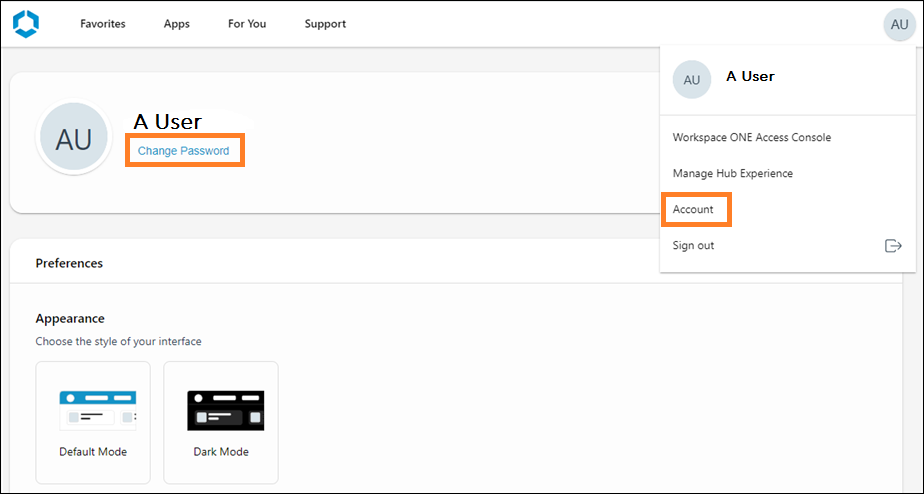
In the Workspace ONE Intelligent Hub app and web portal, end users can change their passwords by going to their Account settings and clicking the Change Password link next to their user name. When Okta applications are integrated with Omnissa Access, this password change is automatically handled by Okta, not by Omnissa Access.
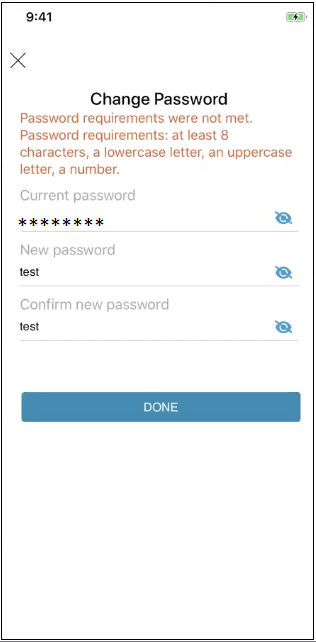
When users change their passwords, password policies configured in the Okta Admin console are enforced. The password policy is not displayed by default on the Change Password page but appears when users enter a password that does not match the policy.
For example:
For information on how to configure password policies in the Okta Admin console, see the Okta documentation.
Was this page helpful?