Workspace ONE® is a secure enterprise environment that delivers and manages applications on iOS, Android, Windows, and Mac OS devices. Identity, application, and enterprise mobility management are integrated into Workspace ONE.
The identity component, Omnissa Access, provides enterprise identity integration and web and mobile single sign-on (SSO) services. Omnissa Access can be used as a standalone federation Identity Provider (IDP). It can also complement an existing IDP and SSO solution like Okta to provide additional services such as a unified app catalog portal and device posture-based conditional access. Omnissa Access can integrate with other SSO and IDP solutions like Okta as a federated IDP or Service Provider (SP). This integration is generally based on SAML trust connections.
This guide provides step-by-step instructions to configure and test use cases supported by the Workspace ONE integration with Okta. To integrate Workspace ONE with Okta, you integrate Omnissa Access, the identity component of Workspace ONE, with Okta.
Main Use Cases
The main use cases supported by the Workspace ONE and Okta integration include enabling Workspace ONE login using Okta authentication, adding Okta applications to the Workspace ONE catalog, and enabling device trust and universal SSO across native and web applications.
Workspace ONE Login Using Okta
The Omnissa Workspace ONE® Intelligent Hub app and web portal can be configured to use Okta as a trusted identity provider, allowing end users to log in using Okta authentication policies. This use case also applies to Omnissa Horizon® Enterprise customers who are using the Workspace ONE catalog to launch Horizon apps and desktops, but have not yet deployed Workspace ONE UEM to manage devices.
To implement this use case, configure the following:
Configure Okta as an Identity Provider for Workspace ONE
Unified Catalog
The Workspace ONE catalog can be configured to publish applications federated through Okta, along with any other applications configured through Workspace ONE, such as Horizon and Citrix applications and desktops, and native applications powered by Workspace ONE UEM. This allows end users to go to a single app to discover, launch, or download their enterprise apps from any device with a consistent user experience.
Note: Okta SWA apps are not currently supported.
To implement this use case, configure the following:
- Configure Okta as an Identity Provider for Workspace ONE
- Configure Omnissa Access as an Identity Provider in Okta
- Configure Application Source in Omnissa Access
- Configure Okta Applications in Omnissa Access
Device Trust
Important: The device trust use case is based on the Okta Device Trust feature. Okta Device Trust is available only with the Okta Classic Engine. It is not supported with the Okta Identity Engine.
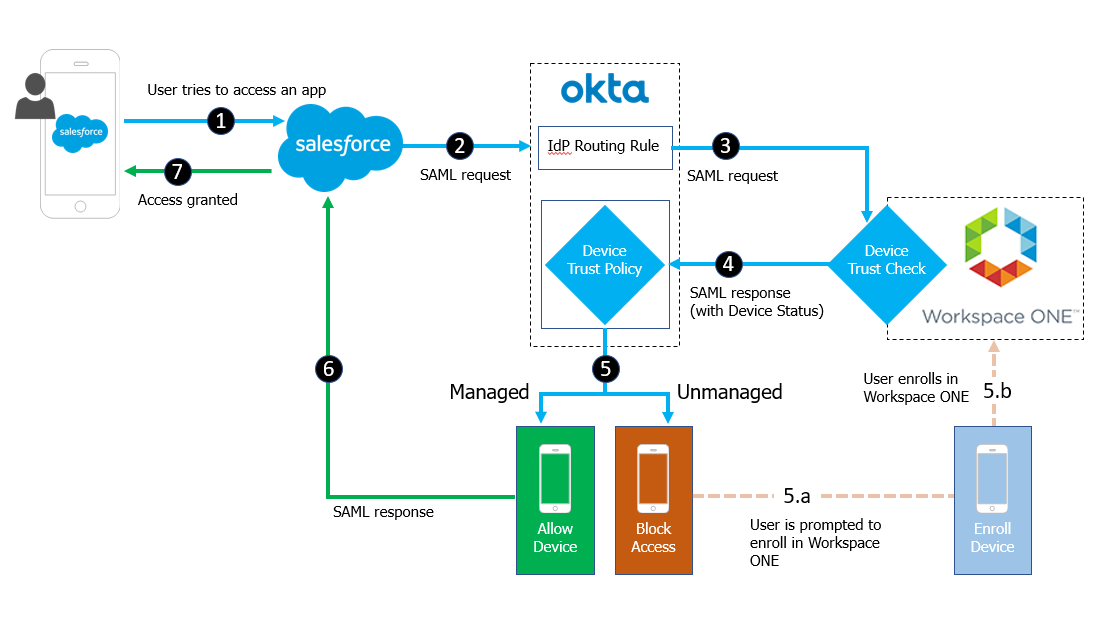
Integrating Okta with Workspace ONE allows administrators to establish device trust by evaluating device posture, such as whether the device is managed, before permitting end users to access sensitive applications. For iOS and Android devices, device posture policies are configured in Okta and evaluated anytime a user logs into a protected application.
For example, a device trust flow using the Salesforce application would follow this sequence for iOS and Android devices:
-
End user attempts to access the Salesforce tenant.
-
Salesforce redirects to Okta as the configured identity provider.
-
Okta processes the incoming request and routes the client to the Workspace ONE identity provider based on configured routing rules.
-
Workspace ONE challenges the user for authentication using Mobile SSO for iOS or Mobile SSO for Android and redirects back to Okta with device trust status.
-
Okta completes evaluation of the device trust policy.
If the device is unmanaged, the user is prompted to enroll in Workspace ONE.
-
Okta issues the SAML assertion for Salesforce, if the device trust rule is satisfied based on the SAML assertion response received from Workspace ONE.
The Device Trust use case requires end-to-end setup, covering all the procedures in this document. To implement this use case, configure the following:
-
Configure Omnissa Access as an Identity Provider in Okta
Establish SAML-based relationship with Workspace ONE for device trust check.
-
Configure identity provider routing rules and access policies.
- (iOS and Android devices) Configure Device Trust and Client Access Policies for iOS and Android Devices
- (Desktop devices) Configure Device Trust and Access Policies for Desktop Devices
Was this page helpful?