Your certificate authority template must be properly configured for Kerberos certificate distribution. You can duplicate the existing Kerberos Authentication template in the Active Directory Certificate Services (AD CS) to configure a new certificate authority template for iOS Kerberos authentication.
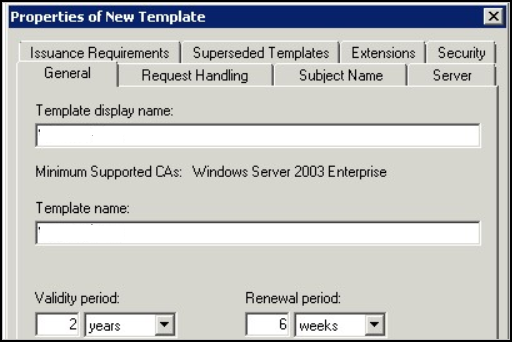
When you duplicate the Kerberos Authentication template from AD CS, you must configure the following information in the Properties of New Template dialog box.
- General tab. Enter the Template display name and the Template name. For example,
iOSKerberos. This name is the display name that is shown in the Certificate Templates snap-in, Certificates snap-in, and Certification Authority snap-in. - Request Handling tab. Enable Allow private key to be exported.
- Subject Name tab. Select Supply in the request radio button. Workspace ONE UEM supplies the subject name when the certificate is requested.
- Extensions tab. Define the application policies.
- Select Applications Policies and click Edit to add a new application policy. Name this policy
Kerberos Client Authentication. - Add the object identifier (OID) as follows:
1.3.6.1.5.2.3.4. Do not change. - In the Description of Application Policies list delete all policies listed except for the Kerberos Client Authentication policy and the Smart Card Authentication policy.
- Select Applications Policies and click Edit to add a new application policy. Name this policy
- Security tab. Remove the Enroll permission for Domain Users. Verify that only Administrators and the Omnissa CA service account have the Enroll permission. Add the Omnissa CA service account to the list of users that can request a certificate and select the Enroll checkbox under Permissions for the service account.
- For all CA integrations, Omnissa recommends monitoring certificate requests for signs of suspicious activity.
Save the changes. Add the template to the list of templates used by the Active Directory Certificate Authority.
In Workspace ONE UEM configure the Certificate Authority and add the Certificate Template.
Was this page helpful?