After onboarding to Omnissa Connect, you can customize the fully qualified domain name (FQDN) for your Omnissa Access tenant so that it is recognizable and represents your organization.
Your Access service URL represents your organization's FQDN. Users enter this FQDN in the browser to access apps in the Omnissa Workspace ONE Intelligent Hub app catalog. Many companies want the service URL to also represent their branding. When Access is provisioned, information received during the order is used to configure the service URL. Omnissa Connect provides an opportunity to customize the tenant name portion of the service URL.
Updating during onboarding
Updating the tenant name of the Access service URL during the Omnissa Connect onboarding process is preferable because this tenant is not yet configured. It is easier for Omnissa Connect to create a new tenant with the customized URL without risking possible loss of data. During the onboarding process in Omnissa Connect, Omnissa Connect presents the option to change the tenant name for your Access service URL.
For details about this method of customizing your Access URL, see the topic Customizing the Access URL.
Update alternative - vanity URL
If you previously configured your Access tenant and are using it actively, you can use a vanity URL rather than changing the URL after Omnissa Connect onboarding. Create a 301 permanent record to redirect traffic to your Access tenant instead of going through a tenant update process.
Updating after onboarding
It is possible to update the Access tenant URL at any time from the Omnissa Connect Home page. 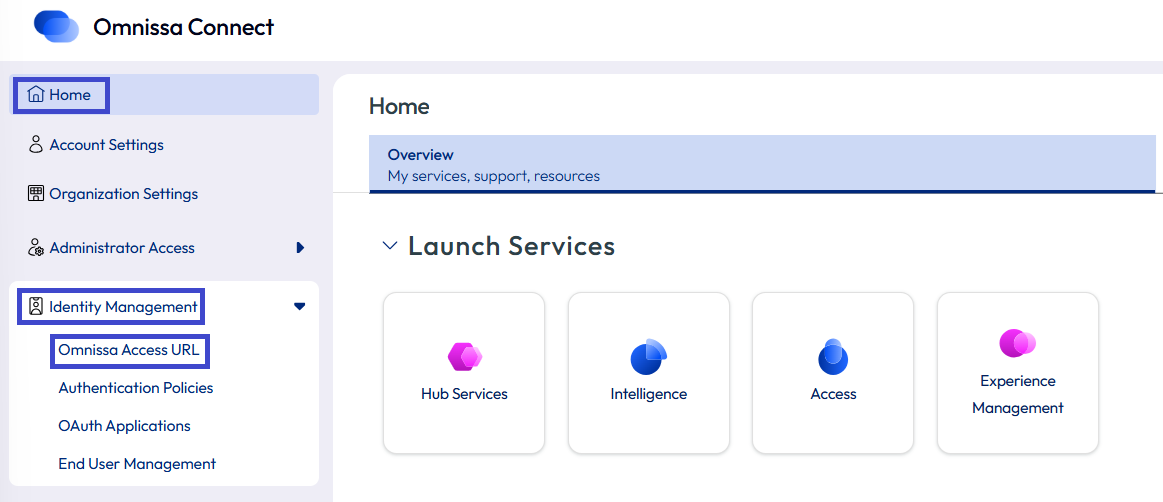
Important: If you customize your tenant name after Omnissa Connect onboarding, customize it before you start configuring your Access tenant.
It's the same procedure to update after onboarding as it is to update during onboarding.
Was this page helpful?