Note: For Horizon versions 2412 and later, this workflow is now available by default with the Auto Discover Site option in the Horizon Console. See Enable SysPrep Multi-Site Capability for Instant Clone Pools and Farms from Horizon Console for details.
You can provision an instant clone desktop pool with Microsoft Sysprep without pre-created computer account customization to automatically select Active Directory sites.
To enable the feature globally or at a pool level, you set the attribute pae-icSysprepDomainJoinEnabled in the Horizon LDAP. In Horizon LDAP, you set this attribute's value to 1, either at the global level or at the pool level. Enabling the feature at the pool level allows you to test the new provisioning workflow on a test pool before enabling it globally for all sysprep pools.
Using ADSI Edit Utility to edit Horizon LDAP
Typically the ADSI Edit Utility is used when changing attributes in Horizon LDAP.
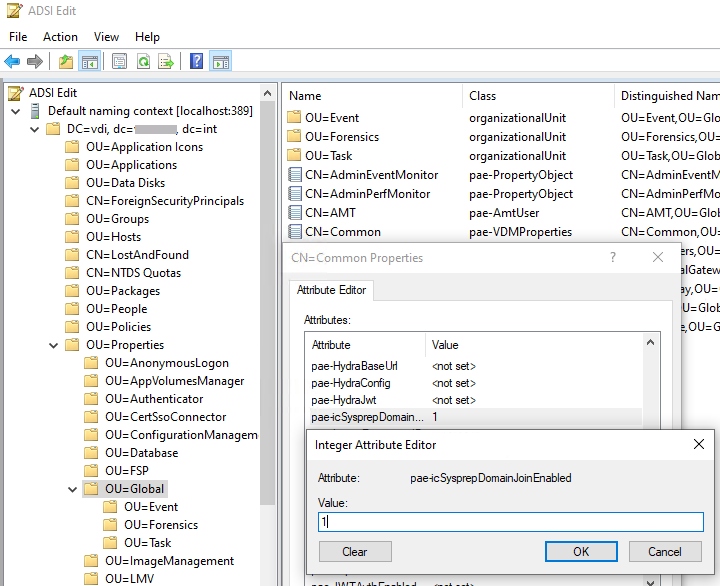
The following screenshot illustrates setting the value of pae-icSysprepDomainJoinEnabled to enable the feature globally.
-
Set the attribute
pae-icSysprepDomainJoinEnabledto the value of 1.-
To enable the feature globally: within the
OU=Globalentry as illustrated in the preceding screenshot, locateCN=Commonand edit the attribute in theCN=Commonproperties. -
To enable the feature at the pool level for existing pools: within the
OU=Server Groups, locate theCN=<PoolName> where <PoolName> is the name of the pool on which you're enabling the feature, and edit the attribute on that CN entry.
-
-
Create an instant clone desktop pool and follow the prompts. In the Guest Customization section, select Use a Customization Specification (sysprep).
The Site Name field is set to Auto Discover Site and cannot be changed.
-
Create a VM Customization Spec in vCenter.
The Workgroup or Domain field can be the default value. In Administrator Password if a password is specified, the password for the Administrator account is set to that value and the administrator account is disabled.
-
Complete the new instant clone sysprep pool creation.
-
Perform a push image on existing sysprep pools for changes to take effect.
Results
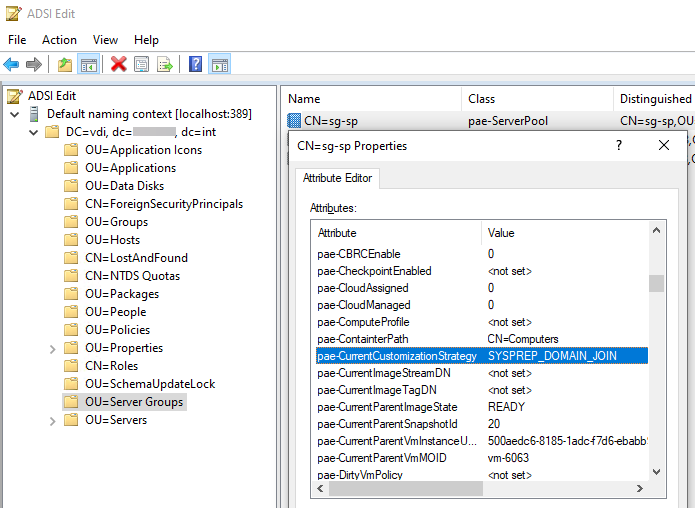
After a pool is provisioned with the new workflow, the pae-CurrentCustomizationStrategy is set toSYSPREP_DOMAIN_JOIN in the pae-ServerPool object in the ADAM database.
Was this page helpful?