You can create reports to track users and group activities and resource usage from the Omnissa Access console Monitor > Reports page.
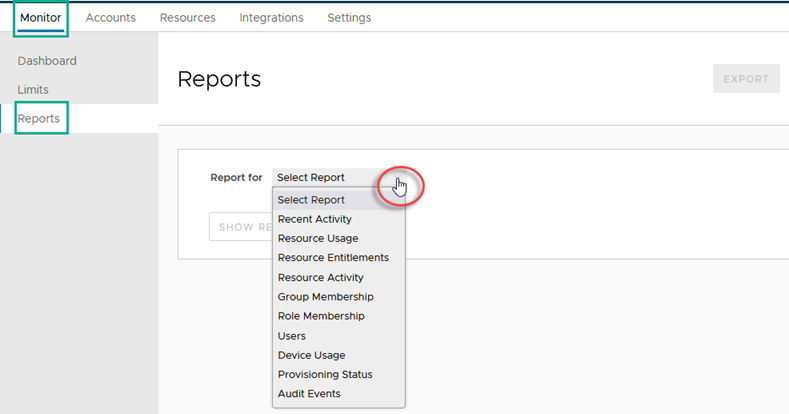
You can export reports in a comma-separated value (csv) file format.
Note: Horizon Service Universal Broker end-user virtual desktops and remote apps launch events are not included in the Omnissa Access reports results.
Report Types
| Report | Description |
|---|---|
| Recent Activity | Recent activity is a report about the actions that users performed while using their Hub portal for the past day, past week, past month, or past 12 weeks. The activity can include user information such as how many unique user logins, how many general logins and resource information such as number of resources launched, resource entitlements added. You can click Show Events to see the date, time, and user details for the activity. |
| Resource Usage | Resource usage is a report of all resources in the Catalog with details for each resource about the number of users, launches, and licenses. You can select to view the activities for the past day, past week, past month, or past 12 weeks. |
| Resource Entitlements | Resource entitlements is a report by resource that shows the number of users entitled to the resource, number of launches, and number of licenses used. |
| Resource Activity | The resource activity report can be created for all users or a specific group of users. The resource activity information lists the user name, the resource entitled to the user and the date the resource was last accessed, and information about the type of device the user used to access the resource. |
| Group Membership | Group membership is a lists the members of a group you specify. |
| Role Membership | Role assignment lists the users that are either API-only administrators or administrators and their email addresses. |
| Users | Users report lists all of the users and provides details about each user, such as the user's email address, role, and group affiliations. |
| Device Usage | The device usage report can show device usage for all users or a specific group of users. The device information is listed by individual user and includes the user's name, device name, operating system information, and date last used. |
| Provisioning Status | The provisioning status report shows when users receive access and when users access is revoked. |
| Audit events | The audit events report lists the events related to a user you specify, such as user logins for the past 30 days and login failures. You can also view the audit event details. This feature is useful for troubleshooting purposes. See Generate an Audit Event Report in Omnissa Access. |
Was this page helpful?