As an Owner, you grant Omnissa Connect users Organization roles and Services roles when you invite them to join your organization.
Roles - Organization and Service
Omnissa Connect has two types of roles it uses to classify and manage user access - Organization roles and Service roles (RBAC). Assign your users these roles when you add them to your organization.
- Organization roles: Access to an organization’s resources is determined by the role assigned to each user in the organization. Each user can be assigned one or more of these roles in an organization.
- Service roles (RBAC): Omnissa Connect comes with a pre-defined, built-in set of Service roles that can be assigned to users in the organization. Consider these roles as Omnissa Connect's roles-based access controls (RBACs).
Organization roles and permissions
The level of permissions assigned to an admin or group depends on the role. If an admin or group is assigned roles that conflict with one another, they receive the role that has greater permissions.
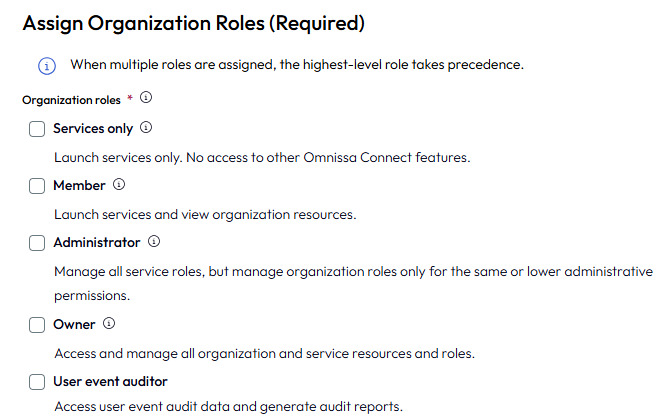
- The Administrator role has limited administrative access.
- Administrators can assign Service roles to any organization role, but can manage only admins, groups, and OAuth apps that have roles with the same or lower administrative permissions.
- For example, an Administrator can grant or manage access for other admins and groups who have the Member or Administrator role in the organization, but cannot manage admins, groups, or resources who are assigned the Owner role.
- The Consumption viewer role can access resources needed to help optimize Omnissa Workspace ONE UEM license assignment and usage.
- This role has access to the License Consumption page.
- This role includes the assignment of the Member role for read-only access so that the user can launch the UEM service and view organization resources needed for license consumption analysis and management.
- The Finance admin role is only for on-premises environments.
- This role has access to the Account Organization and they confirm the correct licenses and subscriptions were ordered during onboarding.
- This role can view values on the Account Overview page for auditing purposes.
- This role has restricted access to UI pages in the console, they cannot download services, and they cannot be assigned Omnissa Service roles.
- The Member role has read-only access to the organization resources.
- The Owner role has full administrative access to all resources in the organization.
- Owners can also self-assign roles to themselves.
- The Services only role can launch services but has no other access to features.
- This role requires the assignment of applicable Service roles.
- This role has access to only the Launch Services area on the Home page.
- The User event auditor role can launch services and view organization resources to help analyze events.
- This role has access to the User Audit Report page and any resources needed to analyze events that occur in the organization.
- This role can generate audit reports.
- This role includes the assignment of the Member role for read-only access so that the user can launch services and view organization resources to help analyze user events.
Permissions for Organization role types
| Permission | Owner | Administrator | Member | Consumption viewer | User event auditor | Services only | Finance admin |
|---|---|---|---|---|---|---|---|
| Belong to one or more organizations | Yes | Yes | Yes | Yes | Yes | Yes | Yes |
| Specify the organization that is displayed when you sign in | Yes | Yes | Yes | No | No | No | No |
| View and modify the organization settings | Yes | Yes, but view only | Yes, but view only | Yes, but view only | Yes, but view only | No | No |
| Deactivate an organization | Yes | No | No | No | No | No | No |
| Add/remove users in your organization | Yes | Yes, but Administrators cannot add Owners | No | No | No | No | No |
| Export CSV list of admins from the console | Yes | Yes | No | No | No | No | No |
| Manage the service access and roles of users in your organization | Yes | Yes | No | No | No | No | No |
| Manage and view payment methods and billing | Yes | When the Billing Read-only check box is selected. The Billing Read-only role is an IGA feature configured in Governance. | When the Billing Read-only check box is selected. The Billing Read-only role is an IGA feature configured in Governance. | No | No | No | Read-only This role can view billing values for on-premises environments. |
| Create and manage OAuth apps to authorize third-party apps to access protected resources | Yes | Only for OAuth apps created by users in the organization. | When the Developer check box is selected. The Developer role is an IGA feature configured in Governance. | No | No | No | No |
| Access the Support Requests widget, Discover More tab, or the Resources area on the Home page | Yes | Yes | Yes | No | No | No | No |
| Access identity and access management features | Yes | Yes, but only if configured with basic or advanced IGA. | Yes, but only if configured with basic or advanced IGA. | No | No | No | No |
| Initiate trials for Omnissa services | Yes | Yes | No | No | No | No | No |
Service roles and permissions (RBAC)
Assign your users (also called Administrators) Services roles so that they can access the desired features in your Omnissa services. Assigning Service roles is optional, but consider assigning the user the All services > Read Only role so your colleagues can view the features available in Omnissa services.
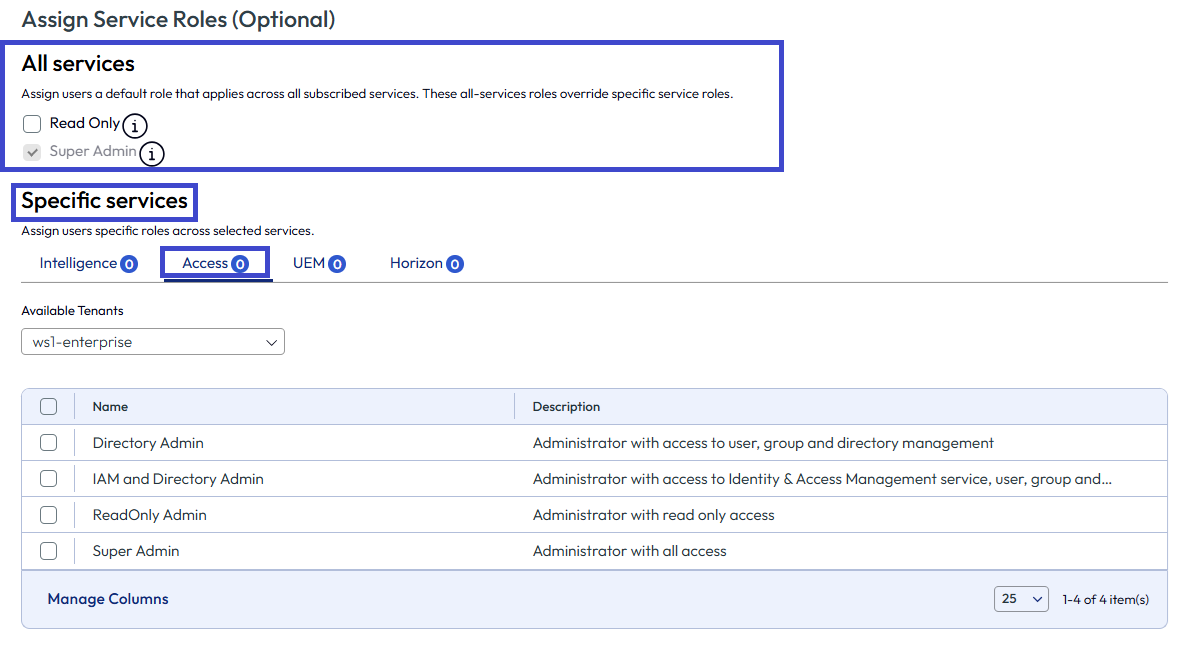
Services roles are native to the specific Omnissa service and you cannot customize them. You cannot add a Service role to an Omnissa service from Omnissa Connect. You cannot assign Service roles to Finance admins.
When adding admins (users), you can select the service, Intelligence, Access, UEM, and Horizon to see what Service roles are available and to view their permissions.
Was this page helpful?