After a user in your Horizon Partner Admin Console partner organization has been granted administrative access to a tenant organization, they can perform actions within that tenant organization's instance of the Horizon Cloud service.
Note: The Horizon Partner Admin Console is currently available in Limited Availability (LA) mode only.
The Partner Admin Console provides comprehensive opportunities for monitoring your tenant organization sessions, activities, and resources. As you discover areas of concern while monitoring your tenants, you can easily open the tenant's Horizon Cloud instance and, with proper permissions given to you through role assignments, make needed changes.
You can take corrective action on the resources within your tenants based on monitored data. Decide, based on monitoring information, if you want or need to open the Horizon Cloud instance of a tenant organization to make specific changes.
Note: By default, a limited purpose Not for Sale (NFR) tenant is provisioned for partners. Partners can access this tenant from the Tenants page.
To open the tenant's Horizon Cloud instance, locate the tenant on the Tenants page in your Partner Admin Console and click Manage in the tenant's Actions column. Respond as needed to open the tenant instance of Horizon Cloud and make needed changes.
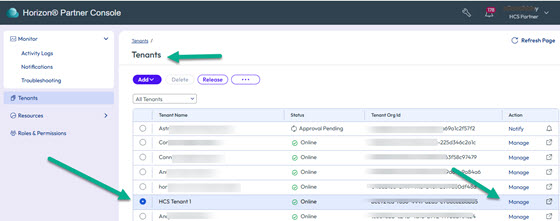
This action opens Horizon Cloud in the tenant organization, enabling you to perform various needed actions such as adding or editing pools and pool groups, updating a VM agent version, or addressing various deployment concerns.
For related information, see Tenant Monitoring and Operations.
To learn more about using and managing Horizon Cloud resources, see Using and Managing Horizon Cloud and the Horizon Cloud Release Notes.
Was this page helpful?