This page describes key things about Horizon Cloud pod upgrades involving Azure Flexible Server PostgreSQL. This page also describes the prerequisites and required procedures when your first-gen tenant is enabled for a pod upgrade that includes use of Azure Flexible Server PostgreSQL.
To have use of this feature, your first-gen tenant must be explicitly enabled for it by the Horizon Cloud Operations Team.
Brief Introduction
Horizon Cloud pods deployed and upgraded prior to September 2024 are deployed using the Microsoft Azure Single-Server PostgreSQL service.
Starting in September 2024, if your tenant is enabled to use the Microsoft Azure Flexible Server PostgreSQL service, when your pods are upgraded, the pods will instead use the Microsoft Azure Flexible Server PostgreSQL service.
The following diagram illustrates the post-upgraded pod's architecture. The difference between this diagram and the one for the pre-upgraded pod is a subnet labeled Database Network. This subnet is needed for connections to the Azure Flexible Server PostgreSQL database service. See the following section for the details about this database subnet.

Pod Manifest Information
The release vehicle for this feature to customers who are enabled for it is named Omnissa Horizon Cloud on Microsoft Azure 2408, and includes:
- Pod manifest 5041.x. This manifest includes the support for the above feature as well as platform code improvements (usually included in a released manifest)
- Horizon Agents Installer (HAI) 24.2.0, the manifest-compatible version.
- Unless otherwise noted in the documentation, this HAI version is built into manifest 5041.x. Running the Import VM wizard in a pod of 5041.x will install the agents from this HAI version. This HAI version is also supported for manual installation for imported VMs in pods of manifest 5041.x.
Only customers who are explicitly enabled for the Azure Flexible Server PostgreSQL feature will have access to this release vehicle and pod manifest.
Prerequisites
When your tenant is enabled to consume this feature, before the pods can be upgraded, you must satisfy the following prerequisites.
-
In the pod's Azure subscription, for each pod that you'll upgrade to use this feature, create a subnet of CIDR /28 and in the subnet's properties, select the
Microsoft.Storageendpoint and set the Subnet Delegation asMicrosoft.DBforPosgreSQL/flexibleServers. The Azure Flexible Server PostgreSQL database service will use this subnet instead of using the pod's management subnet. In the architecture diagram above, this new subnet is labeledDatabase Network. This subnet can reside in the pod's VNet or in a separate VNet. -
If the pod's service principal uses a custom role, add the following permissions to that custom role:
Microsoft.Network/privateDnsZones/virtualNetworkLinks/readandMicrosoft.Network/privateDnsZones/read -
Add Azure IP
168.63.129.16as an IP Forwarder or Conditional Forwarder in your DNS servers. This prerequisite provides for your DNS server to resolve the Azure private DNS zone, which is a requirement for this pod manifest, described in the following bullets.
- If you have more than one DNS server in the VNet as VNet DNS servers, add the IP Forwarder or Conditional Forwarder to all those DNS servers.
- If your environment uses on-premises DNS servers and there is no DNS server VM deployed in Azure, you can work with Omnissa Support to implement one of the following Microsoft-recommended options:
- Deploy a custom DNS server in Azure.
- Use the Azure Private DNS Resolver service
-
Using the Azure portal, for each pod that you'll upgrade to use this feature, create a private DNS zone with the following characteristics:
- The private DNS zone's name must be of the following pattern, depending on where the pod is deployed:
-
Deployed in Azure Commercial Cloud:
name.postgres.database.azure.com, where name is a name you choose, for example,hcspod1.postgres.database.azure.com. When the pod's subscription is in Azure Commercial Cloud, the Private DNS Zone name must have the pattern*.postgres.database.azure.comto satisfy the Horizon Universal Console's validation and the pod upgrade process. -
Deployed in Azure Gov Cloud:
name.postgres.database.usgovcloudapi.net, where name is a name you choose, for examplehcspod1.postgres.database.usgovcloudapi.net. When the pod's subscription is in Azure Commercial Cloud, the Private DNS Zone name must have the pattern*.postgres.database.usgovcloudapi.netto satisfy the Horizon Universal Console's validation and the pod upgrade process.
-
- In the private DNS zone, create a virtual network link that points to the VNet that has the prerequisite
Database Networksubnet (created for the first prerequisite described above). - In the private DNS zone's record sets, add a placeholder record set of type A, named for example
hcs-pgflex-test, that has an IP of0.0.0.0. This placeholder will be used in a proactive validation check before the upgrade process begins. - From the private DNS zone's Properties section, copy the private DNS zone's Resource ID. You will enter this Resource ID into the Horizon Universal Console in Edit Pod flow, to store the value in the pod details prior to upgrading.
- The private DNS zone's name must be of the following pattern, depending on where the pod is deployed:
-
If your DNS server resides in a different VNet, you must also create a virtual network link in the private DNS zone to point to that DNS server. If you have multiple DNS servers and they belong to different VNets, then create virtual network links for each of those VNets.
Adding the required database network subnet
Create the subnet to use for the Database Network of CIDR /28 and in the subnet's properties, select the Microsoft.Storage endpoint and set the Subnet Delegation as Microsoft.DBforPosgreSQL/flexibleServers.
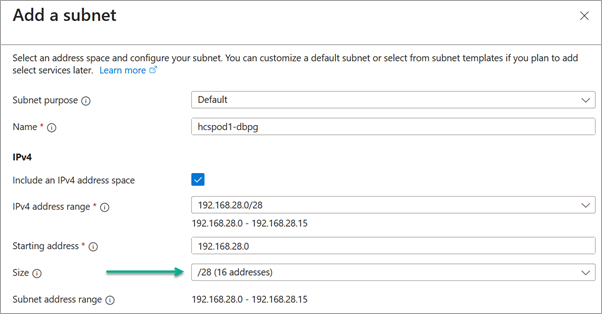
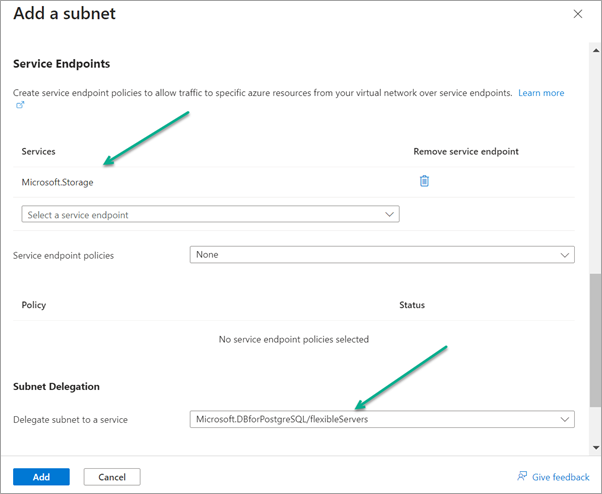
Creating a private DNS zone with prerequisite settings
The following screenshots illustrate the Azure Portal's wizard for creating the private DNS zone. In these screenshots, the selected resource group is the same resource group as the pod's VNet and the entered name is hcspod1.postgres.database.azure.com. You can choose to create the private DNS zone in its own resource group.
Note: The Azure Portal might display a message related to azure.com being an Azure infrastructure domain. You can ignore this message. The use of a private DNS zone for the Azure Flexible Server PostgreSQL service is recommended by Microsoft.
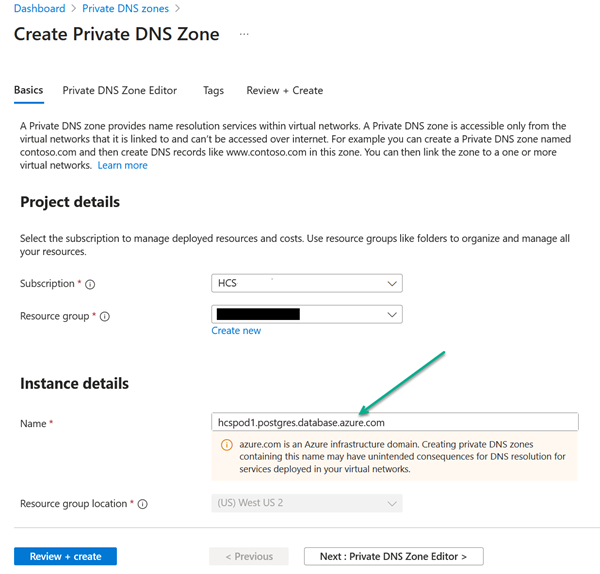
When the portal indicates the private DNS zone is created, go to that private DNS zone and fulfill the following conditions.
Create virtual network link
In the private DNS zone, create a virtual network link that points to the VNet that has the prerequisite Database Network subnet (created for the first prerequisite described above). The wizard asks for a link name. The following screenshots illustrate creating a link with name hcspod1-vnetlink and the appropriate VNet selected. Click Create to complete adding the link.
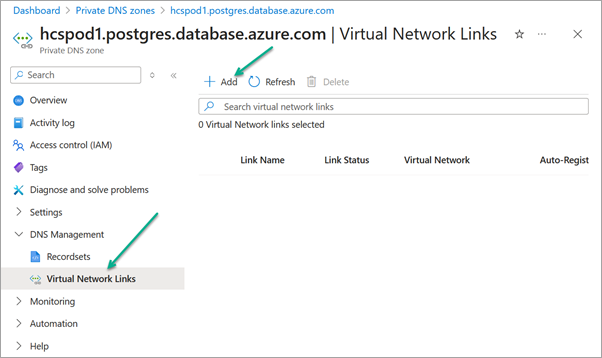
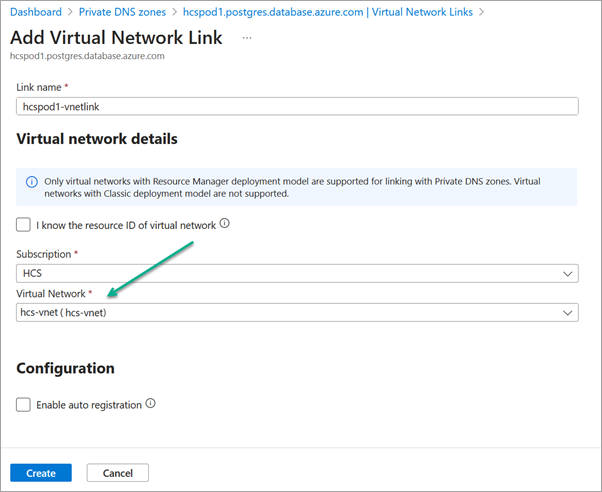
Note: If your DNS server resides in a different VNet, you must also create a virtual network link in the private DNS zone to point to that DNS server. If you have multiple DNS servers and they belong to different VNets, then create virtual network links for each of them.
Add placeholder record set
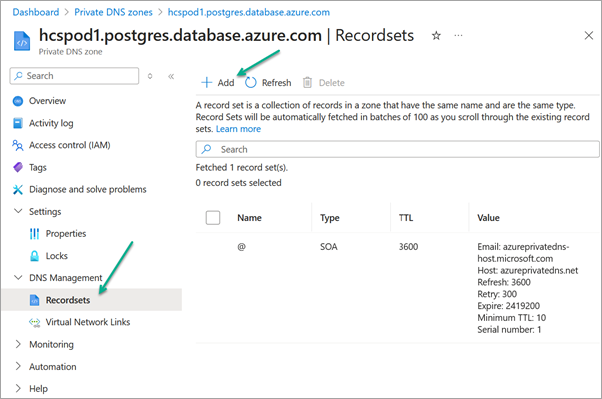
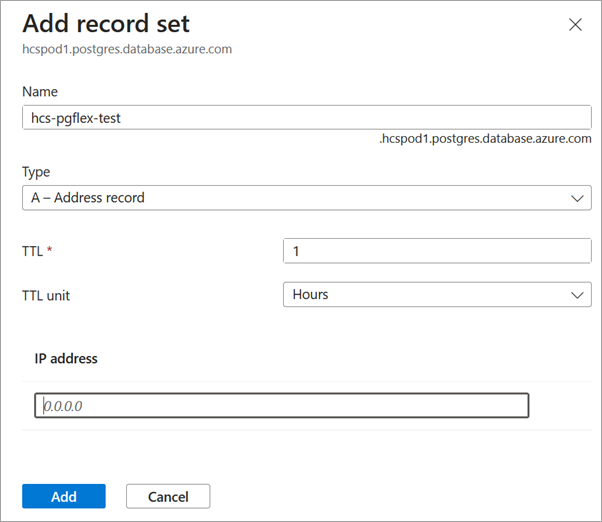
In the private DNS zone's record sets, add a placeholder record set of type A, named for example hcs-pgflex-test, that has an IP of 0.0.0.0. This placeholder will be used in a proactive validation check before the upgrade process begins. The following screenshots illustrate creating this placeholder record set.
Copy the private DNS zone's resource ID
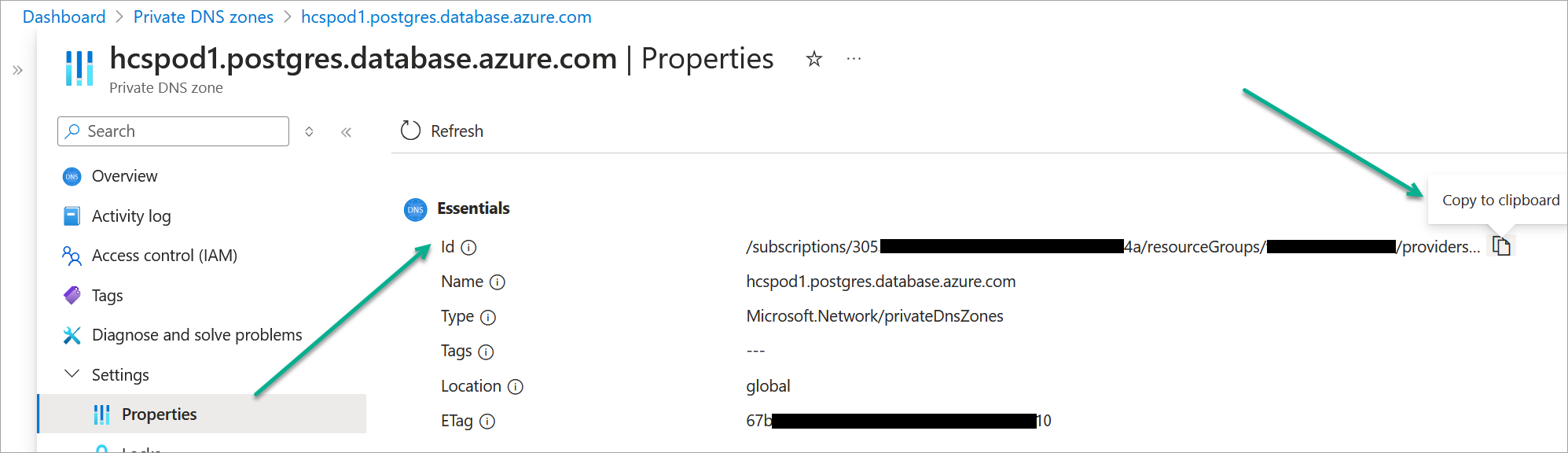
From the private DNS zone's Properties section, copy the private DNS zone's Resource ID. You will enter this Resource ID into the Horizon Universal Console in the upgrade preparation flow, to store the value in the pod details prior to upgrading.
This Resource ID will be a long string in the pattern /subscriptions/UUID/resourceGroups/resourcegroup-name/providers/Microsoft.Network/privateDnsZones/name.postgres.database.azure.com, where UUID is the private DNS zone's subscription's UUID, resourcegroup-name is the private DNS zone's resource group, and name.postgres.database.azure.com is the private DNS zone's name.
Before Running a Pod Upgrade, Add the Required Information to the Pod Details
Before upgrading a pod to use the Flexible Server PostgreSQL, you must add the information about the database network subnet and the private DNS zone to that pod's details.
The UI flow begins with the Upgrade button in the following banner. When Horizon Cloud Operations has enabled your tenant for this feature, the first-gen Horizon Universal Console displays a banner about the upgrade to PostgreSQL Flexible Server, as illustrated in the following screenshot.
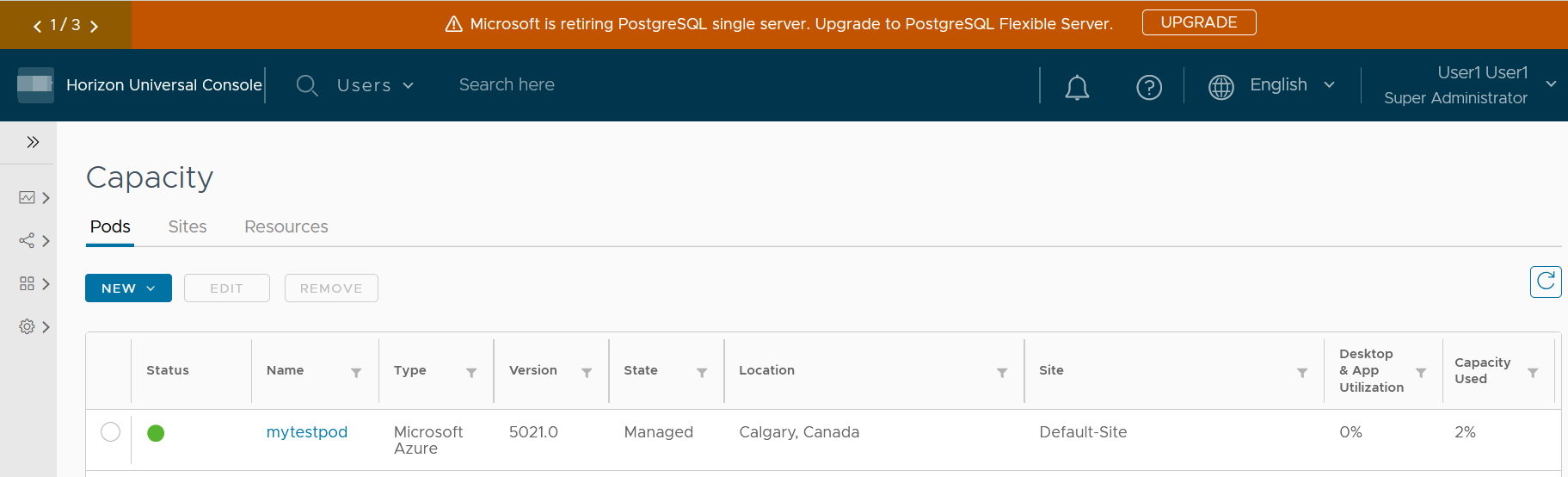
- Click on the banner's Upgrade button to begin the UI flow of adding the required information about the database network subnet and the private DNS zone to the pod details.
The console displays a box which describes the prerequisites and lists the tenant's Horizon Cloud pods. The status column indicates whether the prerequisite information has been added to that pod's details.
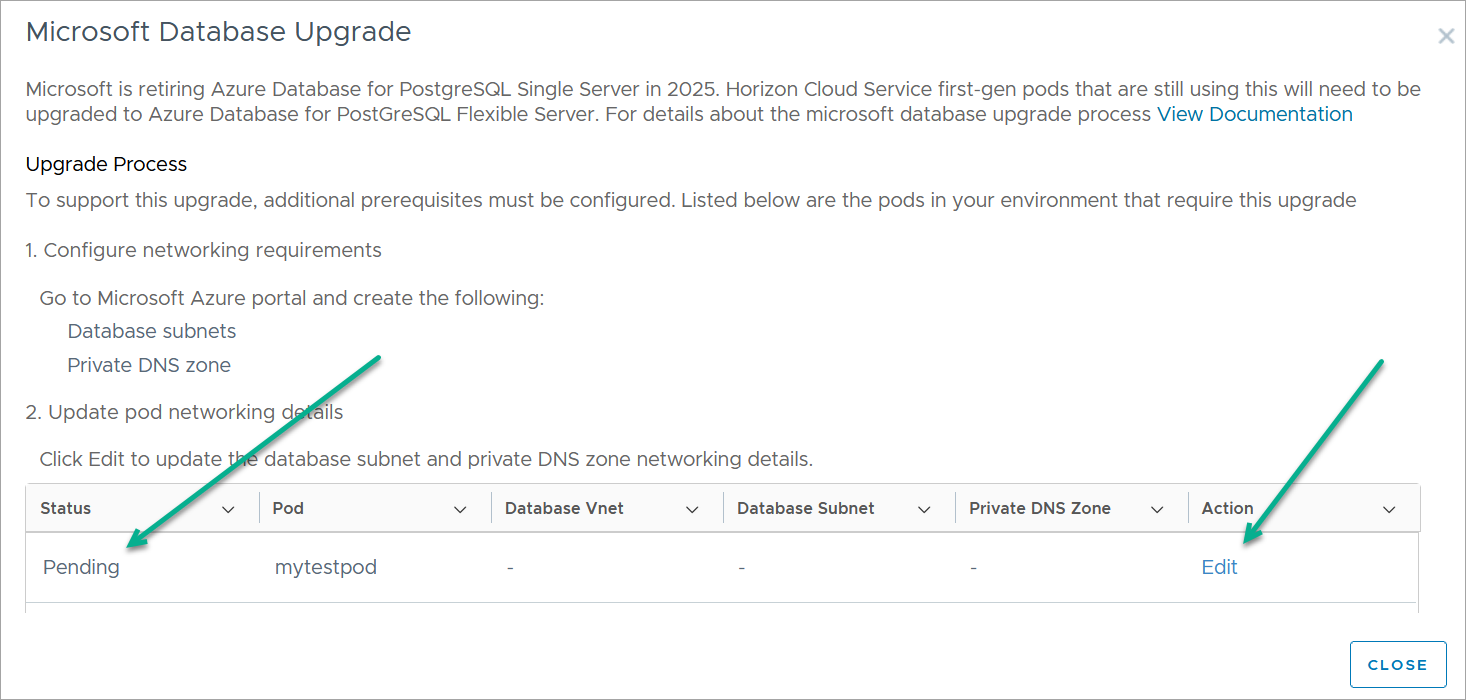
-
Click Edit for the pod. The Edit Pod wizard starts.
-
In the wizard, move to the Pod Details step. In that step, scroll to where you can see the Database section. In this section, you select the prerequisite subnet and paste in the private DNS zone's resource ID that you copied from the Azure portal.
This first screenshot illustrates the Database section and the second one illustrates the section with values specified.
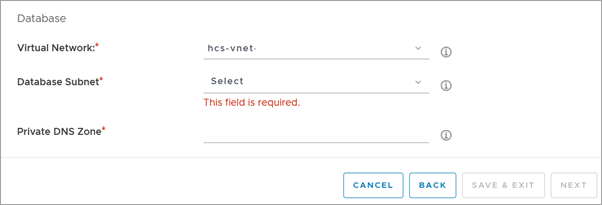
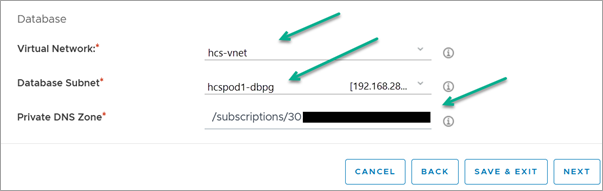
- Click Save & Exit to save the data to the pod's details.
After exiting the wizard, when you re-open the dialog box by clicking the banner's Upgrade button, the box now displays the pod's status as Complete.
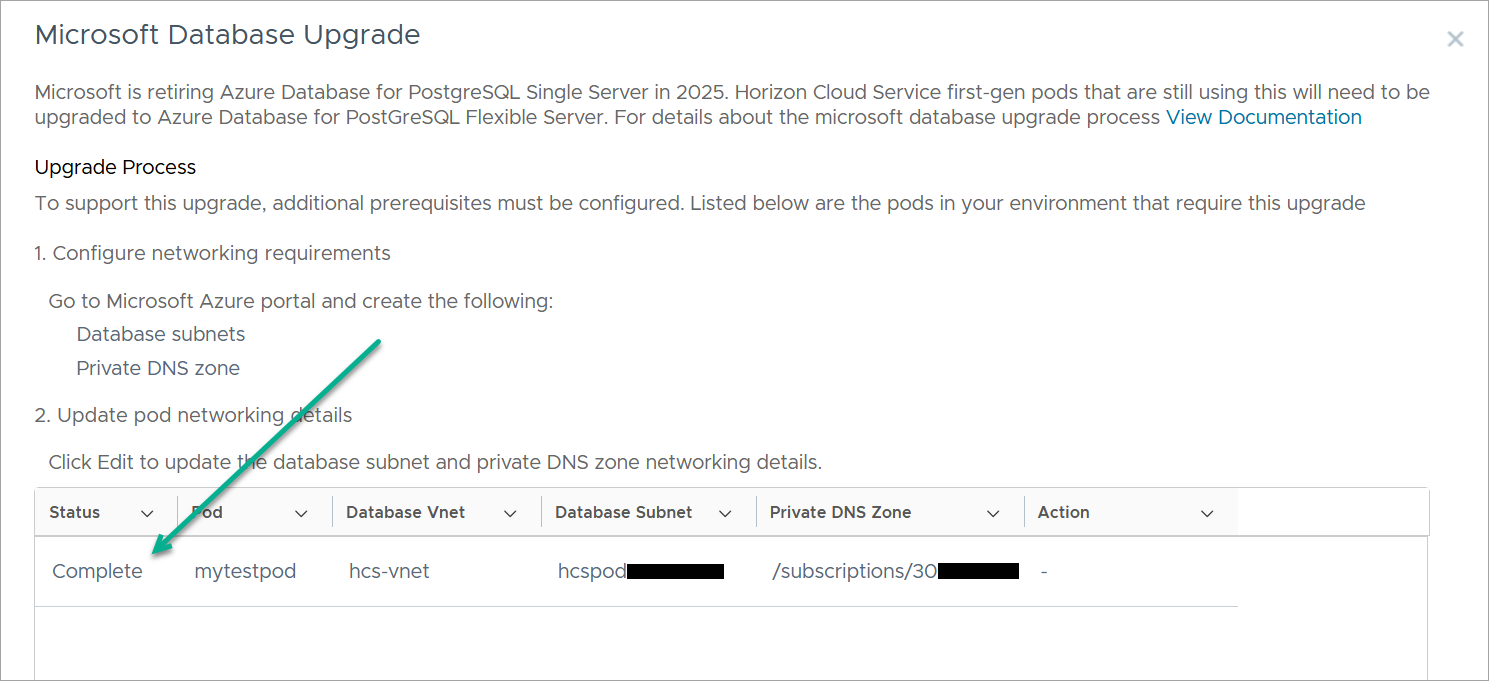
Pods that are listed with status as Complete are eligible to be upgraded.
The Horizon Cloud Operations team will initiate upgrading the pod according to their communications with you and the standard pod upgrade process. Horizon Cloud Operations will notify you when the pod upgrade is complete.
After a Successful Upgrade
To support pod rollback in case of encountering issues in the upgrade, after the pod upgrade completes, the pod's Azure resource group will include the earlier manifest's Single-Server PostgreSQL and VM disks within the pod's Azure resource group.
When you have confirmed to the Horizon Cloud Operations team that everything looks good after the upgrade, the Operations team will run an API to delete those artifacts from the resource group.
Was this page helpful?