The relying party identifier uniquely identifies an AD FS-federated application so that another claims provider can authenticate users seeking access to the application. You must obtain the relying party identifier for each AD FS-federated application that you want to add to the Workspace ONE Intelligent Hub catalog.
Prerequisites
Enable the RelayState Parameter in AD FS
Procedure
-
On the AD FS server, run the AD FS Management console as an administrator.
-
(AD FS 3.0) In the left pane, expand the Trust Relationships folder.
-
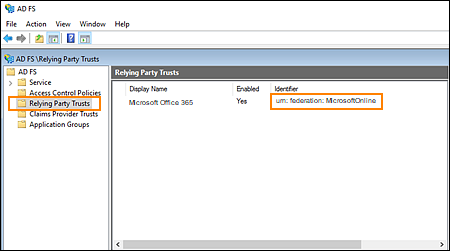
In the left pane, select Relying Party Trusts.
-
In the Relying Party Trusts list, locate the name of the AD FS-federated application that you want to add to the catalog. Note the relying party identifier that appears in the Identifier column for the application.
What to do next
Add an AD FS-federated Application to the Workspace ONE Intelligent Hub Catalog
Was this page helpful?