To complete the configuration of the AD FS identity provider instance, incorporate the AD FS authentication methods into your access policies.
The following procedure describes an example of incorporating AD FS authentication methods into a policy rule for Windows devices. You can use this example as a guideline when configuring your own access policies.
For more information about configuring access policies and policy rules, see the Managing Omnissa Access User Authentication Methods guide.
Prerequisites
Add AD FS as an Identity Provider in the Service
Procedure
-
Log in to the Omnissa Access console with full administrator privileges.
-
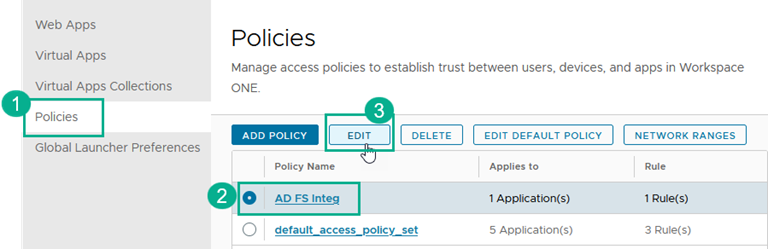
In the Resources tab, select Policies.
-
Select the access policy that you want to modify and click Edit.
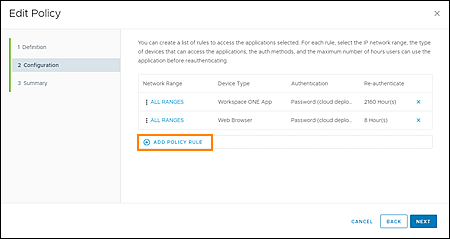
The Edit Policy page appears.
-
Click Next.
-
On the Configuration page, click Add Policy Rule and create a rule for Windows devices.
- Specify Kerberos-based authentication as the first authentication method and Forms-based authentication as the fallback method, according to the following example. Leave the and user belongs to group(s): option blank to apply the rule to all users.
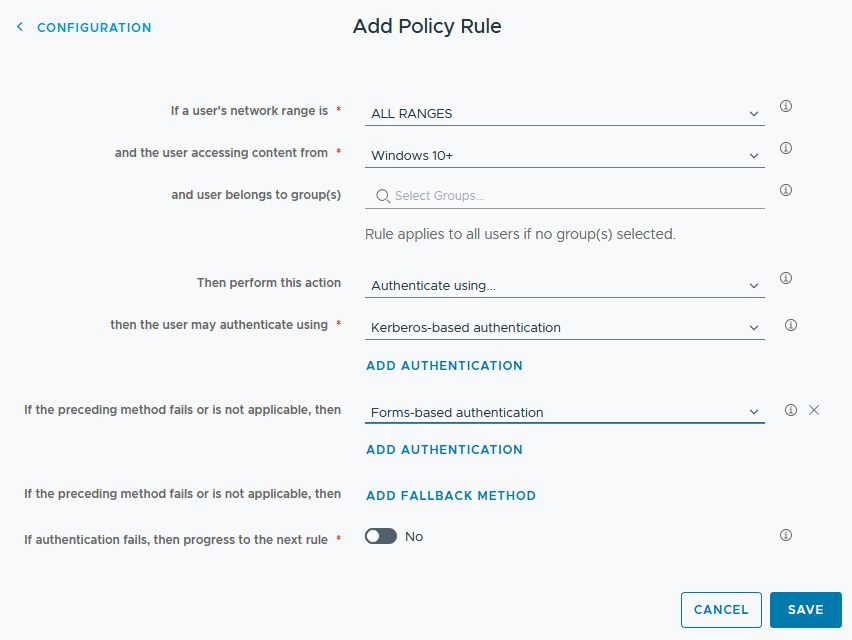
- Click Save.
The new policy rule appears as Kerberos-based authentication+1 in the rules list.
-
In the rules list, reorder the rules such that Kerberos-based authentication+1 appears at the top of the list as the first rule to apply. To move the rule in the list, drag the handle at the left of the rule name.
-
Click Next. Review your changes and then click Save.
Results
You are now finished with configuring AD FS as a trusted identity provider for Omnissa Access. Next, you must configure Omnissa Access as a trusted relying party for AD FS.
What to do next
Perform the procedures described in Configuring Omnissa Access as a Relying Party for AD FS.
Was this page helpful?