To configure the AD FS integration, you must add AD FS as an identity provider instance in Omnissa Access.
Prerequisites
- Download the federation metadata file for the AD FS server by navigating to the URL: https://ADFSdomain/FederationMetadata/2007-06/FederationMetadata.xml where ADFSdomain is replaced with the fully qualified domain name for your AD FS server.
- In the Omnissa Access console, configure the access policies that you want to use for the AD FS identity provider instance. For information about configuring access policies, see the Managing Omnissa Access User Authentication Methods guide.
Procedure
-
Log in to the Omnissa Access console with full administrator privileges.
-
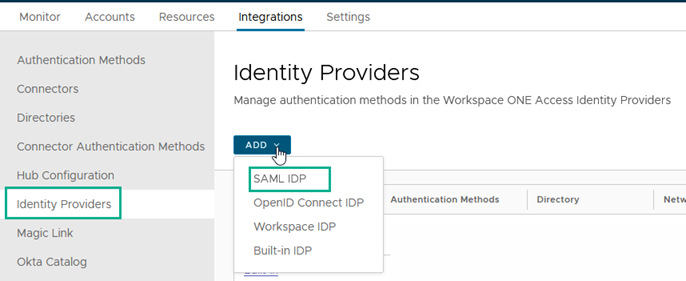
In the Integrations tab, select Identity Providers.
-
Click ADD and select SAML IDP.
-
Modify the configuration settings.
Setting Description Identity Provider Name Enter a short descriptive name for the AD FS identity provider instance. SAML Metadata - To establish trust with AD FS, add the federation metadata here. In the text box, copy and paste the contents of the AD FS federation metadata file that you obtained previously.
- Click Process IdP Metadata. The Name ID format mappings are automatically imported from the AD FS metadata.
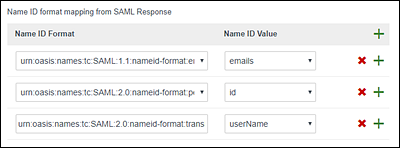
- (Optional) Configure additional AD FS Name ID formats and map them to user values in the Omnissa Access service.
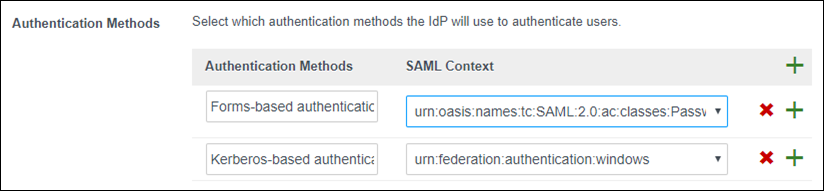
Just-in-Time User Provisioning Do not enable. Users Select the Omnissa Access directories of the users that can authenticate using AD FS. Network The existing network ranges configured in the service are listed. Select the network ranges for the users, based on their IP addresses, that you want to direct to AD FS for authentication. Authentication Methods To add an authentication method that you want AD FS to use, click the green plus sign and enter the name of the method. Then select the SAML authentication context class that supports the method. Configure the following authentication methods. - Forms-based authentication: For SAML Context, select urn:oasis:names:tc:SAML:2.0:ac:classes:PasswordProtectedTransport.
- Kerberos-based authentication: For SAML Context, select urn:federation:authentication:windows
Single Sign-Out Configuration Do not enable. Single sign-out configuration is not required for the AD FS identity provider instance. SAML Signing Certificate To display the Omnissa Access service provider metadata in a browser window, click Service Provider (SP) Metadata. Copy and save the URL. You need this URL later when you configure the Federation Service Properties in AD FS. -
Click Add.
What to do next
Was this page helpful?