The Platform SSO (for macOS) authentication method in Omnissa Access supports Apple's macOS Platform SSO feature, which enables users to log in to their macOS devices using their corporate credentials.
You can configure Omnissa Access as the identity provider for Platform SSO to broker authentication with Active Directory or a third-party identity provider, including providers that do not natively support Platform SSO. With the Platform SSO (for macOS) authentication method configured, users can also single sign-on to the Workspace ONE Intelligent Hub app and their apps without authenticating again.
Configuring Platform SSO involves uploading the Workspace ONE UEM certificate to Omnissa Access, creating and pushing Workspace ONE UEM profiles, and enabling the Platform SSO (for macOS) authentication method in Omnissa Access. This topic describes how to enable the authentication method. For requirements, prerequisites, and information about the complete configuration, see Configuring Apple macOS Platform Single Sign-On with Omnissa Access.
Procedure
-
In the Omnissa Access console, navigate to Integrations > Authentication Methods.
-
Select the Platform SSO (for macOS) authentication method.
-
Click Configure.
-
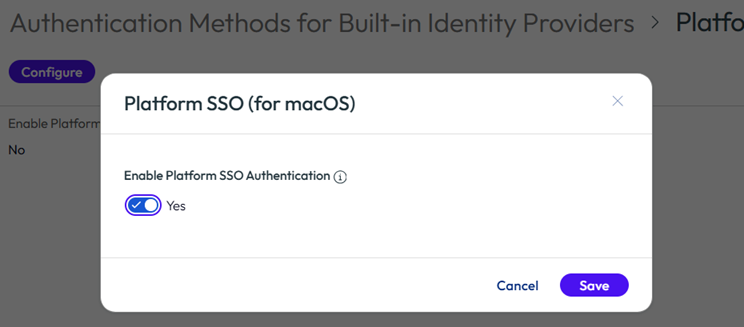
Toggle the Enable Platform SSO Authentication option to Yes, and click Save.
-
Navigate to Resources > Policies and add the authentication method to the relevant policies.
Was this page helpful?