Users can launch Horizon desktops and applications from the Omnissa Intelligent Hub app or portal in Horizon Client or a Web browser, based on how the desktop or application is configured in Horizon. If a desktop or application is only configured for Horizon Client, users must install Horizon Client on their systems.
The Horizon HTML Access feature enables Horizon administrators to configure a desktop or application for browsers. This configuration is done in Horizon and no configuration is required in Omnissa Access. See the Horizon HTML Access documentation for information.
Omnissa Access supports all the display protocols that Horizon supports for Horizon Client. When Omnissa Access users launch a desktop or application in Horizon Client, it uses the protocol that is set in Horizon.
Note: In Horizon, in addition to setting the default display protocol, administrators can specify whether users are allowed to choose a display protocol. If you want to support versions of Horizon Client that do not support the default protocol, allowing users to choose the display protocol is recommended. Otherwise, the application or desktop cannot be launched.
For information about configuring the display protocols and launch options, see the Horizon documentation.
In the Omnissa Access console, you can check the launch options that a Horizon desktop or application supports.
Procedure
-
Log in to the Omnissa Access console.
-
Select Resources > Virtual Apps.
-
Click the icon in the Type column heading and select either Horizon Desktop or Horizon Application, or both, to view all Horizon desktop and application pools.
You can also search for a specific pool by name.
-
Click the desktop or application name.
In the Definition section, the Supported client types field displays the launch options that are set in Horizon.
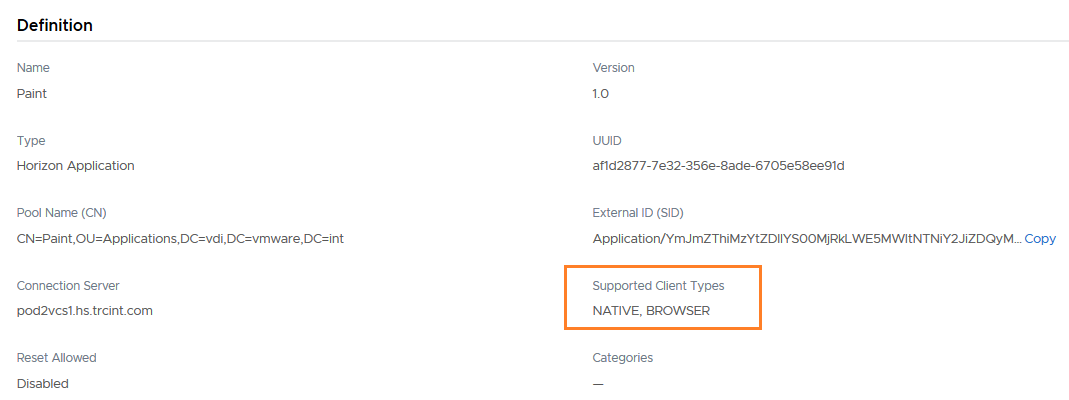
The value can be NATIVE or BROWSER, or both. If only NATIVE is listed, the desktop or application can only be launched in Horizon Client. Users must install Horizon Client on their systems before starting the application from the Hub catalog. If BROWSER is listed, users can start the application or desktop in a browser. If both are specified, users can select how they want to start the application.
Was this page helpful?