You can integrate Web apps and Virtual Apps with Omnissa® Access™ to make these apps and desktops available to end users in the Omnissa® Intelligent Hub app and portal. Omnissa Access provides multi-factor authentication, conditional access, and single sign-on to the apps.
You can integrate the following types of resources with Omnissa Access:
-
Web apps
-
Virtual apps
-
Omnissa Horizon® applications and desktops
-
Citrix-published resources
-
Horizon® Cloud Service™ applications and desktops
See Providing Access to Horizon Cloud Service Desktops and Applications in Omnissa Access for information on the types of Horizon Cloud Service environments supported.
-
ThinApp® packaged applications
-
-
App Volumes packaged apps
Except for Web applications, each resource type requires you to integrate Omnissa Access with another product or component.
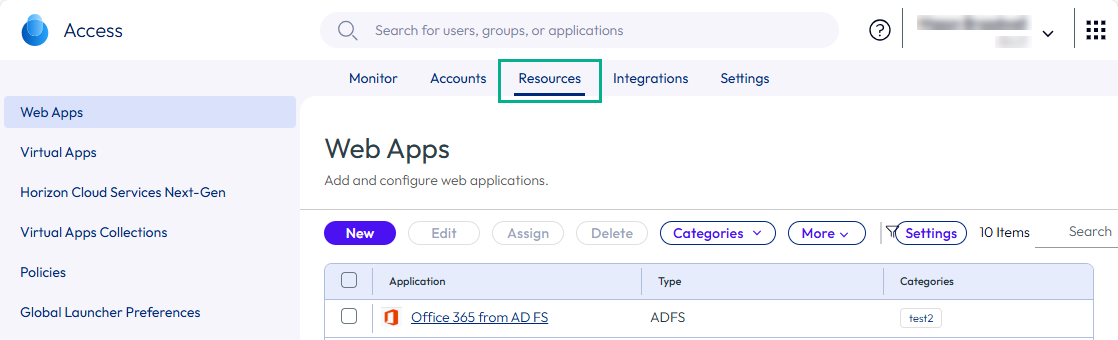
You integrate these resources from the Resources tab in the Omnissa Access console.
-
To integrate Web applications, you use the Resources > Web Apps page.
-
To integrate and manage Horizon desktops and applications, Citrix-published resources, or ThinApp packaged applications, you use the Resources > Virtual Apps Collections and Resources > Virtual Apps pages.
You configure the integrations in the Resources > Virtual Apps Collections page.
You view the synced resources in the Resources > Virtual Apps page.
-
To integrate with the Horizon Cloud Service, you either configure the integration from the Horizon Cloud console or configure virtual apps collections in Omnissa Access, based on the type of Horizon Cloud environment that you have.
-
To integrate App Volumes apps, you configure the integration in App Volumes Manager. You view the synced apps in the Omnissa Access Resources > App Volumes page.
You can manage settings for integrated resources from the following pages.
-
Settings for Web applications are available from the Settings button on the Resources > Web Apps page.
-
Settings for Horizon, Horizon Cloud, ThinApp, and Citrix-published resources are available from the Settings button on the Resources > Virtual Apps tab.
-
Launcher preference settings for virtual apps are available on the Resources > Global Launcher Preferences page.
-
Global settings for the Intelligent Hub app catalog are available from the Integrations > Hub Configuration pages.
-
You can also manage settings for individual applications by clicking the application in the Resources > Web Apps or Resources > Virtual Apps page and clicking Edit.
Functionality Discontinued for Legacy Connectors
Omnissa Identity Manager Connector 19.03.0.1 reached the end of extended support on August 31, 2022. All functionality related to 19.03.0.1 and earlier connectors is now discontinued in Omnissa Access.
Connector Version
This documentation is based on the latest available version of the Omnissa Access connector.
Was this page helpful?