Before you can use the Horizon Partner Admin Console to configure your organization, as well as add and configure your tenant organizations, you must first onboard your organization to the Partner Admin Console.
Note: The Horizon Partner Admin Console is currently available in Limited Availability (LA) mode only.
Prerequisites
To onboard to the Partner Admin Console, you must first have an Omnissa Commit Contract for Horizon, which you can obtain by working with the Omnissa Partner Sales Team.
Note: If you do not have an existing Omnissa Commit Contract, reach out to the Omnissa Partner Sales Team to request one. Omnissa will subsequently send you an email with the subscription terms agreement.
Procedure
-
New and existing Omnissa partners who have a Horizon Commit Contract can request access to the Partner Admin Console by sending an email to getHCPartnerAdminConsoleLA@omnissa.com.
-
Omnissa will subsequently send a reply email that contains all of your Partner Admin Console access instructions. Follow the instructions provided in that email.
-
When you receive confirmation that your organization has been onboarded, go to https://cloud.horizon.omnissa.com/partneradmin/index.html and log in to the Partner Admin Console.
Upon successful login, the left pane navigation appears as shown below.
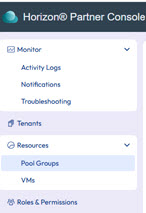
Note: The user account that is used to log in to the Partner Admin Console must have the administrator role assigned in the Horizon Cloud service as stated in the Prerequisites section above.
Note: The default organization for the user account that is used to log in to the Partner Admin Console should be the organization name that you specified in Step 3 above. You can change the default organization by using the drop-down menu in the upper right corner of the UI, directly under your login name.
You are now ready to onboard your tenants. See Onboarding Tenant Organizations.
Was this page helpful?